The GuitArchitect’s Guide to Modes: Melodic Patterns Book “Pre-Release” Now Available

6/5/12

.

The official version of this book has been released as both a print and PDF version, so I’m leaving this page up  as a pointer for  historical purposes (and so that people who are interested in the book can get some more detailed information).   

.

All ordering information (including an overview of the book and jpegs of sample pages) can be found here.

.

Thanks!

-SC


FnH Interview Online and other Guest Blogging

Hey all – a couple of brief news things:

.

1.  My interview with FNH Guitars is now live on Live4Guitar, a very cool guitar blog with a paid lesson service as well.  I’m going to be posting some lessons and additional content there fairly regularly, so check back here or at Live4Guitar.

.

2.  I’ve also taken on a new weekly column for Guitar-Muse.com, that will be a 10 questions with various builders, players and tech people.  I’m in the process of lining some cool people up – but wanted to get your feedback as well.  The first person on the block is Jonathan Wilson who’s doing incredible work making bowed guitars in SoCal (check out some of the awesomeness on the Togaman GuitarViol site).  Update: This interview is now online, you can read all about it here.

.

I’ve also got interviews with FnH Guitars, Jack Sanders and a couple of other people lined up.  But I’m interested to see who you dear readers, would like to read about.  If you could take a second to just put a name or a company name in the survey, it would be very helpful.

Click here to put your request in

.

Thanks for reading!

-SC

Some Useful Online Practice Tools

While some larger GuitArchitecture posts are in the pipeline, I wanted to post about a few online tools I use frequently when practicing that may be helpful to you as well.

In previous practice posts, I talked about keeping a practice log and using small increments of time (5-10 minutes) in multiple sessions to really focus on ideas.  (You can download a sample log here or here). The tools I mentioned to assist in this are a metronome and a stop watch.

.

Seventh String

Not to be confused with the very cool sevenstring.org forum, Seventh string is the company that produces the excellent Transcribe! software.  While Transcribe! isn’t free (nor should it be – it’s an excellent piece of software that will pay for itself many times over) they have a number of useful free apps on their utilities page that may be of interest to you.  The apps all use Java so you’ll need to have that installed if they’re not working – but the great thing about each of these apps is that they can either be run online or downloaded to your computer to run if you’re somewhere without an internet connection.

Getting in tune is the first step to any practice session.  The online tuner on seventh string is functional but I find the tuning fork to be a lot more useful.  In addition to providing tones to tune to, the tuning fork also can act as a drone.  Drones can be a great tool for developing melodic ideas in a harmonic context.

The real prize here though is the metronome.  I love the old school graphic and the click sound isn’t annoying to me.  It also has tap tempo and can move incrementally.

.

Stopwatch

Working hand in hand with the metronome for timed training is a stop watch.  I’ve plenty of hardware versions that are fine.  But I really like the  numerous variations on the online-stopwatch site.  The countdown version is perfect for setting 5-10 minute increments (or longer) and rings when it’s done.  There’s a metronome on this site as well – but it doesn’t allow incremental movement.

When practicing mid day – I tend to just open up my log, tune up, set the countdown timer turn on the metronome and work on the first thing on the log list.

.

The simpler you make a routine – the easier it is to maintain.

Anyways, nothing Earth shattering here – but I hope it helps!

Thanks for reading!

-SC

.

If you like this post you may also like:

.

PRACTICE MAKES BETTER AKA PRACTICING PART I

PROPER POSTURE IS REQUIRED FOR PROPER PERFORMANCE – PRACTICING PART II

TENSION AND THE SODA CAN OR PRACTICING PART III

DEFINITIONS AND DOCUMENTS OR PRACTICING PART IV

.

PRACTICE WHAT YOU PLAY OR PRACTICING PART V

TESTING YOUR VOCABULARY OR PRACTICING PART VI

POSSESSION IS 9/10S OF THE LAW BUT PERCEPTION IS EVERYTHING OR PRACTICING PART VII

Some Useful Online Practice Tools

.

FINDING THE DEEPER LESSON

MELVILLE, MADNESS AND PRACTICING – OR FINDING THE DEEPER LESSON PART 2

INSPIRATION VS. INTIMIDATION

What’s wrong with playing “Flight of the Bumblebee” for a world speed record?

.

I have linked two sample documents for logs below.  You could use word or excel, or any basic word processing or spreadsheet application to generate one of these.  I haven’t seen an online version of these I like – So I’ll stick with these for now.

PRACTICE LOG (PDF)

Weekly Practice Log (Word)

Putting The Trio In Rough Hewn Trio Or Some Upcoming Shows

We’ve booked a couple of shows around Chris’ summer tour with Martin Fabricius and Craig’s ongoing tour of regional correctional facilities.

.

In chronological order:

.

  • Saturday, April 30 · 2:00pm – 3:00pm UC Irvine, Claire Trevor School of the Arts, Winifred Smith Hall – 4002 Mesa Road – Irvine, CA – iPhone Not Required (but bring’m if you got’m) i.e. Lavender’s Grad Recital
  • Friday, May 27 – Tribal Café – 1651 West Temple Street Los Angeles, CA 90026-5026 (213) 483-4458
    Yes Memorial Day Weekend.  No – we’re not sure who’s going to be in town to be there. Yes it will be awesome. Starts at 7:30 – bands TBA
  • Friday, July 15th – Tribal Café (Do you see a trend here) Starts at 7:30 – bands TBA

Here’s the info for the Irvine show from Chris.  This is going to be a really cool recital that will feature audience members playing with the band using Chris’ Thumbafon iphone ap.

.

iPhone Not Required (but bring’m if you got’m)

.

Saturday, April 30 · 2:00pm – 3:00pm

UC Irvine, Claire Trevor School of the Arts, Winifred Smith Hall

4002 Mesa Road

Irvine, CA

This is the penultimate performance of my graduate work, which is centered around the investigation of using mobile devices as a means toward audience collaborated performance. It’s an epic social/musical experiment* that YOU WON’T WANT TO MISS!

Performance starts at 2pm.

Checkout www.thumbafon.com for information on the iPhone App which will be used during the performance.

Featuring the Rough Hewn Trio”

Finally if you want to get a sense of the mellower side of our ensemble:

..

.

A Game Changer? The Sonuus i2M musicport overview

I haven’t done a gear review in a while – so I thought I’d bring something exciting to the table this time.

.

Lately, I’ve been thinking more about Midi guitar.  Not in the traditional sense of, “wouldn’t it be great to get some flute sounds out of my guitar for this smooth jazz solo?” but using it in (potentially) some more subversive ways.

.

Midi conversion as an improvisation tool:

The first thought that occurred to me was midi guitar is a glitchy proposition to begin with. Even optimizing everything (picking technique, muting, pick choice, tracking parameters, etc) – there was still a lot that could go “wrong”.  This excited me from an improvisational standpoint because it meant that I could have other notes spit out at me that I didn’t play – and that I’d have to actually improvise with what was happening there.  To me, this is much more in the spirit of improvising that playing the same 40 licks I’ve worked out over Stella by Starlight.

.

Midi conversion as a texture:

Additionally, the glitch effect can work really well in sound scape ideas where I might be generating different sounds over (and within) a loop.  That’s appealing to me as well.

.

Midi conversion as a transcriber:

The real interest for this idea though came up with the dvd instructional material that I wanted to generate.  After seeing clips of John McLaughlin’s instructional dvd and realizing that he was simply using a midi guitar to capture audio and midi data in Logic.  By doing this – he would have a rough transcription of what he was playing and then be able to tweak it to make it more accurate from there.  A really good idea and one that stuck with me.

But midi always struck me as a lark.  The pickups and converters meant that I was looking at $500-$600 minimum for something that really wasn’t necessary.  Then I started seeing the ads for…

.

The Sonuus i2M musicport:

If you’ve picked up a guitar magazine or been anywhere guitar related on the internet – you have undoubtably seen an ad for one of the Sonuus Midi Converters.  Their newest converter the i2M musicport, is a small (read: tiny) monophonic midi converter and a 16bit 48k digital audio interface.  Listing for $199 (and selling for $149) this is one of the most intriguing products on the market to me right now.

The unit has a ¼ inch jack on one side and a USB connection on the other which makes it about the size of an adult thumb.  It’s bus powered by the USB – so there’s no additional power supply (the green lit SONUUS logo is a nice design touch as well as the key clip.

It’s impossible for me to image a smaller device but how does it sound?  Since the i2M acts as an audio interface and an audio midi converter – I’ll address this question in two parts.

.

Audio:

The ¼ inch jack is actually a high impedance (hi-Z) input preamp with a 16 bit/44.1 or 48k conversion rate.  Even though I typically like higher audio specs when using my guitar the sound is remarkably transparent and I had no issues with quality.  In fact, this is an ideal interface for practicing or jotting down ideas and would even consider trying it out on a gig if I needed to.  It should also be noted that while I’ve only tested it with a guitar it can be used with bass guitar or other line level sources (like a microphone).  There should be no real issue in using a 7 or 8 string guitar with it either.

.

Midi:

First: I should state that this unit is a midi converter.  It doesn’t have any midi sounds on its own so you’ll need appropriate software (any software with a midi sampler or synth  will probably do) to hear and record midi.

Secondly: The midi conversion is monophonic.  Anything involving chords or multiple held notes will produce unpredictable results.

Having said that, the i2M does monophonic conversion remarkably well.  Tracking was fast, smooth and had very low latency with stock settings (particularly on the higher strings).  If you go to the sonuus website, you can download the Desktop Editor software which will allow you to adjust midi settings to suit your style as well.

Rather than just list them, I’d recommend that you go to the Sonuus web site where you can get full specs.

In use:

I decided to see if I could use the i2M as both an audio interface and a midi converter to see if I could use the score function in Logic to transcribe what I was playing.

The i2M is class-compliant which means that it’s plug and play.  I opened up Logic and had no problem setting it up as a default audio and midi input.  To create a real world example of what it sounds like it when you plug-in and play – nothing was optimized.  The audio is generated from a FnH Ultrasonic guitar plugging into the i2M at 48k.  No amp sims were used in Logic.  The guitar track only has LA convolver, some speaker IRs and a reverb on the channel. The midi is generated from the EXS 24 (using the Garageband/Logic Yamaha Piano).

All Logic and i2M settings are stock.  I heard the piano sound and decided to improvise in a Cecil Taylor style where caution was just thrown to the wind and I approached ideas as melodic flourishes.  I wanted to throw the unit some curve balls so I tried sweep picking, alternate picking and tapping various ideas to see how it reacted.

This video below is just a screen shot of the score pages with an mp3 of both channels so you can compare the difference between the audio and the midi tracking. (You’ll probably want to see it at full screen size – FYI).

.

Here’s what impressed me:

The tracking was pretty clean.  There were a few random glitches on the midi score  but those could be easily fixed.  For the most part, I got a rough sketch of what I was playing while I was playing it.  Very cool.

There are certain open strings ringing and other string noses that were ignored.  This was surprising and cool.

The audio signal sounded pretty good out of the box – but to be 100% fair – this was with a clean sound.   I  ran this through POD Farm to see how the distorted tones were – but  for me, the resolution and bit depth weren’t there for a satisfying dirty tone.  In other words, as an audio converter – this isn’t going to replace my Apogee Duet – but this is really nit picking as the unit is, first and foremost, a midi converter so the fact that it processes any audio is just as bonus.  Additionally, comparing a $150 multifunction unit to a $500 specialized audio interface isn’t a fair comparison.   That being said, the i2M has a reasonable starting point for a clean tone.

.

Also while the unit is plug and play as an audio device for Logic and Garage band, AU lab didn’t recognize it.  Not a deal breaker and something I need to research further but it may be something to look into depending on what platform you plan on using.

This unit is just a lot of fun.  I probably spent 2 hours just playing the various logic EXS patches.  Additionally the piano/guitar sound gave me a lot of compositional ideas in a Maria João idea – which is always a good thing.  I tried it with Absynth as well and it worked seamlessly (it even kept tracking as I took liberal swipes at my tremolo arm).

.

In my opinion this unit is a game changer for guitarists (and hopefully for a lot of other instruments as well).  To have something that works this well at this price point while putting an audio interface and a midi converter well within most gear budgets.  For this demonstration, I’m essentially using it as a toy, but the potential applications for this are exciting.

Whether you’re looking to lightly tread the waters of midi guitar, get in deep for sonic mangling or just need a decent pocket audio interface, you’re hard pressed to do better than the i2M.

Thanks for reading!

-SC

Getting Through The Gig – Negotiating A Chord Chart Part 1

In the previous surviving the gig post, I talked about some memorization skills that can help get through gigs that require learning a lot of tunes.  In this series of posts, I want to focus on how to get through gigs that may have unfamiliar chord changes.

In this post, I’m going to be discussing how to interpret chord symbols and then developing some short cuts for how to generate chord voicings on the bandstand as it were.  If you are already familiar with how to read chord voicings – you may want to skim this and just go to part 2.

There will be a lot of detail over these posts for how I’m doing what I’m doing, but once you get the concept under your belt.  It should be something you can do on the fly if need be.

As an example, I’ll be look at part of a chart Rough Hewn touch/stick/Warr guitarist Chris Lavender sent to me, called 232

(232 © Chris Lavender 2011 used with permission)

.

First Step – Know what notes the chord symbols are asking for.

It’s not that hard to figure out chords if you know what the symbols mean.  Here are some general shortcuts for chord types beyond triads.  There are only 3 basic categories that we’ll look at: Major, Minor and Dominant:

.

Major

(Sometimes designated by “major”, “maj” or a triangle)

Any type of major chord always has a major triad (Root, 3rd and 5th) plus a major 7th in the full chord voicing unless it states otherwise.  If a chart has any type of C Major chord variation (C Major 7, C Major 9 or C Major 13)  –  the voicing has a C, E, G and B.

Note:

When removing notes from any voicing the 5th is usually the first to go (unless it’s altered like #5, or b5).

The initial short cut is: any major type chord starts with (1,3, 7) or (C, E, B) in the key of C.


Minor

(Sometimes designated by “minor”, “min”. or “-” )

Any type of minor chord always has a minor triad (Root, b3rd and 5th) plus a b7th in the full chord voicing unless it states otherwise.  If a chart has any type of C Major chord variation (C minor 7, C minor 9, C minor 11 or C minor 13)  –  the voicing has a C, Eb, G and Bb.

Note:

When removing notes from any voicing the 5th is usually the first to go (unless it’s altered like #5, or b5).

The initial short cut is: any minor type chord starts with (1,b3, b7) or (C, bE, bB) in the key of C.


Dominant

(Sometimes designated by “dominant”, “dom”. or no designation

i.e. “C7”, “C9” or “C13” refers to a dominant chord unless otherwise stated)

Any type of dominant chord always has a major triad (Root, 3rd and 5th) plus a b7th in the full chord voicing unless it states otherwise.  If a chart has any type of C dominant chord variation (C 7, C 9, C 11 or C 13)  –  the voicing has a C, E, G and Bb.

Note:

When removing notes from any voicing the 5th is usually the first to go (unless it’s altered like #5, or b5).

The initial short cut is: any dominant type chord starts with (1,3, b7) or (C, E, Bb) in the key of C.


Beyond this, you just need to add in additional pitches based on what the voicing indicates.

Here’s a chart that relates all of the potential chord tones that you might see to a scale degree for quick reference.

Putting the chart to use:

The first chord in the 232 chart is a C major 9 #11.  As a reminder – any extended C major chord will have C, E, G, B in the full voicing.  Since it’s a C major 9, a 9th – which in the chart above is a D – will have to be added.    The #11 means an F# will get added to the voicing as well.  This brings the full voicing to (C, E, G, B, D, and F#).

Again, the only time you would probably play a full voicing is for a solo guitar or perhaps a duet performance.  In the next post, I’ll discuss how to extract what you need to get through the chart.

.

Second Step – Know some chords

When I went to Berklee, I was advised that I should learn at least 2 chord voicings for any chords that could be put on a chart in front of me.  These stock voicings are typically low E or A string rooted (as it helps with visualization) and are the default voicings that you would use if you were sight-reading a chart.  These typically include triads, Major /Minor / Dominant chord 7th, 9th, 11th and 13th chords.

While this is, generally, useful advice, I should state for the record that while I did the initial memorization required for school proficiencies – I quickly forgot the majority of voicings I wasn’t using all the time. Learning every inversion of every possible 7th, 9th, 11th and 13th chord on multiple string sets will take YEARS.  For some people, it’s the best method, but it never worked that well for me.

.

Once I understood how chords worked, I never bothered to memorize many specific voicings above a 9th chord because I found some shortcuts to get the sounds I needed.


Note:

This is not to say that you should be lazy.If you follow through on the suggestions that I have – you should plan on learning triads and 7th chords at a very deep level (i.e. you should have the goal of being able to play any triad or 7th chord in any inversion in any position).

(more on how to do that in a future post)


I hope this helps!  In the next post – I’ll simplify the 232 chart with some harmonic shortcuts.

While digesting this – I’d recommend you take some time to work on your chord inversions.  If you’re unfamiliar with them you may want to check out the D major inversions I’ve posted below, and adapt this process to minor triads (just flat the third – F# and make it F in the examples below), and 7th chords (major, dominant and minor).

.

(The following is adapted from another post (Recycling Chords Part II: Triad Transformation).

.

Thanks for reading!!


-SC

.

Note:  D major is used in the following examples instead of C major because the original post dealt with transforming triads.  Each note of a 1st position D major chord can be lowered to another note on the fingerboard, without using open strings.  In other words, each chord is a moveable voicing on the fingerboard. The following should be adapted to C major and other keys as necessary.

.

The first step to adapting voicings is to make sure you can visualize triads both horizontally and vertically across the fingerboard.

.

Horizontal (i.e. positional) Visualization

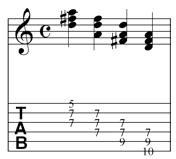
Here’s a series of  D major chord inversions in the 2nd position.

Helpful Tip

As you play through these voicings pay particular attention to which chord tone each finger is on (i.e. for the first D Major chord voicing – the first finger is on the 5th of the chord (A), the third finger is on the root (D) and the second finger is on the 3rd (F#). More on this later.

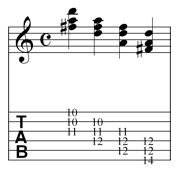
Here are the D major inversions in the 5th position

and in the 10th position.

Vertical Visualization

.

Note:

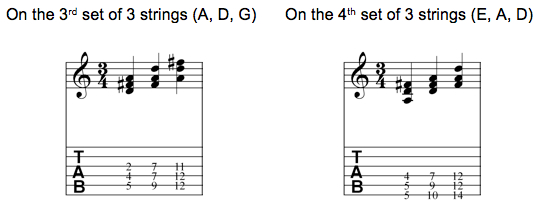
the important thing with both the horizontal and vertical voicings is knowing where each chord tone is located in the voicing.

.

One way to practice this is to play through the chords and stop at random points and ask, “where is the root?” “where is the 3rd?”  “where is the 5th ?”  This has to be full internalized to be able to realize the goal of instant chord tone identification.


Tubtime: “We Bleed The Sun And Make It Pay” now available on CD Baby

The long overdue Tubtime cd, “We Bleed The Sun And Make It Pay” – is finally up for sale on the CD baby tubtime page, and should be available on Itunes and Amazon over the next several months.

Featuring the talents of Patty Barkas, Geof Chase, Joe Rauen and Keichi Hashimoto – Tubtime is an experiment in 2003 to see if an accessible cd of structured improvisation could be successfully executed.

The CD notes are below:

Tubtime has its roots in work in the unholy union of drummer/engineer Geoff Chase’s “Directive 4″ project that featured rock improvisation with various Boston musicians and guitarist Scott Collins’ goal to be able to work with musicians of such a high caliber that they could perform a full set of improvised material that sounded pre-composed.

Over the course of 2003-2004 Tubtime ended up with several cds worth of material that will all hopefully see the light of day. The music is being finally released after numerous relocations and other various hold ups, because we kept running into people who had heard of us (or heard the tracks) despite having never played live. While we haven’t performed since then – the threat of more music is always a real one.

“We Bleed The Sun And Make It Pay” was the culmination of 4 such sessions. All of the music was written and tracked live and in real time (although, Geoff took some of the improvised material and used it as transitional material on transitional tracks.)

The poem on the cover photo (taken by Joe Rauen) was inspired by a quote attributed to Dick Cheney who rationalized a series of governmental policies by saying, “this is out due.” It was such an incredibly brazen sense of entitlement that the poetic fragment was written around it.

Visually, the Tubtime project was working around a “disturbed child” aesthetic with lots of pictures with distorted perspective and coloring outside of the lines. I think that the music captures some of that as well. There is a certain honesty of immediacy that comes from real improvisation – and hopefully that translates as well.

There was no real concept when we recorded the tracks, but I developed one when assembling the cd. As the tracks were mixed and sequences there was a specific story line worked out involving themes of narcissism, paranoia and altered states of perception.

“We Bleed The Sun and Make It Pay” is a type of sonic documentary of where we all were at the time of recording it. As it takes a couple of minutes to develop each of the pieces – I think It works best as a bumpy 58 minute sonic journey. I hope you enjoy both the turbulence and the scenery.

The tracks were performed by:
Patty Barkas – vocals
Geoff Chase – drums
Scott Collins –guitar & loops
Keichi Hashimoto – trumpet
Joe Rauen – bass & loops

Thanks for reading!

Rough Hewn Trio

I just wanted to take a second to announce a new project I’ve been working on with Chris Lavender  and Craig Bunch.  Rough Hewn Trio is a project that mixes through composed ideas with heavy doses of improvisation.

We have our first gig this Thursday @ CalArts where we’ll be accompanying Germaine Dulac’s La Souriante Madame Beudet (The Smiling Madame Beudet) and Teinosuke Kinugasa’s  Brilliant “lost” film – Kurutta Ippeiji, (aka Page of Madness or Page out of order).

Craig and I have done a preliminary mix of some live recordings we’ve made – so we should have videos and mp3s up on a dedicated site soon with other novel things like an EPK and a bio.

Thanks for reading!  More info coming soon.