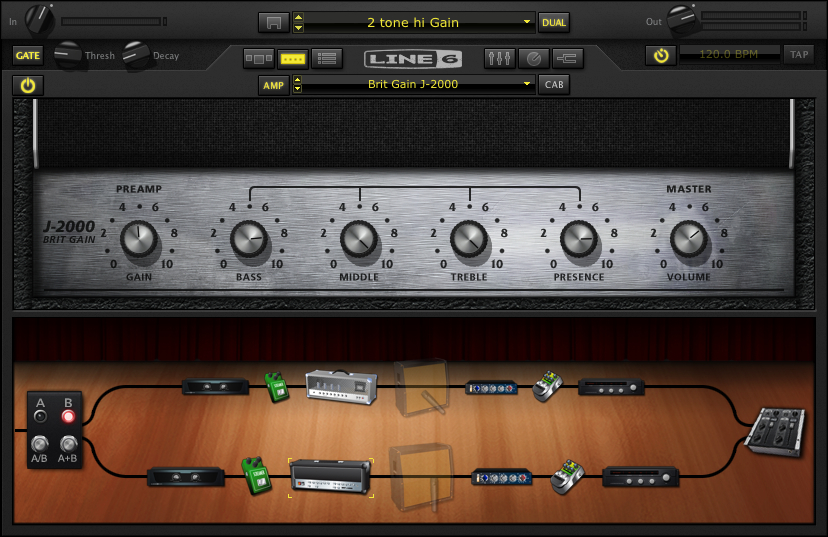
AU Lab/POD Farm 2.0/Live Laptop Rig Tutorial Part 2

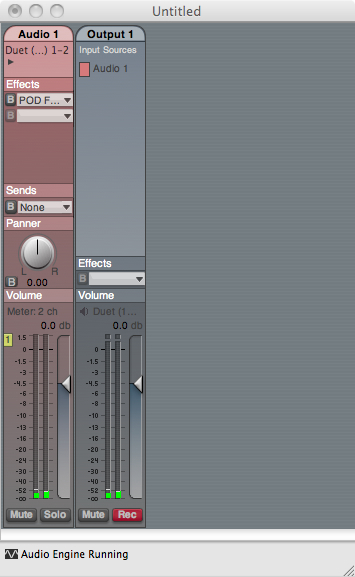
In the previous post, an AU Lab session (or document) was established and an A/B POD Farm patch was created.  In this post, I’m going to start modifying the patch to make it more useable.

Building the rig:

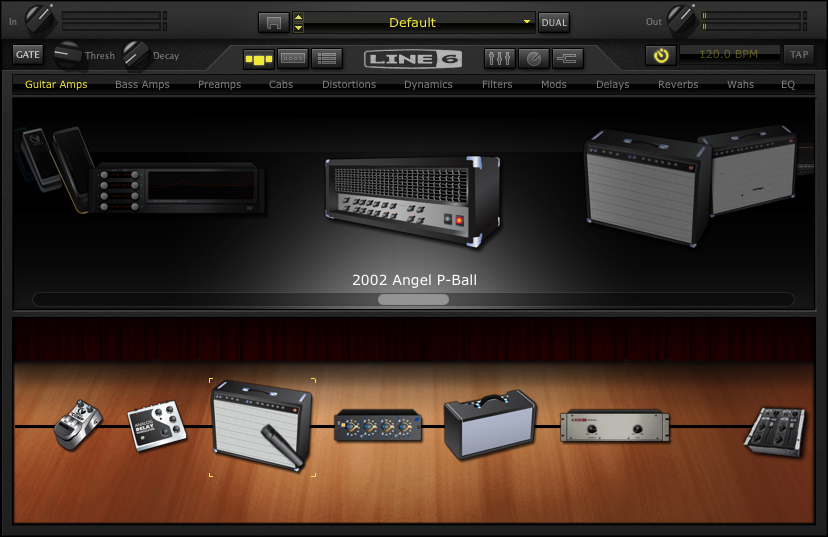
Okay first I’m going to swap out the amp. I like the Double Verb instead.

You can drag and drop amps into the signal chain, but if I click on the down arrow to the right of the AMP field – I can just scroll down to the Double Verb amp.

Here are the settings I’m using.
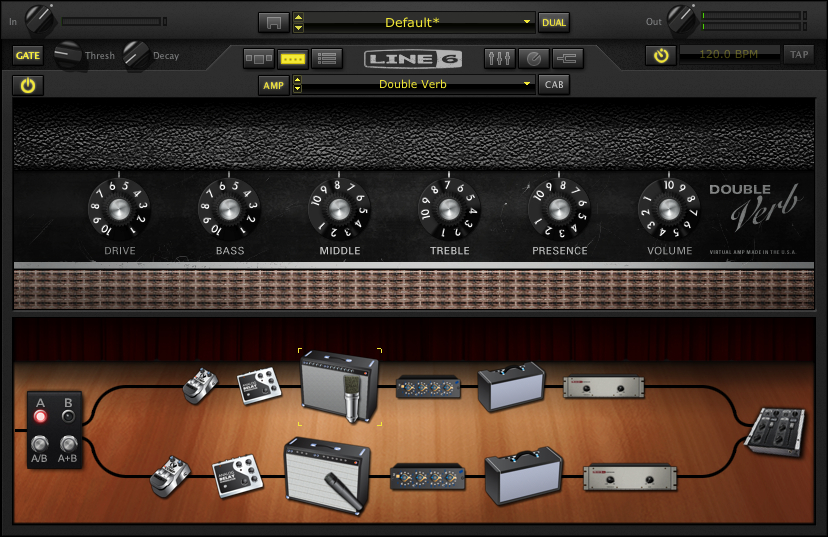
If you look in the left hand corner underneath the input knob on POD Farm, you’ll notice the global gate is on.  I tend to use the global gate at a low setting.  This came from a ruined session where I switched to a distorted sound that DIDN’T have a gate on it and squealed between each phrase.  Now I keep the master gate on to not worry about that scenario.

Compression:

Louder isn’t always better.

Compression has it’s place – but I try to play dynamically, so the compression is the first thing to leave the POD farm signal chain.

If you click on the compressor in the signal chain and then ctrl-click on the compressor you’ll get the following options.

Just select Delete.  If you change your mind you can drag and drop another compressor from the menu into the signal chain.

Another point to bring up, is that when I use an amp and effects – I try to use the same signal chain for all of them.  (This comes from years of playing gigs and having a bunch of effects pedals going through the same amp and reverb).

Looking at this set up, the mic pre (currently between the amp and the reverb) would be something that I would want in the channel signal chain in AU LAB instead of POD Farm – so that it was the same mic pre for any amp I’m using.

The first step is to delete the mic-pre from the POD Farm signal chain (using the same method as the compressor above).

Next (in AU LAB) in the Audio 1 channel – click on the arrow in the next available Effects field below PODfarm .

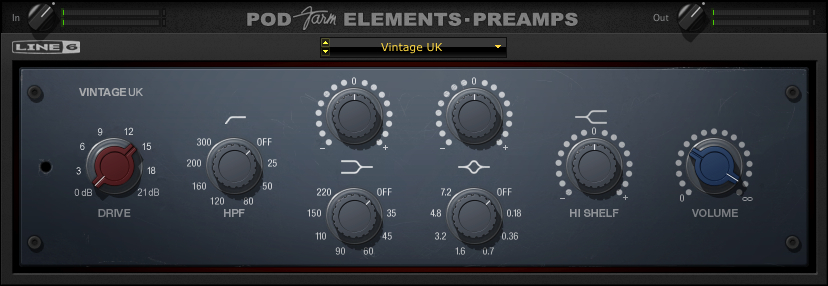
If you scroll down to Line 6, you’ll see that in addition to PODFarm, that each individual component of a PODfarm rig has been broken down into components (aka POD Elements).  This is so you can use individual effects or amps as an AU plug in which much less of a CPU hit than loading in another instance of POD Farm.

In this case choose: POD Farm Element – Preamp.  I’ve chosen Vintage UK.
Reverb:

The reverb would also be something that I would want in the channel signal chain – so that it was the same reverb for any amp I’m using.  (The other advantage is that by placing the reverb outside of POD Farm, when I change amp settings the reverb doesn’t cut off with the amp change.)

Delete the Reverb from the signal chain in POD Farm (using the same method as the compressor and the mic-pre above).

Next, (in AU LAB) in the Audio 1 channel – click on the arrow in the next available Effects field below POD Farm Element – Preamp.

If you scroll down to Line 6, choose: POD Farm Elements – Reverbs.  I’ve chosen Standard Spring.  Here are the settings I’m using.

Impulse Responses:

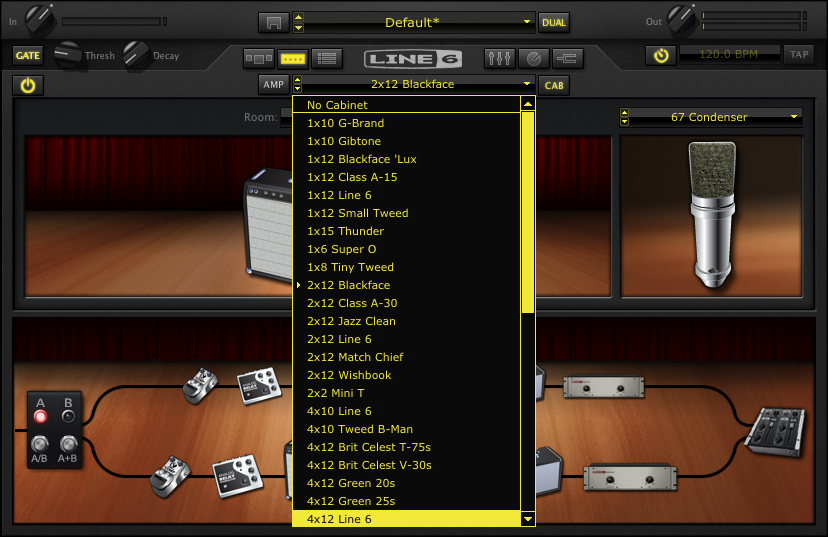
I use impulse responses rather than the speaker sims in Pod farm.  So the next thing I’m going to do is get rid of the speaker cabinet/microphone on Podfarm.  If I click on the CAB button – I’ll get a list of speaker cabinets and microphones used.  If I scroll to the top of the list – I’ll get “No Cabinet” which deactivates both the cabinet and the microphone.
Next, (in AU LAB) in the Audio 1 channel – click on the arrow in the next available Effects field belowPOD Farm Element – Reverbs.

Scroll down to Lernvall Audio and select LA Convolver.

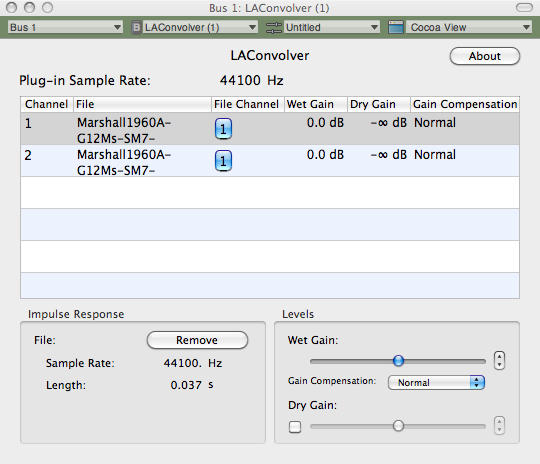
Now I’m going to select to impulse responses to act as a speaker simulator.  I’ve experimented with putting multiple instances of LAConvolver  on buses and running multiple cabs, but since I want to run SooperLooper in the bus (Where I can loop guitar and any other incoming audio source), I’m going to just stick with a stereo set.

Select a channel and hit “choose” under file. In this case I’m using the free RedWirez cabinet I got as part of their birthday giveaway.

I want to use a high sample rate to get better definition so I’ve chosen 88.2 K. (or 2 times 44.1k)

I’ve chosen an SM57 on the grill and a KM84 about 3 inches behind the back of the amp.  I tend to start with the Wet gain in the center position and adjust as necessary.

A brief note:

I’ve mentioned this in other posts, but since I want to use the same speaker cab for all the amplifiers, I’m going with a 4×12 for familiarity.  Normally,  I wouldn’t match a double verb up with a 4×12, but since I’m going to be running a Marshall on the other channel, I’m going to just have to adjust the clean amp signals accordingly.

Fixing the Sample Rate:

If you notice, the plug in sample rate and the Impulse response sample rates are different.  It will work like this – but I want to use the highest sample rate I can for the most clarity.  There is a delicate balancing act that comes between high sample rates, stability and useable latency, so everything here is a compromise.

I’ll fix this with Audio Midi Set up :

First: click on AU Lab and look under Preferences.

When the preferences window opens, click on the tab marked Devices.

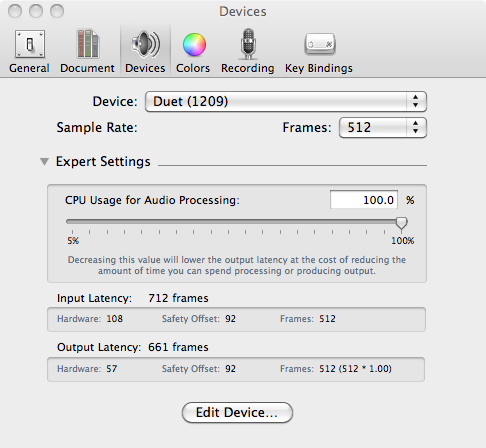
If you click on the expert setting arrow you’ll see something like the following:
Another  brief note:

I’ve set the CPU to 100% to avoid glitches.  I’ve also set the latency really high to attempt to keep the system stable.  Depending on the system and interface that you’re using, you’ll probably have to lower the setting to the point that you get glitching (or max out the memory) and then bring it up a little bit from there.  With the headphone out of the Duet – even with these settings the latency is suprisingly tolerable.

If I click Edit Device – that opens up the Audio-Midi Setup application (or you could find it in the Application – –  > Utilities folder)

Note:  I’ve changed the output format to 88.2.

Going back to the Audio-midi sample rate window – it shows:

An Important note about sample rates:

I’ll mention this again – but if you’re going to be incorporating other audio into the session (including looping in SooperLooper) – you’re probably going to have to set the sample rate back to 44.1 (and set the Impulse responses back to 44.1).  If I’m not looping –  I try to set the rate as high as I can, but know that it’s going to have to get bounced down to 44.1 for recording, etc.

While I’m on the preferences Tab I might as well set up recording to the external drive.  Click on the tab marked “Recording”.

Now if I click on the “Rec” button at the bottom of OUTPUT 1 in AU LAB, it will record whatever I do to the Lacie as the default location, in a 24 Bit AIFF format.

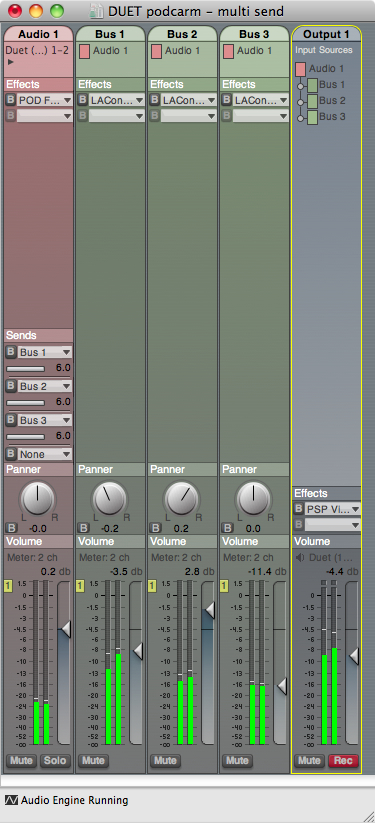
With the changes in this part of the tutorial, the AU Lab Input looks like this with some sample input:

You’ll notice that the output is a little off balance.

If you pan it to the left you’ll balance the signal out a little more. Here’s the setting with all the global FX so far.

You may want to save the AU LAB session now, if you haven’t done so already.

In the next session, I’m going to complete the clean channel effects and automate some parameters with the Midi Learn function to be able to make changes to the sounds with the Line 6 Shortboard.

You can find all of the laptop guitar rig posts on the Blueprints tab on the top of the page.  Once on the blueprints page – just scroll down to the Laptop Guitar Rig section.

Thanks for reading!
AU Lab/POD Farm 2.0/Live Laptop Rig Tutorial part 1

I’ve received a couple of pm’s regarding AU lab and setting it up for live use (largely from this post).  With an upcoming film accompaniment and a need to re-tool the setup a little I thought I would build a rig from scratch and explain how I’m doing everything.

About this tutorial:

What I am doing here is documenting the specific process for building a working rig for myself.  If you don’t have this specific hardware/software set up, you could adapt the process to whatever you’re using.

AU LAB

First a bit about AU Lab.  If you have a Mac Laptop with an OSX operating system, you have access to one of the greatest FREE music applications imaginable.  AU Lab is a program that was designed for AU (Audio Unit – The Mac proprietary plug in standard – much in concept like a VST) developers to test plug ins – but since it can accept audio and midi, has buses and can record audio – this makes it a great tool.  The fact that it does it with a fraction of the CPU of something like Logic makes it essential.

AU Lab can be installed as part of the SDK package that is on your OSX install discs.  If for whatever reason you can’t find your discs – you can go to the Apple Developer site and sign up for a free account.  You can then download the SDK package.  Once it’s installed it should be in folder called “Developer” but if you just search for “AU Lab” on your computer it will come up.

3/10/11 NOTE:

The UA LAB Version used in all of these examples is AU LAB Version 2.1.  Version 2.2 has not been stable on my system with the Apogee Duet.  You can read about the current version here – but in the meantime – you may want to download X code 3.2.2 Developer’s Tools – which has version 2.1 of AU Lab, if it isn’t installed on your system already.

Before getting into the setup – here are the tools I’m using for this particular rig:

Hardware:

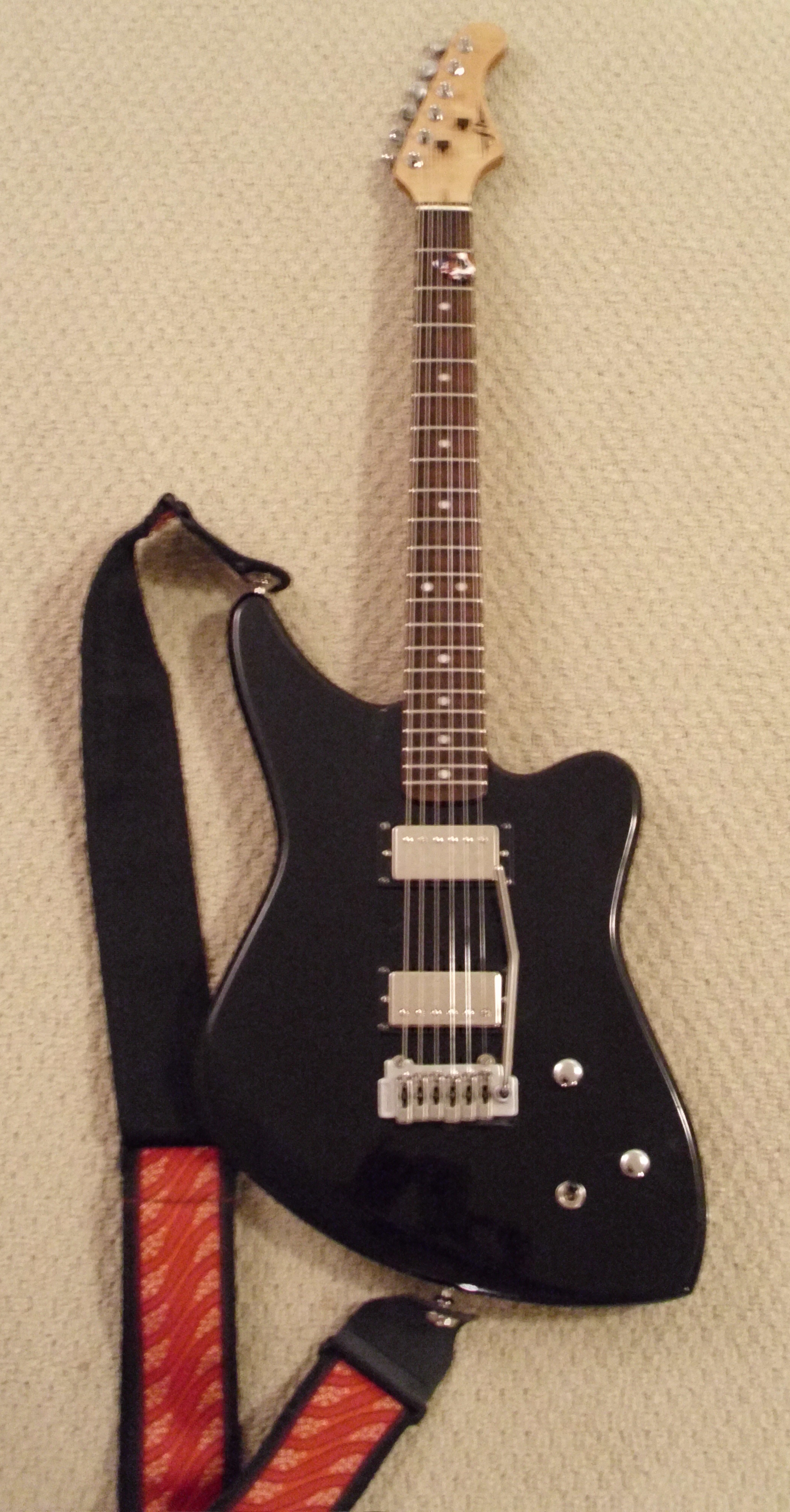
FNH custom guitar:  You can find a full review of this guitar here.

Macbook Pro- 2.4 Ghz Intel Core 2 Duo.  This is actually a 2008 version I got with a killer educational discount.  15” with firewire 400 and 800.  This Macbook has had 4 gigs of memory that I got from OWC (although the first slot can take 6 gigs so I’ll probably upgrade that before the end of the year) and a  Seagate 500 gig 7200 rpm drive.  I underestimated just how important the internal drive was to performance but it made a very big difference.

Lacie Rugged Drive – This is the 320 gig bus powered version.  Also 7200 rpm.  I run it on the firewire 800 port and use it to record to.  It’s a little overkill – but I can use it for larger sessions as well.

Apogee Duet – Firewire interface.  No other A/D converter near this quality in this price range –  No question about it.

Line 6 FBV shortboard Mark II – Line 6 got it 100% right with this product.  Smaller than the old shortboard, but can be USB powered.

Ilok key – This is required for the Ilok version of POD Farm.

Korg nanokey – The keyboard for this is a little toylike – but I’m not a keybaordist.  It is velocity sensitive and kits in a laptop bag – and I can use it to trigger patches, samples, etc.  I think all the Korg nano products are really cool.  Very useful item.

Apiotek USB 2.0 Quad – This is an express card adaptor that opens up 4 usb slots on the computer.  Since the Macbook only has 2 USB ports and I have at least 3 usb devices – this is REALLY helpful.

Software:

I’m not going to go into any real depth on the software – As I’ve already covered it in other posts.  (Look under LAPTOP GUITAR RIG)

AU Lab

POD Farm 2 Platinum (And POD Farm Elements)

La Convolver

RedWirez

SooperLooper

Absynth

Optional Software:

If using this hardware you will probably have to use one or all of these at some point.

Audio Midi Setup (Mac application – part of the OS install)

Apogee Maestro (Comes with the Duet)

Line 6 FBV Control (Free download from Line 6)

This will be a VERY indepth tutorial – but I want to make sure I cover everything I can.

AU LAB Set up

Go ahead and launch AU Lab

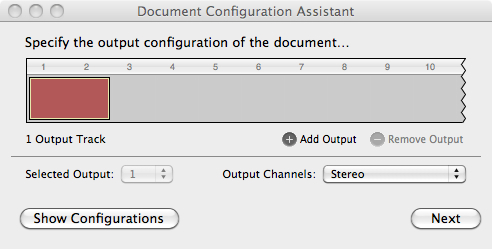
You’ll come to a screen that looks like this:

I want to run a stereo channel out so this is fine.

Click Next.

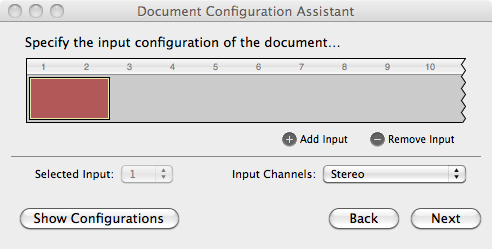
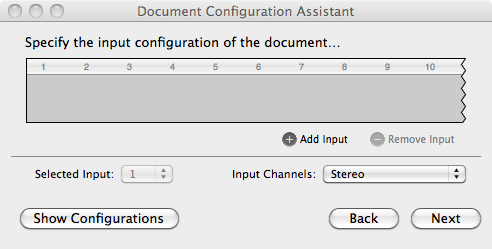
Notice that the default setting has no input – you can change this later – but it helps to set it up now.

Click Add Input.

Now you have an input source.

Click Next

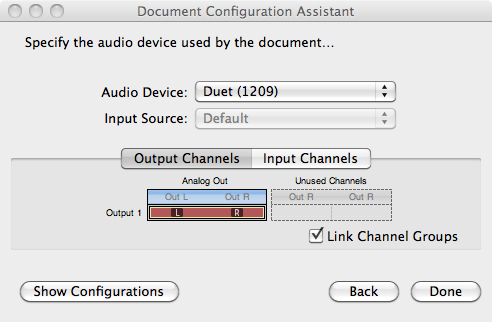
In this case I’m using the Duet – so it came up as the default in the Audio Device field.  If you’re not seeing the audio device you want to use open Audio Midi Setup (in the Applications – –  > Utilities folder) and make sure you see it there.

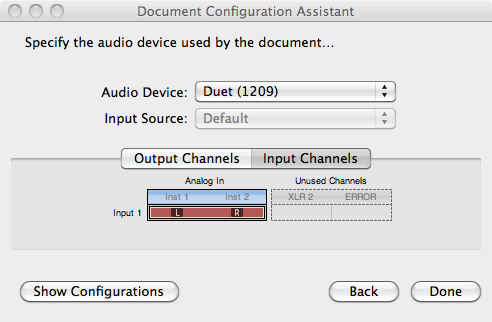
You can check the input channels if you’d like:

This shows that the Left/Right 1/4” ins are both available.  I’ll only be using Instrument 1 for the guitar – but I could run another instrument if I wanted to.

Click Done:

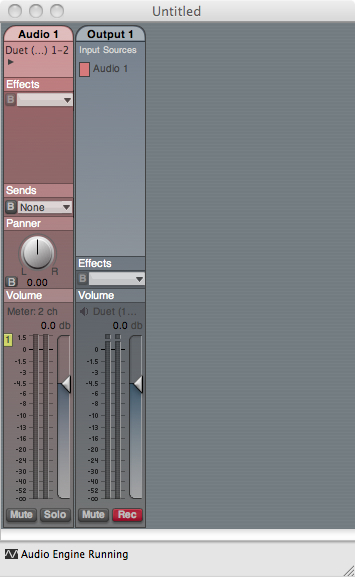
Here’s the screen that you’ll get.  If you have your guitar plugged in and strum a chord – you should hear it.  But this is going to get a lot better.

POD Farm set up

The first step is to set up PodFarm:  Click on The Effects tab in Audio 1 and scroll down until you get to Podfarm 2.

Here is the default screen in Pod Farm:

What I’m going to do here is set up a clean and distorted channel that I can switch back and forth between and automate some of the parameters so I can change them with my shortboard.

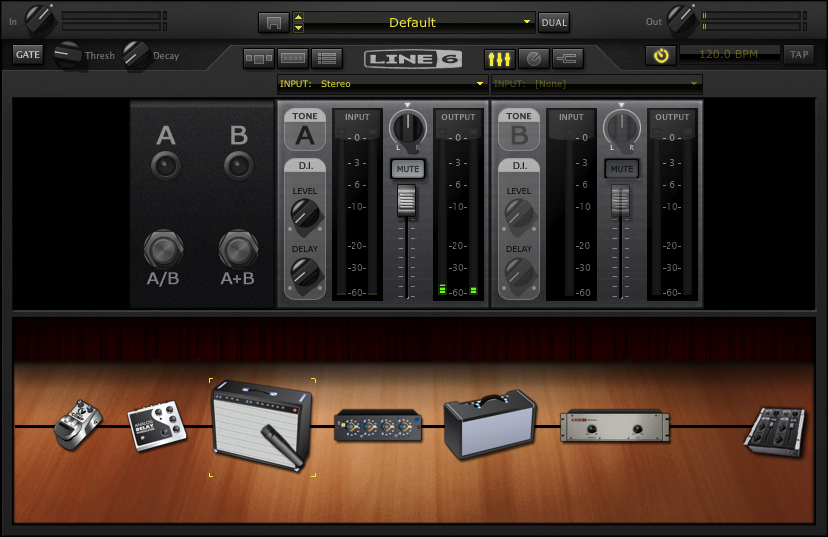
The First thing to do is get the input sorted out – since I’ve selected a stereo input in AUlab – the default in Pod farm will be a stereo in.

I only need  the left channel in as I’m only using 1 guitar for right now.

If I click on the arrow to the right of input: Stereo and scroll down to left – I now have the Instrument 1 Input on the Duet (left) as the input for this channel.

Before setting everything up – I’ll take a second to get in tune:

If I click on the tuning fork to the right of the Line 6 logo – that opens the Tuner.

If I click on the tuning fork to the right of the Line 6 logo – that opens the Tuner.

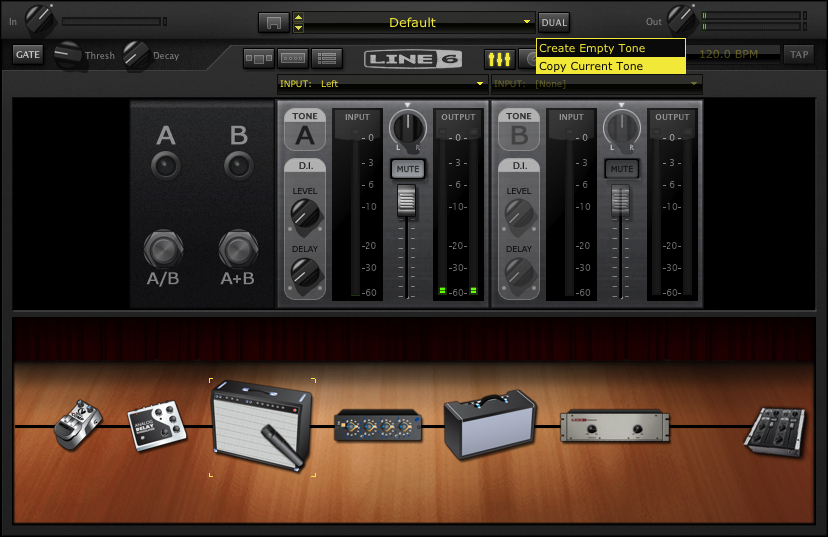
The next step is to create a Dual Tone.   In this case I’ll just copy the current tone.

Click the dual button and select Copy Tone.

And you’ll get this:

Note that the input has stayed the same as well.  Now my single guitar input can be used on both channels.

In general, I haven’t had a lot of success with 2 channel sounds – particularly distortion – which tends to overload in unpredictable ways.  I’ve clicked on the A+B Switch to turn it off.

A brief note:

The first time I did this – the guitar tone was digitally distorting (unpleasantly) so I brought the output of PodFarm down and it was still an issue.  Once I opened Apogee Maestro – the utility that came with the Apogee Duet – I realized that the signal coming out of the Duet was too hot.

It’s important to realize that the more items you add, the more things you’ll have to check when it goes wrong.

You may want to save the AU LAB session and save the POD Farm patch as well.    AU Lab saves all the settings of all the effects in the session, but you need to save the patch in POD Farm to load it again.

In future sessions, I’m going to create an A/B rig with a dirty and clean guitar amps and use the midi learn functions to change effects with the Line 6 Shortboard.

You can find all of the laptop guitar rig posts on the Blueprints tab on the top of the page.  Once on the blueprints page – just scroll down to the Laptop Guitar Rig section. 

Thanks for reading!
Toothpicks And Their Proper Place In Guitar Maintenance

A dilemma of growing up in a small town is that you don’t always have access to information that would be helpful to you.

In my senior year of high school, I had a problem as my beloved Aria Pro II Knight Warrior (Yes – with the Kahler.  No – not with the studded leather belt and the buxom model in my arms) had an ever-widening hole where the lower strap button was screwed into and would fall out occasionally.

I asked what I should do about this and was told that you could always stick a toothpick in the hole and that would fill in the gap.  And that worked pretty well. For a while.  Then I would go to 2 toothpicks, then 3…

That year, I entered the annual talent show with some people who I was playing with and we had I think a 2 song set.  One tune we were playing was Ace Frehley’s  Rock Soldiers.  I have no idea why,  but at the time I was really into the song.  Maybe because it was the rock version of The Devil Went down to Georgia.

At the point of the solo – I was ready to fully fly into it and really show off (or so I thought at the time) – when – you guessed it –the strap button fell out and some 20-30 tooth picks came gushing out of my guitar.

I dropped to the floor to prevent the guitar from falling, but what I hoped would be a moment of triumph turned into a very limp guitar solo and much embarrassment.

At that moment I realized that I should learn something about guitar set up.  I studied it a bit, did a lot of guitar set ups (and some repairs) when I was at Sandy’s Music  and got to the point where I could do basic maintenance and minor repairs on my guitars.

Recently I noticed that with the  tremolo  installation on my guitar that the high E string in particular binds up a bit and so as a first step, I decided to lubricate the nut slots to see if that helps with binding.

In this case I’m using Guitar Grease, a graphite paste which I got from Stu-Mac

and one of those dreaded tooth picks mentioned earlier (which I probably got with a lunch somewhere along the way).

You don’t need to buy a special paste to do this – you could just as easily use a pencil – but I have a difficult time getting the groove evenly lubricated with a pencil and this seems to work better for me.  Additionally as you don’t want to use more than necessary –   I find the tooth pick helps with controlling the portion of graphite I’m applying.

Removing the string from the nut slot – I just scoop a little graphite paste onto the tip of the toothpick and lubricate the nut slot particularly focusing on the entering point and exiting point of the string – as that’s where it typically binds.

If you’re a beginning guitarist you should gain some familiarity with basic repair and maintenance.  In addition to saving yourself some cash – if you ever have to take it to someone for repair – you’ll be able to speak about the problem intelligently and save some bench time (and money).

To use a non-guitar example  see the difference in price next time in going to an auto mechanic with a specific problem (“there’s something wrong with the ignition – the battery is fully charged – I get power to the radio, lights, etc – but the car won’t start”) versus “I hear a knocking sound”…

Next post – a more radical solution.

Thanks for reading.

And by the way, listening to Rock Soldiers for the first time since high school I don’t get it now either.  But  I did just listen to Loudness’ Let it Go looking for this clip and that brought a smile.

Setting Up “Testing Environments” Or Multi Layered Tones In AU Lab

One site that I always forget to link to and need to do so now is the Guitar Amp Modeling Blog,  which is just a really tremendous resource.  It’s really inspiring to me to see so many people working on pushing more and more into alternate live and studio approaches to guitar.

A couple of days ago I went to the Speaker Cabinet Impulse section of the forum and found that RedWirez, a company that sells a high end collection of speaker impulses is giving away their impulses from a Marshall 1960A with Celestion G12M 25-watt Greenbacks to celebrate their birthday!  The folder is about 107 MB of impulses that go from 44.1 KhZ – 16 bit to 96 KhZ – 24 bit.

There are 17 different types of mikes used for each IR set AND there are ambient mics to capture the back of the cab at various distances, room and wall mics as well. You can go to the link for that here.

I still have the recabinet set – which at $15 for something like 2000 irs is an amazing bargain as well.

But one thing that comes up in something like this is how do you sort through all those speaker sounds?

My solution is to set up a bunch of instances of LA convolver on multiple busses in AU LAB.

In this way I can set up one bus at a time and mute the other channels to be able to a/b/c everything.

Additionally, you can set up more complex sounds by combining different IR’s.

For example here are the IR’s used in bus 1:

and bus1 is the tone.

Here are the IR’s used in bus 2:

and bus2 is the tone.

Here are the IR’s used in bus 3:

and bus3 is the tone.

And the final tone of all 3 together:

To my ears, this creates a more full bodied sound than any one channel.  Each plug in takes up more processing power – so it may be a balancing act based on resources – but since AU LAB uses so much less CPU than something like Logic, it’s easier to pull off here.

In case you’re interested – here’s the patch the sound is based on:

Thanks for dropping by!

An observation from a session

Last night I had an improv session with Warr Guitarist Chris Lavender and Drummer Craig Bunch.

We had originally planned on using amps – but with a limitation on the bass amp as a DI – we ended up going direct.

I ran out the FX send of my atomic to the laptop for cab sims (IR’s) and  looping – Chris went direct out of his Guitar Rig control.  With the Atomic – I don’t know if the signal hits the FX send Pre or post poweramp – but it sounded really good.

Craig ran both signals to mic pres (i didn’t get the make) before going into Pro-tools.

Headphone mixes were a little iffy -but everyone was listening through the mains nodding their head with an – “oh yeah”!

Next time we’re bypassing the amps entirely.  We figure we can use them live but the recording sounds were strong enough that we’re willing to go direct.

I can’t tell you how many years I’ve waited to have a feasible laptop guitar rig.   Pretty amazing to actually have it here.

No ringing in my ears today also was a nice touch as well…

Where To Get Your Guitar Repaired In LA Or Lessons For The Self Employed Musician

Yesterday, I took some cash from a gear sale and had a Wilkinson tremolo installed on my FNH guitar which was a long overdue modification.

I started by calling Andy Brauer, to see about getting the work done.  The first thing Andy said to me was that the scope of the job (i.e. routing out a cavity on a guitar with a hard tail bridge) wasn’t something that he would be willing to take on, but he said if I called him back in a half an hour he’d get a phone number to me.

.

Lesson 1:  Have a clear concept of what work you are willing to do rather than half ass something you don’t want to do. Since this isn’t an option for someone of Andy’s caliber – he made a referral for me so I could get the work done


I called him back a 1/2 hour later and Andy got the number for me. He told me to give Seth Mayer a call (818-427-1543).  I got in touch with Seth and he seemed like a nice and knowledgeable guy and told me to bring it by his workshop that evening.  As Andy had referred Seth (and Andy’s reputation is unimpeachable to me), I went to Seth’s knowing that I was going to get my instrument sorted out.

.

Lesson 2:  When you refer people to someone you build good will but you put your name on the line.


I brought it by Seth’s and he explained that the holes from the original bridge might need to be doweled and might not be completely covered up by the new trem.  This was fine with me.   I said he didn’t even have to sweat putting a back back plate on the route  as my main concern was that it was functional instead of being “pristine”.  Seth said he would do what he could to try to accommodate both aspects and that it would be done within a week.

I got a call today (2 days later) that it was done.  Here’s the guitar:

.

.

When I went to go pick it up, I found that Seth had recessed the trem so I could pull up on it like I asked.

.

.

He also threw a back plate on it and did a great job setting it up in general.

.

Lesson 3:  When you tell someone you’ll do something – do it.  

But if you can improve upon that it’s to your benefit to do so.


Seth could have hung onto it for a week and done the job and I never would have known.  Instead, he turned it around asap.  He could have tried charging me a rush fee.  (I’ve had plenty of guys try to pull that before.) Instead – he did much more than I asked him to do.

Do you ever wonder why certain stores go out of business?  The ones’s that don’t repair things competently or when they say they are going to?  The one’s that leave you a bad taste in your mouth after you’ve gone there?  Do you ever wonder why certain musicians who flake on sessions don’t get call backs?

Now when anyone asks me where to take a guitar to get repaired in LA – I’ll send them to Seth.  This is the same level of referral that you should work towards as a musician.

.

Lesson 4:  This is what it means to be a professional.  In your interactions as a professional musician – your word is your bond.


Seth Mayer Guitar Repair

818-427-1543

smayer@yahoo.com

myspace.com/guitarrepair

Testing Your Vocabulary Or Practicing Part VI

In the last post on practicing, I focused a great deal on the importance of listening in general and I’d like to focus and frame that importance a little more this time.

.

Before I move on, you may want to read my previous posts on practicing.  If you have missed those posts, you can find them here: part 1part 2part 3 , part 4 and part 5.

.

It’s important to realize that scales, arpeggios or any other kind of melodic or harmonic device is only a tool in the service of making music – and is not music in and of itself.

.

One way to get to making music with these devices is to learn other people’s music and phrasing, either by transcribing or learning by ear.

As a guitar teacher, I occasionally to run into students who are resistant to this idea as they only want to learn “their music”.

.

Learning other people’s music is learning your music because it’s part of a process in developing your voice.

The point of music is to communicate and to communicate with people you must have something to say.  This is done not only with vocabulary, but with a familiarity of language that comes from constant exposure and interaction.

.

When you learn other people’s music, or licks or chord progressions you learn vocabulary.  You learn phrases that work their way into your being and begin to form your aesthetic.  When you talk about “your writing style” for something you’re writing – do you make up all of the words you are going to use?  In reality, you use words that you’ve used before.  You use phrases that you’ve seen other people use that have now become part of “your writing style”.

.

If you’ve ever been around a child that’s learning to verbalize their thoughts – you’ve heard a lot of sounds coming out that are not recognizable as words (much less sentences).  It can be a real struggle to determine what it is that the child is attempting to do (or perhaps wants).  If you were to isolate that child at a certain point of development and refuse to interact verbally, the child would eventually develop his or her own language – but it would be completely inaccessible to you.  You would be unable to communicate verbally with the child and have to do things visually to convey ideas.

I’ve heard some singer/songwriter music that was done with this mindset.  The lyrics represent things that are so personal that it is impossible to gain any meaning from them without an intimate knowledge of the person.  Harmonically (because the performers use sounds that “are theirs” and nothing more),  the approach is severely limited and the chord progressions tend to all sound the same.  If you’ve ever had this experience you may find that you tend to tune out after a song or two as I do.

.

Learning vocabulary

When learning vocabulary, there are several steps (this is a profoundly oversimplified list):

  1. Exposure (or more likely multiple exposures) to a word (usually in a context)
  2. Use of the word
  3. Integration of the word into conversation/writing etc.

.

This means that there is a lot of word use to get to the point of integration.  In musical terms, you may have to shed a lick or phrase a lot not only from a technical standpoint (use of the phrase), but also to have it be “available” when you’re improvising (integration).  And this is a real test of your vocabulary.

.

You might think you have something down – but no matter how much you shed something,

if you can’t access it when you’re improvising – it’s not fully integrated into your playing.

.

It’s important to realize that integrating vocabulary is a conscious decision.  It isn’t passive at all.  Just because I hear a sound – doesn’t mean I know what it is or how to react to it. This is the real difference between hearing and listening.

.

Hearing is biological, listening is mental.

You can get a lot from working with transcription software (like transcribe) and using it as a phrase trainer (i.e. taking an advanced technical or shred lick and slowing it down to such a slow speed that it becomes playable).

.

Don’t be afraid of working on complex solos or phrases!

.

All you have to do is:

slow it down and

break it into small components that you can play and

try to increase the speed a little every day.

.

In this way you’re actually getting more complex patterns under your fingers and gaining some refined ideas to draw upon.  By working in this manner, you can develop phrases so that you have something that you can use at a variety of tempos. Having ideas that work in a number of contexts  makes it easier to integrate into your playing..

If this is an area of interest, you may also want to read this post on music as language.  You can also find some posts that may help with practice/motivation stating with one on focus here, a thought on music theory in performance here, or the importance of deadlines here.

.

I hope this helps!  Thanks for dropping by!

-SC

.

If you like this post you may also like:

.

PRACTICE MAKES BETTER AKA PRACTICING PART I

PROPER POSTURE IS REQUIRED FOR PROPER PERFORMANCE – PRACTICING PART II

TENSION AND THE SODA CAN OR PRACTICING PART III

DEFINITIONS AND DOCUMENTS OR PRACTICING PART IV

.

PRACTICE WHAT YOU PLAY OR PRACTICING PART V

TESTING YOUR VOCABULARY OR PRACTICING PART VI

POSSESSION IS 9/10S OF THE LAW BUT PERCEPTION IS EVERYTHING OR PRACTICING PART VII

Some Useful Online Practice Tools

.

FINDING THE DEEPER LESSON

MELVILLE, MADNESS AND PRACTICING – OR FINDING THE DEEPER LESSON PART 2

INSPIRATION VS. INTIMIDATION

What’s wrong with playing “Flight of the Bumblebee” for a world speed record?

.

Building Blocks – or more examinations of a laptop guitar setup.

If you’ve ever seen the American dubbed version of Mad Max (the whole movie plays very differently with the original voices – I’m just so used to the original American release’s versions of Night Rider, Toecutter and the Goose –  that that’s the only one I can watch), there’s a moment where The Goose realizes that the person they’re about to arrest is an associate of ToeCutter, and the camera closes in on his face as he says,

“Well well well…”


I wanted to go a little more in depth with the laptop guitar rig I’ve been toying around with.  I’ve posted a couple of things about this but I realized that it may be more beneficial to examine each component and see how it fits in the puzzle.  I tend to focus these on distorted sounds as those to me are the most difficult to replicate.  Even Logic has some decent sounding clean amps built in – getting a useable dirty sound is still the challenge at least for me.

So what I did was improvise a little idea in a C# minor tonality and then played a series of versions of it through different versions of the laptop set up – to show the evolution of where I have things now.

There’s still a great deal more work to do in this area, but at least these are some starting points and may at least shed a light on the process I’m using.

As a starting point you may want to look at the gear page or my previous entries on this topic here or here.

The (salt) lick


To begin with, here’s an mp3 of the first thing I improvised:  C# min improv .

* Note:

occasionally mp3’s don’t load properly when I check them in Safari.  When I refesh the page they come up.  If you have this problem – it may work for you.  If you still can’t hear the mp3 just leave a comment and I’ll re-post it.

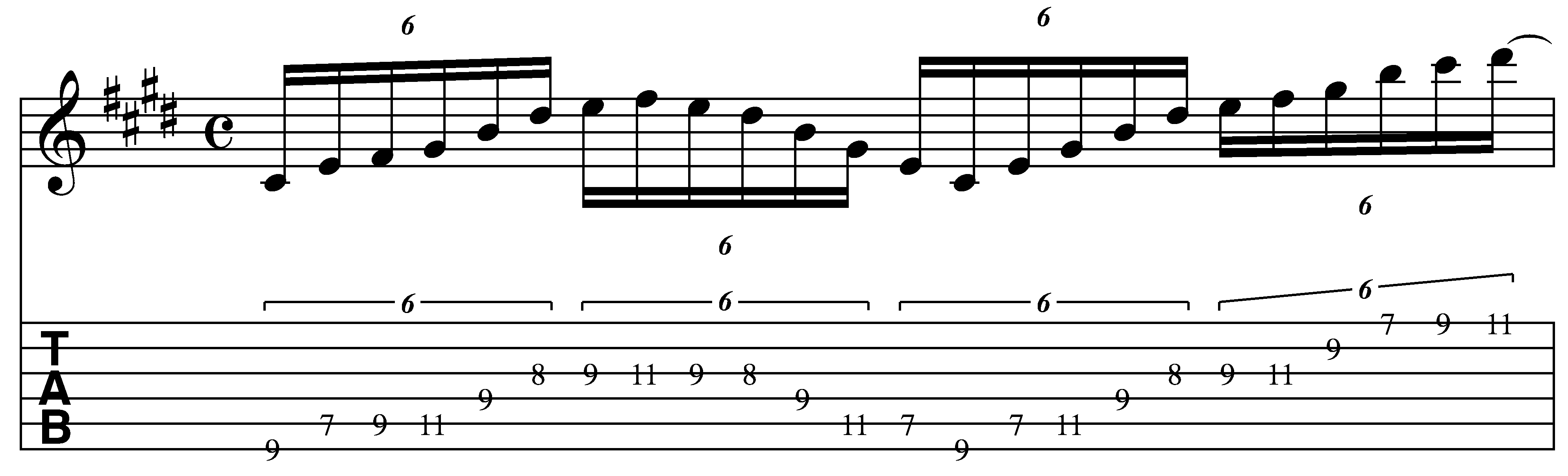
And here’s the notation

The first part of the lick is somewhere between a scale passage and an arpeggio which makes it a little interesting to me.  This approach is something I use a lot in my soloing to get away from the temptation to go on autopilot and just run scales up and down the whole time.

Visually, I’m initially thinking “G#min arpeggio”, and then dropping the lowest notes by alternating 3rds to extend the tonality.  This is an arpeggio trick I use all the time to get new sounds out of old shapes.  I’ll detail this process here:

Here’s a G# minor arpeggio:

When I look at the distance between the G# and the B – that’s a minor 3rd.  By alternating 3rds ( either major-minor or minor-major) I can extend the tonality.  A major 3rd down from G# would be E.

If I drop the lowest note to the “E” on the A string – I’d have an E maj 7 arpeggio. (E G#, B, D#).

If I drop the lowest note to the “C#” on the E string – I’d have a C# minor 9 arpeggio. (C#, E, G#, B, D#).

(If you wanted to go further you could continue the process to A, F#, etc.)

The next thing I do is to add the F# on the A and G string.

This makes G# min7 / E maj 9 / C# min 11 depending on the chord it’s being played over or how you’re visualizing it.

Now that I have the larger shape – I fill in some 3 note per string patterns on the G and high E strings.

There’s a slight 2 string variation on the A string that’s hammered instead of picked, but otherwise the picking pattern discussed on the swept pentatonic lesson is the same approach that’s used here.

This is very similar to the 3 note per string / 1 note per string pentatonic patterns that I’ve been exploring in the online lessons area of the blog (you can see a pdf here).

The process that I’m detailing is how I began to practice these things and then develop them into more complex ideas.  I tend to see sounds like this as one large pattern now ( note:  the GuitArchitecture process is all about sonic visualization – i.e. associating shapes with sounds so that sounds can be created and manipulated in real time) .  So when I improvise, I’m not really too conscious of exactly what’s happening theoretically – only sonically.

This ends in a pretty pedestrian B major (C# Phrygian) scale run.  In soloing I would typically try to develop it into something else – but for the purposes of a sound demo – it makes sense to have a short lick with a definitive ending.

The sounds

First I’ll play the lick with the sound used at the ending point of the process.  Here are some screen shots of the set up.

The FNH guitar on the neck pickup goes into the Apogee duet into AU LAB:

I run PSP Vintage Warmer

into Pod farm 2.01 Ilok version

I’m using the Marshall side of this rather than the Soldano – so I’ll show the signal chain there (it’s the same for both setups shown).

I’m going to start with the mixer and then go from there:

Since I’m only running a single line in- I’ve set both inputs to left.

There’s a little tonal secret hiding in plain sight here as well.  If you look carefully – you’ll see that the DI is set to about 18%.  This allows some of the dry guitar signal to come through as well.  This give the tone a little body and clarity that’s lacking from just the straight signal.

You might find that to completely not be the case – and again – this is just one person’s process detailed here.

Here’s the gate.  I tend to keep the levels low so it doesn’t kick in when I’m playing – but kills the noise when the volume is off.

The gain on the Marshall is set around 22%.  I tend to crank the mids a little to help make sure the sound cuts through in a live mix (note the use of the term “help”.  In reality – sound at any live gig is only as good as the sound person.  I just do what I can on my end to make sure I can hear myself on stage.).

Before the Marshall for the “lead” sound I’ve put in a tube screamer.  Here are the settings for that:

Here’s the lick with the tube screamer (same as above): with tube screamer

Here’s the lick without the tube screamer:  without tube screamer .

To give you a sense of how important the amp gain is to the overall sound – here’s a variation of the lick above with the amp gain set around half:

Here’s the lick with the tube screamer (same as above): TS_ON_50%_gain .

Here’s the lick without the tube screamer:  NO_TS_50%_gain .

I actually like this amount of saturation for lead lines – but the reason I’ve gone with the lower gain is that chords (outside or Root-5th diads) – tends to just crap out and turn to sonic mush with higher gain settings.  So to balance the 2 I’ve been working on lower tweaks.


WHY THE CABINET IS TRANSLUCENT.

Oh that’s easy.  It’s because I’m not using it.

Instead I’m using Impulse Responses from Recabinet in LA Convolver (See the links above for more info).

Here are the settings:

The IR’s are from the Recabinet Modern 2.02 Mac and PC-> 1960 4×12 cabinet settings.  You’ll notice that I don’t have anything fancy in terms of mikes set up on the cabinet,

Here is a major component of this process.  Recabinet comes with something like 2000 IRs.  I could spend weeks doing nothing but checking tonal variations on all the different cabs mikes.  Someday when I need to get really deep into this – I will.

In the meantime – to cut down on the number of parameters and just get to a tone – I went with the KISS (keep it simple stupid) approach.  I thought about what cabinet could be a constant for all my sounds clean and dirty – and the 4 x 12 came to me.  I’ve heard a DeVille through one and it sounded good so I decided to use that as the standard and tweak the amp around the cabinet.  Live, a 57 on the grill sounds good to me.  I tried 2 different variations of the same thing and went from there.

To contrast this:  here is the sound of just PodFarm – with the PodFarm cabinets but with the PSP and post preamp off.

Here’s the lick with the tube screamer (same as above): NO_IR_YES_TS .

Here’s the lick without the tube screamer:  NO_IR_NO_TS .

Some of you may prefer these sounds.  I happen to think that “initial” mp3 – has a bit more character than these.

Here’s the rest of the signal chain:

Here’s the pre-amp (post amp! – this is a very useful tweak!):

Here’s the delay:

Here’s the reverb:

So to quote the Goose, “Well well well…”

It’s still a work in progress.  I’d like to work on tweaking the preamp after the cab to carve the tone a bit more and experiment with using an outside delay later in the AULAB signal chain – but for now this is where it is.

I hope this helps!  If you have any questions or comments please fell free to leave them on the blog – or e-mail me at guitar.blueprint@gmail.com .

Thanks for dropping by.

-SC

Glass Noodles – adapting a Philip Glass arpeggio approach to guitar

I tend to get a lot of playing ideas from sources other than guitar.  A primary source of influence is film and one of my all time favorites is Mishima. To me, Philip Glass’ score works brilliantly with the subject matter and helps create a powerful experience.

Here’s a lesson post on some cool approaches I borrowed (read: stole) from Glass that might provide you with some inspiration.

I’ll post the exercise first and then add some color commentary.

A link to an mp3 is here:  Glass Noodles122bpm

First thing’s first – the  triadic* chord progression (see note at the bottom) is  G Major, G# diminished, A Major, A# diminished, B Minor, G Major, B minor, B Diminshed, B Minor, G Major, B minor, B Diminshed. (Note: The second bar repeats – I just forgot to put the repeats in).

I’ll start with a technical issue and then go into the theoretical things to grab.

.

If you want it hypnotic –   you’ll have to lose the pick.

.

Part of the sound of this is the hypnotic repetition and a large part of that sound come from a uniform attack.  You can sweep pick all of these arpeggios as well – but for a more legato sound it’s best to approach all of these with fret hand tapping (i.e. all hammer ons and no picking).  From a technical standpoint the real challenges here are 1. keeping the attacks uniform (i.e. all of the note volumes are even) and 2. playing it in the pocket rhythmically.

.

Getting the maximum effect of something like this requires  sequencer like articulation and timing – and that alone makes this something worth studying.

.

As a starting point you’ll probably want to mute the stings to prevent open notes from ringing out (I just use my picking hand – some people use a hair tie or a piece of cloth.)

For uniform attacks – you’ll have to have very clean hammer-on technique with the fingertips hitting the strings instead of the pads of the fingers.   If there’s any slop there – it will come out in the arpeggios.  One other thing to note is that the notes should be lifted off and not pulled off.  If the only sound created is by the individual fingers hitting the strings – you will have a more uniform sound (which is totally the goal here).

.

Here’s a good way to visualize the fret hand finger motion you’re looking for.

.

Put the palms of your hands on a table.  Now without lifting the palms up, tap your fingertips one at a time on the table starting from the pinky and ending on the index.  You’ll notice that the fingers stay curved and that the large knuckle of each finger is responsible for the tapping.  This motion is what you’re looking for in this process.  You should also notice that you don’t need to hit the fingertips very hard against the table to get a crisp attack.

.

You should strive to get volume with the minimum amount of finger pressure.

The more relaxed you can keep your hand, the easier this will be.

.

You can add some compression to make help make the attacks more uniform as well.  I typically don’t use a lot of compression as I like to play very dynamically and find myself adjusting volume and tone a lot when I play – but a compressor plug in will make all of this easier to play.

This approach gets counter-intuitive at the G major arpeggio (the second arpeggio of bar 2).  For a technical stand point this is the trickiest part of the passage. (Note:  The numbers under the notes indicate fret hand fingerings.)
.

.

I am used to playing the G major arpeggio as a 5 string form – which usually uses the 3rd finger as a barre on the 12th fret, but barring the B and G on the 12 fret completely breaks up the sound and makes it impossible to get the tapped sound of the other notes.  To get around this – I use the index finger to fret the G  so each note gets a unique attack.

.

This is one of those deceptive exercises.  Playing it at 60% will not take very long – but the difference between 60% and 100% is HUGE.

.

Playing everything  with correct timing and really articulating every note will take a while.  Don’t get discouraged if it doesn’t happen right way.

.

The key here is to plan on spending a lot of time playing the arpeggios really slowly to make sure that the timing and volumes are 100% from the beginning.  You can read some of my posts on practicing to get a sense of the best way to start working on something like this.

Now some theory observations:

.

If you sharp the root of a major arpeggio – you get a diminished arpeggio.
.

This doesn’t sound like much – but look at the first 3 arpeggios.  By making the G a G#, you get a nice chromatic motion on the B string leading into the A Major Arpeggio.  You can also notice that the A# in the diminished arpeggio after the A major arpeggio leads right into the B Minor arpeggio.  This is a great way to sequence between 2 Major Arpeggios a step apart (Like G major and A major).

.

If you sharp the 5th of a minor arpeggio – you get the root of a major arpeggio.

.

Again a small thing – but by using this you get  a nice voice leading between the B minor/G major arpeggios in bar 2.  Also notice the chromatic motion on both the G and the high E string.   This continues the chromatic movement that occurred on the B string between the first 3 arpeggios.

.

If you flat the 5th of a minor arpeggio – you get the 5th of a Diminished arpeggio.

.

Check out the last arpeggio in bar 2!  By continuing the downward chromatic motion through the  G Major – B Minor – B Diminished – a sense of urgency is created and then the last point –

.

There’s mystery in keeping it unresolved.


.

In the Mishima soundtrack (you HAVE put the movie in your Netflix Queue yes?) there are a number of moments where at the end of the arpeggio flurries – it ends on an unresolved chord.   Here I’ve repeated the last arpeggio fully and then ended on the lower F on the last repeat.  If I was making a song out of these ideas – I would continue with the type of figures and ideas that have already been presented here and possibly resolving them.  But here in this context – ending on the F – just leaves a giant question mark and makes it interesting.  If you don’t believe me – watch the film!

.

*Note: If you move away from triads – there’s another analysis here:

.

The notes of G# diminished are can also be seen as the 3rd, 5th, and b7 of an E7 arpeggio.

Therefore: If you sharp the root of a major arpeggio – you also get the 3rd of a dominant 7th arpeggio (with no root).

.

This would make the chord progression   G Major, E7, A Major, F#7, B Minor, G Major, B minor, B Diminshed, B Minor, G Major, B minor, B Diminshed.

The bass motion would be what determines the actual chord progression.  I believe the bass motion followed the chromatic motion but the E7->A and F#7-Bm are pretty standard analysis for a chord progression like this.


More posts soon.  Please feel free to post any questions or comments you might have or e-mail me at guitar.blueprint@gmail.com.

-SC