AU Lab/POD Farm 2.0/Live Laptop Rig Tutorial Part 2

In the previous post, an AU Lab session (or document) was established and an A/B POD Farm patch was created.  In this post, I’m going to start modifying the patch to make it more useable.

Building the rig:

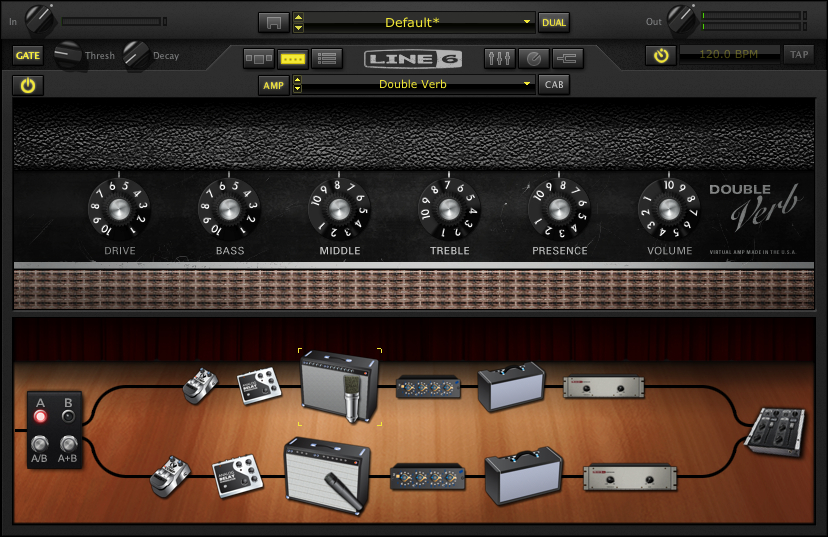
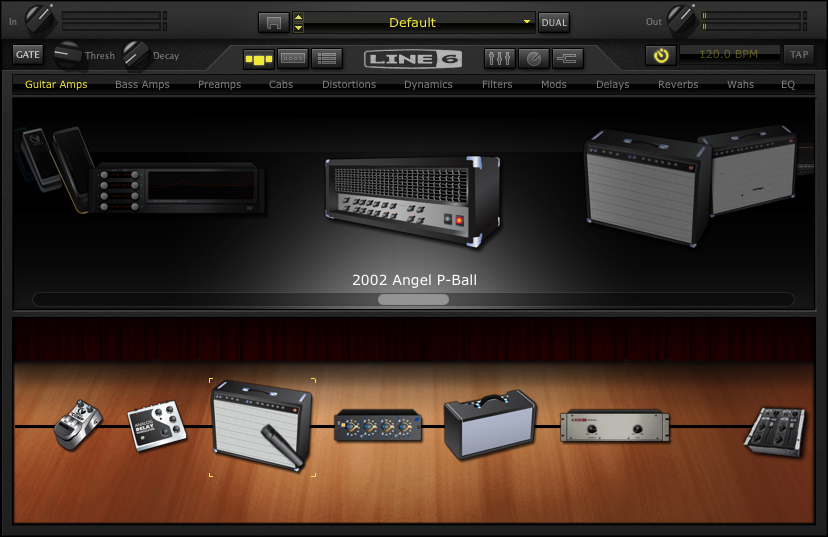
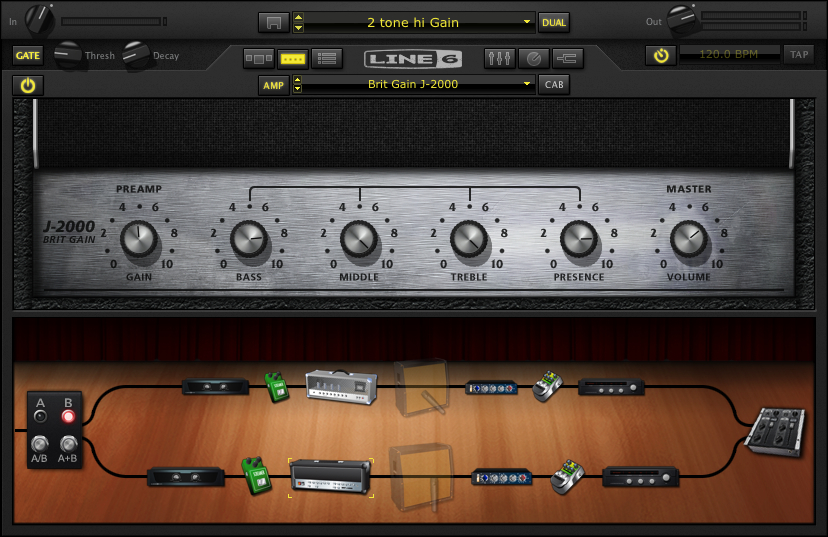
Okay first I’m going to swap out the amp. I like the Double Verb instead.

You can drag and drop amps into the signal chain, but if I click on the down arrow to the right of the AMP field – I can just scroll down to the Double Verb amp.

Here are the settings I’m using.

If you look in the left hand corner underneath the input knob on POD Farm, you’ll notice the global gate is on.  I tend to use the global gate at a low setting.  This came from a ruined session where I switched to a distorted sound that DIDN’T have a gate on it and squealed between each phrase.  Now I keep the master gate on to not worry about that scenario.

Compression:

Louder isn’t always better.

Compression has it’s place – but I try to play dynamically, so the compression is the first thing to leave the POD farm signal chain.

If you click on the compressor in the signal chain and then ctrl-click on the compressor you’ll get the following options.

Just select Delete.  If you change your mind you can drag and drop another compressor from the menu into the signal chain.

Another point to bring up, is that when I use an amp and effects – I try to use the same signal chain for all of them.  (This comes from years of playing gigs and having a bunch of effects pedals going through the same amp and reverb).

Looking at this set up, the mic pre (currently between the amp and the reverb) would be something that I would want in the channel signal chain in AU LAB instead of POD Farm – so that it was the same mic pre for any amp I’m using.

The first step is to delete the mic-pre from the POD Farm signal chain (using the same method as the compressor above).

Next (in AU LAB) in the Audio 1 channel – click on the arrow in the next available Effects field below PODfarm .

If you scroll down to Line 6, you’ll see that in addition to PODFarm, that each individual component of a PODfarm rig has been broken down into components (aka POD Elements).  This is so you can use individual effects or amps as an AU plug in which much less of a CPU hit than loading in another instance of POD Farm.

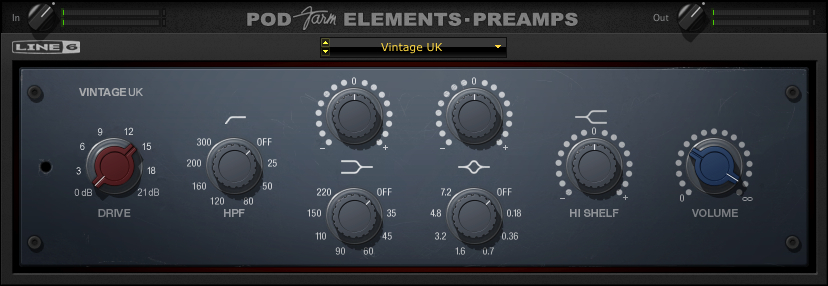
In this case choose: POD Farm Element – Preamp.  I’ve chosen Vintage UK.

Reverb:

The reverb would also be something that I would want in the channel signal chain – so that it was the same reverb for any amp I’m using.  (The other advantage is that by placing the reverb outside of POD Farm, when I change amp settings the reverb doesn’t cut off with the amp change.)

Delete the Reverb from the signal chain in POD Farm (using the same method as the compressor and the mic-pre above).

Next, (in AU LAB) in the Audio 1 channel – click on the arrow in the next available Effects field below POD Farm Element – Preamp.

If you scroll down to Line 6, choose: POD Farm Elements – Reverbs.  I’ve chosen Standard Spring.  Here are the settings I’m using.

Impulse Responses:

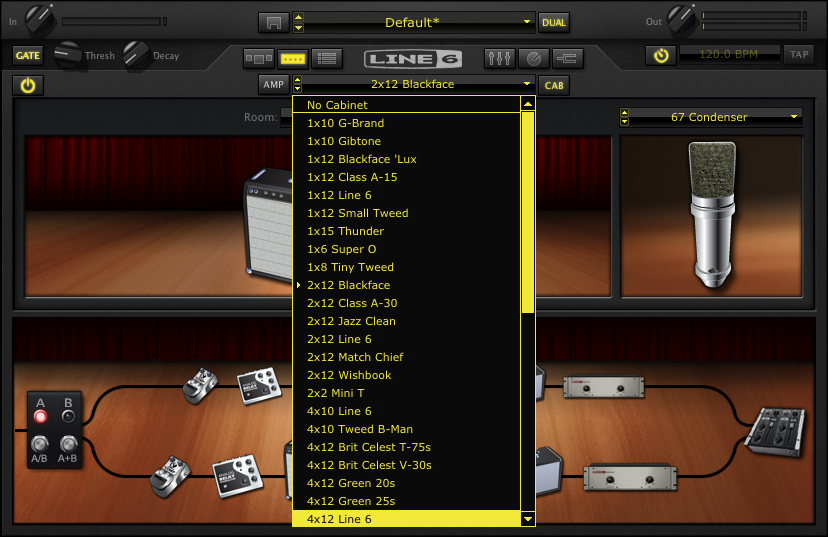
I use impulse responses rather than the speaker sims in Pod farm.  So the next thing I’m going to do is get rid of the speaker cabinet/microphone on Podfarm.  If I click on the CAB button – I’ll get a list of speaker cabinets and microphones used.  If I scroll to the top of the list – I’ll get “No Cabinet” which deactivates both the cabinet and the microphone.

Next, (in AU LAB) in the Audio 1 channel – click on the arrow in the next available Effects field belowPOD Farm Element – Reverbs.

Scroll down to Lernvall Audio and select LA Convolver.

Now I’m going to select to impulse responses to act as a speaker simulator.  I’ve experimented with putting multiple instances of LAConvolver  on buses and running multiple cabs, but since I want to run SooperLooper in the bus (Where I can loop guitar and any other incoming audio source), I’m going to just stick with a stereo set.

Select a channel and hit “choose” under file. In this case I’m using the free RedWirez cabinet I got as part of their birthday giveaway.

I want to use a high sample rate to get better definition so I’ve chosen 88.2 K. (or 2 times 44.1k)

I’ve chosen an SM57 on the grill and a KM84 about 3 inches behind the back of the amp.  I tend to start with the Wet gain in the center position and adjust as necessary.

A brief note:

I’ve mentioned this in other posts, but since I want to use the same speaker cab for all the amplifiers, I’m going with a 4×12 for familiarity.  Normally,  I wouldn’t match a double verb up with a 4×12, but since I’m going to be running a Marshall on the other channel, I’m going to just have to adjust the clean amp signals accordingly.

Fixing the Sample Rate:

If you notice, the plug in sample rate and the Impulse response sample rates are different.  It will work like this – but I want to use the highest sample rate I can for the most clarity.  There is a delicate balancing act that comes between high sample rates, stability and useable latency, so everything here is a compromise.

I’ll fix this with Audio Midi Set up :

First: click on AU Lab and look under Preferences.

When the preferences window opens, click on the tab marked Devices.

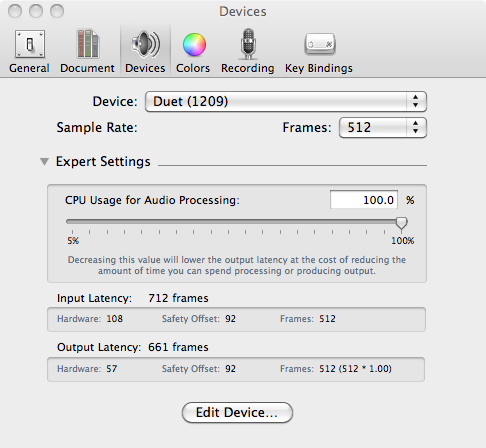
If you click on the expert setting arrow you’ll see something like the following:

Another  brief note:

I’ve set the CPU to 100% to avoid glitches.  I’ve also set the latency really high to attempt to keep the system stable.  Depending on the system and interface that you’re using, you’ll probably have to lower the setting to the point that you get glitching (or max out the memory) and then bring it up a little bit from there.  With the headphone out of the Duet – even with these settings the latency is suprisingly tolerable.

If I click Edit Device – that opens up the Audio-Midi Setup application (or you could find it in the Application – –  > Utilities folder)

Note:  I’ve changed the output format to 88.2.

Going back to the Audio-midi sample rate window – it shows:

An Important note about sample rates:

I’ll mention this again – but if you’re going to be incorporating other audio into the session (including looping in SooperLooper) – you’re probably going to have to set the sample rate back to 44.1 (and set the Impulse responses back to 44.1).  If I’m not looping –  I try to set the rate as high as I can, but know that it’s going to have to get bounced down to 44.1 for recording, etc.

While I’m on the preferences Tab I might as well set up recording to the external drive.  Click on the tab marked “Recording”.

Now if I click on the “Rec” button at the bottom of OUTPUT 1 in AU LAB, it will record whatever I do to the Lacie as the default location, in a 24 Bit AIFF format.

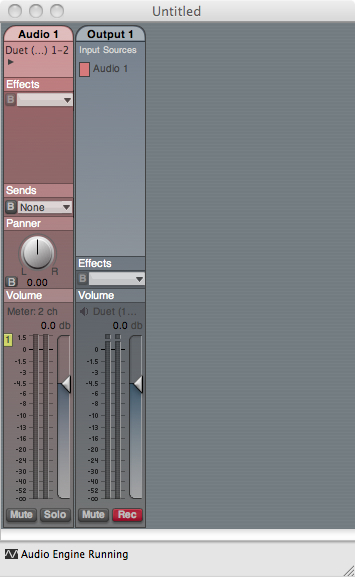
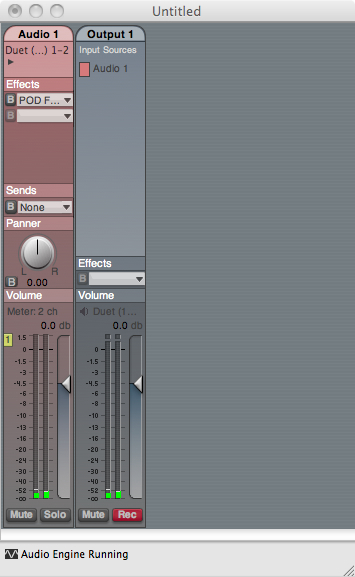
With the changes in this part of the tutorial, the AU Lab Input looks like this with some sample input:

You’ll notice that the output is a little off balance.

If you pan it to the left you’ll balance the signal out a little more. Here’s the setting with all the global FX so far.

You may want to save the AU LAB session now, if you haven’t done so already.

In the next session, I’m going to complete the clean channel effects and automate some parameters with the Midi Learn function to be able to make changes to the sounds with the Line 6 Shortboard.

You can find all of the laptop guitar rig posts on the Blueprints tab on the top of the page.  Once on the blueprints page – just scroll down to the Laptop Guitar Rig section.

Thanks for reading!

AU Lab/POD Farm 2.0/Live Laptop Rig Tutorial part 1

I’ve received a couple of pm’s regarding AU lab and setting it up for live use (largely from this post).  With an upcoming film accompaniment and a need to re-tool the setup a little I thought I would build a rig from scratch and explain how I’m doing everything.

About this tutorial:

What I am doing here is documenting the specific process for building a working rig for myself.  If you don’t have this specific hardware/software set up, you could adapt the process to whatever you’re using.

AU LAB

First a bit about AU Lab.  If you have a Mac Laptop with an OSX operating system, you have access to one of the greatest FREE music applications imaginable.  AU Lab is a program that was designed for AU (Audio Unit – The Mac proprietary plug in standard – much in concept like a VST) developers to test plug ins – but since it can accept audio and midi, has buses and can record audio – this makes it a great tool.  The fact that it does it with a fraction of the CPU of something like Logic makes it essential.

AU Lab can be installed as part of the SDK package that is on your OSX install discs.  If for whatever reason you can’t find your discs – you can go to the Apple Developer site and sign up for a free account.  You can then download the SDK package.  Once it’s installed it should be in folder called “Developer” but if you just search for “AU Lab” on your computer it will come up.

3/10/11 NOTE:

The UA LAB Version used in all of these examples is AU LAB Version 2.1.  Version 2.2 has not been stable on my system with the Apogee Duet.  You can read about the current version here – but in the meantime – you may want to download X code 3.2.2 Developer’s Tools – which has version 2.1 of AU Lab, if it isn’t installed on your system already.

Before getting into the setup – here are the tools I’m using for this particular rig:

Hardware:

FNH custom guitar:  You can find a full review of this guitar here.

Macbook Pro- 2.4 Ghz Intel Core 2 Duo.  This is actually a 2008 version I got with a killer educational discount.  15” with firewire 400 and 800.  This Macbook has had 4 gigs of memory that I got from OWC (although the first slot can take 6 gigs so I’ll probably upgrade that before the end of the year) and a  Seagate 500 gig 7200 rpm drive.  I underestimated just how important the internal drive was to performance but it made a very big difference.

Lacie Rugged Drive – This is the 320 gig bus powered version.  Also 7200 rpm.  I run it on the firewire 800 port and use it to record to.  It’s a little overkill – but I can use it for larger sessions as well.

Apogee Duet – Firewire interface.  No other A/D converter near this quality in this price range –  No question about it.

Line 6 FBV shortboard Mark II – Line 6 got it 100% right with this product.  Smaller than the old shortboard, but can be USB powered.

Ilok key – This is required for the Ilok version of POD Farm.

Korg nanokey – The keyboard for this is a little toylike – but I’m not a keybaordist.  It is velocity sensitive and kits in a laptop bag – and I can use it to trigger patches, samples, etc.  I think all the Korg nano products are really cool.  Very useful item.

Apiotek USB 2.0 Quad – This is an express card adaptor that opens up 4 usb slots on the computer.  Since the Macbook only has 2 USB ports and I have at least 3 usb devices – this is REALLY helpful.

Software:

I’m not going to go into any real depth on the software – As I’ve already covered it in other posts.  (Look under LAPTOP GUITAR RIG)

AU Lab

POD Farm 2 Platinum (And POD Farm Elements)

La Convolver

RedWirez

SooperLooper

Absynth

Optional Software:

If using this hardware you will probably have to use one or all of these at some point.

Audio Midi Setup (Mac application – part of the OS install)

Apogee Maestro (Comes with the Duet)

Line 6 FBV Control (Free download from Line 6)

This will be a VERY indepth tutorial – but I want to make sure I cover everything I can.

AU LAB Set up

Go ahead and launch AU Lab

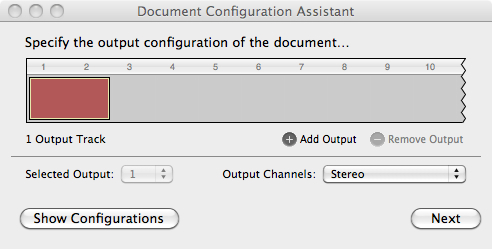
You’ll come to a screen that looks like this:

I want to run a stereo channel out so this is fine.

Click Next.

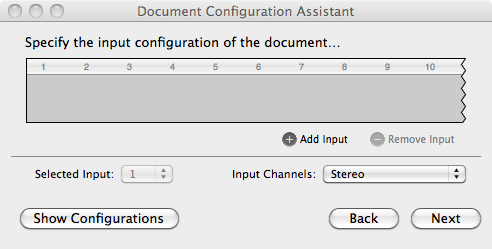
Notice that the default setting has no input – you can change this later – but it helps to set it up now.

Click Add Input.

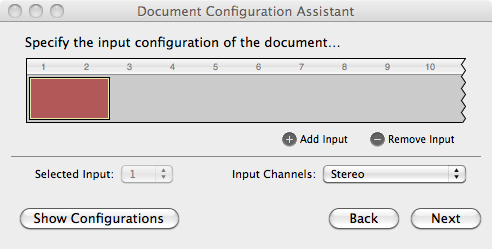
Now you have an input source.

Click Next

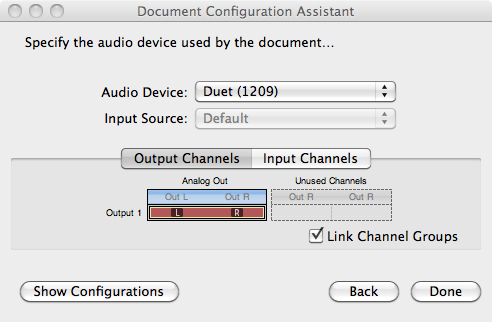
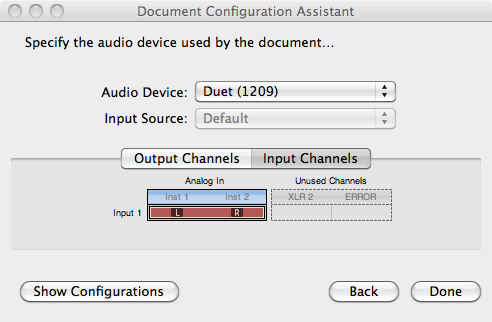
In this case I’m using the Duet – so it came up as the default in the Audio Device field.  If you’re not seeing the audio device you want to use open Audio Midi Setup (in the Applications – –  > Utilities folder) and make sure you see it there.

You can check the input channels if you’d like:

This shows that the Left/Right 1/4” ins are both available.  I’ll only be using Instrument 1 for the guitar – but I could run another instrument if I wanted to.

Click Done:

Here’s the screen that you’ll get.  If you have your guitar plugged in and strum a chord – you should hear it.  But this is going to get a lot better.

POD Farm set up

The first step is to set up PodFarm:  Click on The Effects tab in Audio 1 and scroll down until you get to Podfarm 2.

Here is the default screen in Pod Farm:

What I’m going to do here is set up a clean and distorted channel that I can switch back and forth between and automate some of the parameters so I can change them with my shortboard.

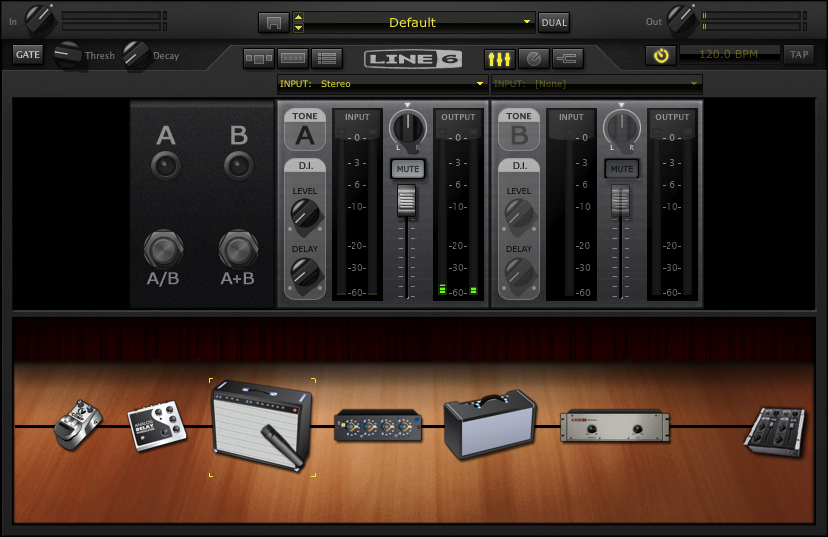
The First thing to do is get the input sorted out – since I’ve selected a stereo input in AUlab – the default in Pod farm will be a stereo in.

I only need  the left channel in as I’m only using 1 guitar for right now.

If I click on the arrow to the right of input: Stereo and scroll down to left – I now have the Instrument 1 Input on the Duet (left) as the input for this channel.

Before setting everything up – I’ll take a second to get in tune:

If I click on the tuning fork to the right of the Line 6 logo – that opens the Tuner.

If I click on the tuning fork to the right of the Line 6 logo – that opens the Tuner.

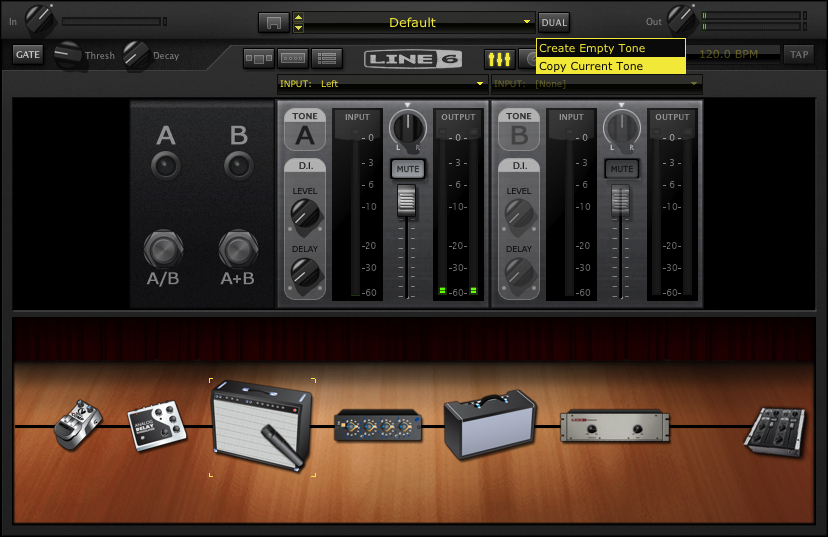
The next step is to create a Dual Tone.   In this case I’ll just copy the current tone.

Click the dual button and select Copy Tone.

And you’ll get this:

Note that the input has stayed the same as well.  Now my single guitar input can be used on both channels.

In general, I haven’t had a lot of success with 2 channel sounds – particularly distortion – which tends to overload in unpredictable ways.  I’ve clicked on the A+B Switch to turn it off.

A brief note:

The first time I did this – the guitar tone was digitally distorting (unpleasantly) so I brought the output of PodFarm down and it was still an issue.  Once I opened Apogee Maestro – the utility that came with the Apogee Duet – I realized that the signal coming out of the Duet was too hot.

It’s important to realize that the more items you add, the more things you’ll have to check when it goes wrong.

You may want to save the AU LAB session and save the POD Farm patch as well.    AU Lab saves all the settings of all the effects in the session, but you need to save the patch in POD Farm to load it again.

In future sessions, I’m going to create an A/B rig with a dirty and clean guitar amps and use the midi learn functions to change effects with the Line 6 Shortboard.

You can find all of the laptop guitar rig posts on the Blueprints tab on the top of the page.  Once on the blueprints page – just scroll down to the Laptop Guitar Rig section. 

Thanks for reading!

An observation from a session

Last night I had an improv session with Warr Guitarist Chris Lavender and Drummer Craig Bunch.

We had originally planned on using amps – but with a limitation on the bass amp as a DI – we ended up going direct.

I ran out the FX send of my atomic to the laptop for cab sims (IR’s) and  looping – Chris went direct out of his Guitar Rig control.  With the Atomic – I don’t know if the signal hits the FX send Pre or post poweramp – but it sounded really good.

Craig ran both signals to mic pres (i didn’t get the make) before going into Pro-tools.

Headphone mixes were a little iffy -but everyone was listening through the mains nodding their head with an – “oh yeah”!

Next time we’re bypassing the amps entirely.  We figure we can use them live but the recording sounds were strong enough that we’re willing to go direct.

I can’t tell you how many years I’ve waited to have a feasible laptop guitar rig.   Pretty amazing to actually have it here.

No ringing in my ears today also was a nice touch as well…

Building Blocks – or more examinations of a laptop guitar setup.

If you’ve ever seen the American dubbed version of Mad Max (the whole movie plays very differently with the original voices – I’m just so used to the original American release’s versions of Night Rider, Toecutter and the Goose –  that that’s the only one I can watch), there’s a moment where The Goose realizes that the person they’re about to arrest is an associate of ToeCutter, and the camera closes in on his face as he says,

“Well well well…”


I wanted to go a little more in depth with the laptop guitar rig I’ve been toying around with.  I’ve posted a couple of things about this but I realized that it may be more beneficial to examine each component and see how it fits in the puzzle.  I tend to focus these on distorted sounds as those to me are the most difficult to replicate.  Even Logic has some decent sounding clean amps built in – getting a useable dirty sound is still the challenge at least for me.

So what I did was improvise a little idea in a C# minor tonality and then played a series of versions of it through different versions of the laptop set up – to show the evolution of where I have things now.

There’s still a great deal more work to do in this area, but at least these are some starting points and may at least shed a light on the process I’m using.

As a starting point you may want to look at the gear page or my previous entries on this topic here or here.

The (salt) lick


To begin with, here’s an mp3 of the first thing I improvised:  C# min improv .

* Note:

occasionally mp3’s don’t load properly when I check them in Safari.  When I refesh the page they come up.  If you have this problem – it may work for you.  If you still can’t hear the mp3 just leave a comment and I’ll re-post it.

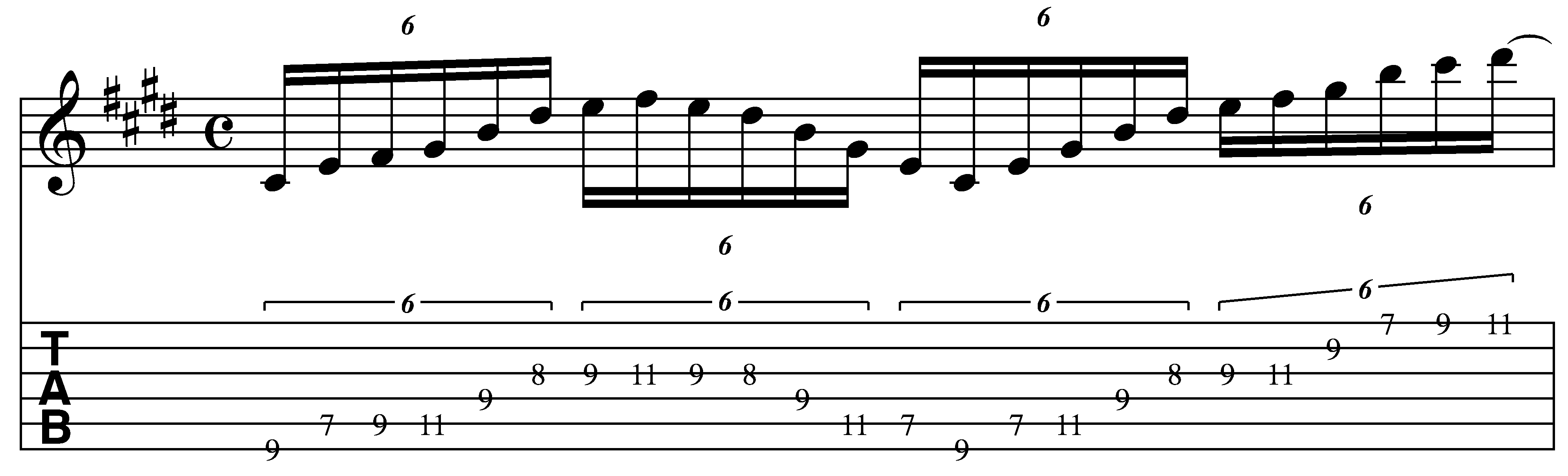
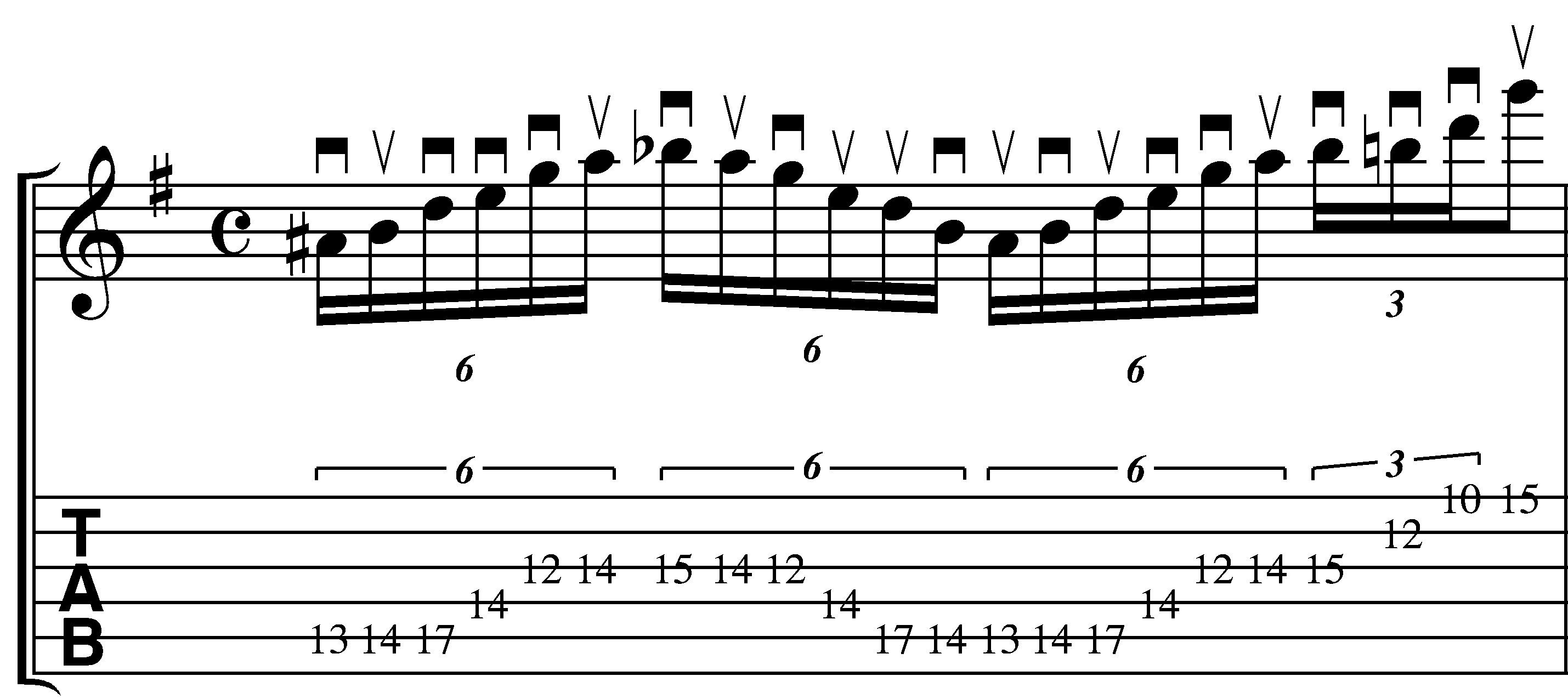
And here’s the notation

The first part of the lick is somewhere between a scale passage and an arpeggio which makes it a little interesting to me.  This approach is something I use a lot in my soloing to get away from the temptation to go on autopilot and just run scales up and down the whole time.

Visually, I’m initially thinking “G#min arpeggio”, and then dropping the lowest notes by alternating 3rds to extend the tonality.  This is an arpeggio trick I use all the time to get new sounds out of old shapes.  I’ll detail this process here:

Here’s a G# minor arpeggio:

When I look at the distance between the G# and the B – that’s a minor 3rd.  By alternating 3rds ( either major-minor or minor-major) I can extend the tonality.  A major 3rd down from G# would be E.

If I drop the lowest note to the “E” on the A string – I’d have an E maj 7 arpeggio. (E G#, B, D#).

If I drop the lowest note to the “C#” on the E string – I’d have a C# minor 9 arpeggio. (C#, E, G#, B, D#).

(If you wanted to go further you could continue the process to A, F#, etc.)

The next thing I do is to add the F# on the A and G string.

This makes G# min7 / E maj 9 / C# min 11 depending on the chord it’s being played over or how you’re visualizing it.

Now that I have the larger shape – I fill in some 3 note per string patterns on the G and high E strings.

There’s a slight 2 string variation on the A string that’s hammered instead of picked, but otherwise the picking pattern discussed on the swept pentatonic lesson is the same approach that’s used here.

This is very similar to the 3 note per string / 1 note per string pentatonic patterns that I’ve been exploring in the online lessons area of the blog (you can see a pdf here).

The process that I’m detailing is how I began to practice these things and then develop them into more complex ideas.  I tend to see sounds like this as one large pattern now ( note:  the GuitArchitecture process is all about sonic visualization – i.e. associating shapes with sounds so that sounds can be created and manipulated in real time) .  So when I improvise, I’m not really too conscious of exactly what’s happening theoretically – only sonically.

This ends in a pretty pedestrian B major (C# Phrygian) scale run.  In soloing I would typically try to develop it into something else – but for the purposes of a sound demo – it makes sense to have a short lick with a definitive ending.

The sounds

First I’ll play the lick with the sound used at the ending point of the process.  Here are some screen shots of the set up.

The FNH guitar on the neck pickup goes into the Apogee duet into AU LAB:

I run PSP Vintage Warmer

into Pod farm 2.01 Ilok version

I’m using the Marshall side of this rather than the Soldano – so I’ll show the signal chain there (it’s the same for both setups shown).

I’m going to start with the mixer and then go from there:

Since I’m only running a single line in- I’ve set both inputs to left.

There’s a little tonal secret hiding in plain sight here as well.  If you look carefully – you’ll see that the DI is set to about 18%.  This allows some of the dry guitar signal to come through as well.  This give the tone a little body and clarity that’s lacking from just the straight signal.

You might find that to completely not be the case – and again – this is just one person’s process detailed here.

Here’s the gate.  I tend to keep the levels low so it doesn’t kick in when I’m playing – but kills the noise when the volume is off.

The gain on the Marshall is set around 22%.  I tend to crank the mids a little to help make sure the sound cuts through in a live mix (note the use of the term “help”.  In reality – sound at any live gig is only as good as the sound person.  I just do what I can on my end to make sure I can hear myself on stage.).

Before the Marshall for the “lead” sound I’ve put in a tube screamer.  Here are the settings for that:

Here’s the lick with the tube screamer (same as above): with tube screamer

Here’s the lick without the tube screamer:  without tube screamer .

To give you a sense of how important the amp gain is to the overall sound – here’s a variation of the lick above with the amp gain set around half:

Here’s the lick with the tube screamer (same as above): TS_ON_50%_gain .

Here’s the lick without the tube screamer:  NO_TS_50%_gain .

I actually like this amount of saturation for lead lines – but the reason I’ve gone with the lower gain is that chords (outside or Root-5th diads) – tends to just crap out and turn to sonic mush with higher gain settings.  So to balance the 2 I’ve been working on lower tweaks.


WHY THE CABINET IS TRANSLUCENT.

Oh that’s easy.  It’s because I’m not using it.

Instead I’m using Impulse Responses from Recabinet in LA Convolver (See the links above for more info).

Here are the settings:

The IR’s are from the Recabinet Modern 2.02 Mac and PC-> 1960 4×12 cabinet settings.  You’ll notice that I don’t have anything fancy in terms of mikes set up on the cabinet,

Here is a major component of this process.  Recabinet comes with something like 2000 IRs.  I could spend weeks doing nothing but checking tonal variations on all the different cabs mikes.  Someday when I need to get really deep into this – I will.

In the meantime – to cut down on the number of parameters and just get to a tone – I went with the KISS (keep it simple stupid) approach.  I thought about what cabinet could be a constant for all my sounds clean and dirty – and the 4 x 12 came to me.  I’ve heard a DeVille through one and it sounded good so I decided to use that as the standard and tweak the amp around the cabinet.  Live, a 57 on the grill sounds good to me.  I tried 2 different variations of the same thing and went from there.

To contrast this:  here is the sound of just PodFarm – with the PodFarm cabinets but with the PSP and post preamp off.

Here’s the lick with the tube screamer (same as above): NO_IR_YES_TS .

Here’s the lick without the tube screamer:  NO_IR_NO_TS .

Some of you may prefer these sounds.  I happen to think that “initial” mp3 – has a bit more character than these.

Here’s the rest of the signal chain:

Here’s the pre-amp (post amp! – this is a very useful tweak!):

Here’s the delay:

Here’s the reverb:

So to quote the Goose, “Well well well…”

It’s still a work in progress.  I’d like to work on tweaking the preamp after the cab to carve the tone a bit more and experiment with using an outside delay later in the AULAB signal chain – but for now this is where it is.

I hope this helps!  If you have any questions or comments please fell free to leave them on the blog – or e-mail me at guitar.blueprint@gmail.com .

Thanks for dropping by.

-SC

A quick lick – and a rig du jour update from Ho Chi Minh City

Greetings from the former/current Saigon. (Technically Ho Chi Minh City but many of the locals call it Saigon).  I had hoped to post a couple of blog updates up before I left, but instead was running around checking things for the trip. Now a jet lagged – iced coffee and soon to be bahn mi –  fueled post:

.

1 lick or 2?

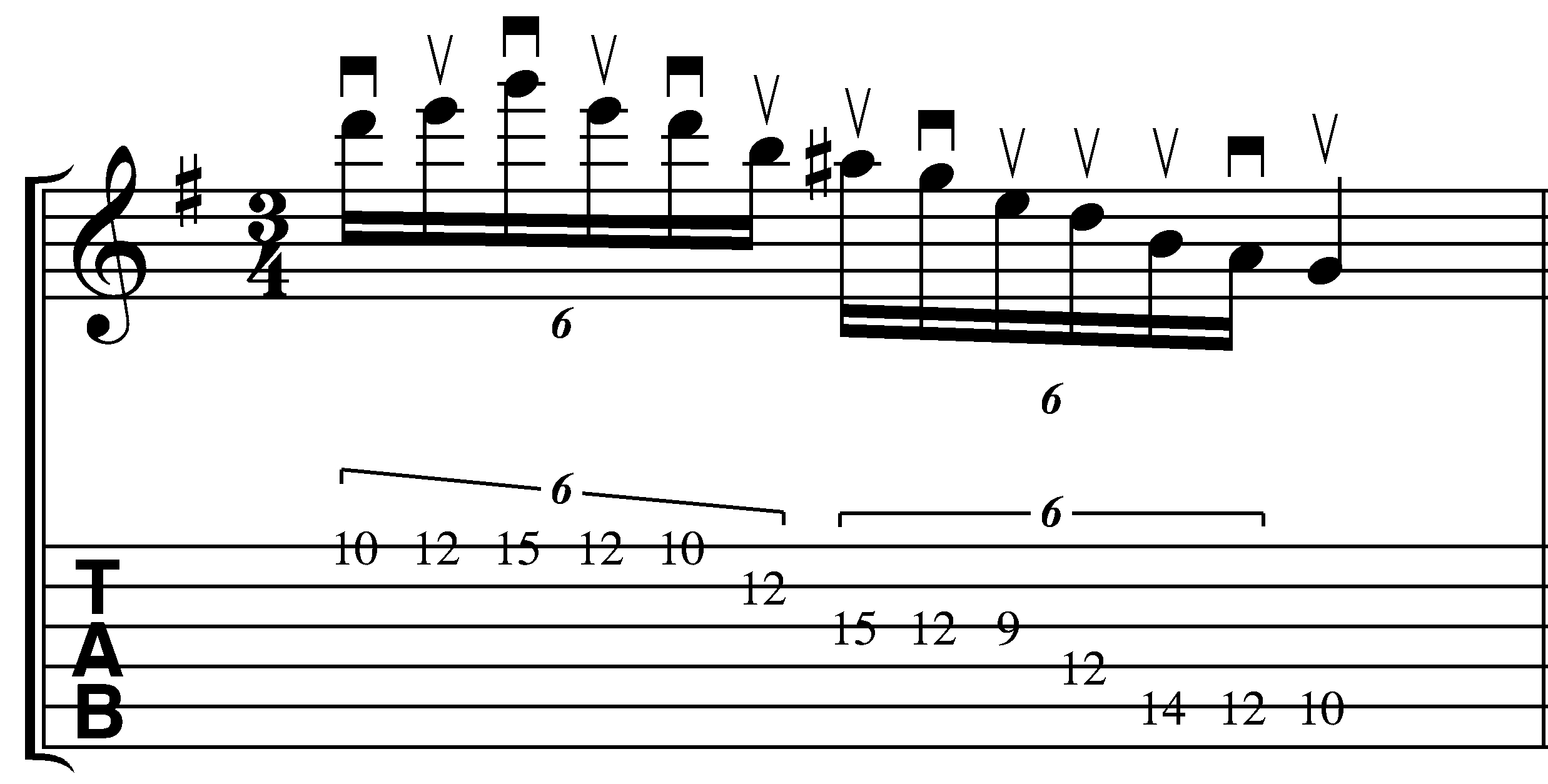
So first – here is a lick that works off of the swept pentatonic idea (alternating 3 and 1 note per string ideas) that I explored in the last online lesson (you can find a pdf of that lesson here).  While the online lessons have focused a lot on pentatonics – I wanted to add the tritone to make “the blues scale” and show how this approach could be adapted.  Here is the idea ascending:

.

It’s very scalar – but I added  a couple of points of interest:

1. the little descending turn around allows you to play the basic ascending idea starting on both up and down strokes.

2.  I started on the tritone (if played over E minor) or the b3 (if played over G major) instead of the root.  If you’re playing this over G – think Bluegrass metal ; )

3.  The motion is more diagonally oriented than the strict pentatonic example but is the same basic approach.  I start the lick with my first finger and then shift positions for the D on the 12th fret of the D string and the D on the HighE.

.

Here is an mp3: Lick1

As variation – I took the same concept and applied it in a more positional approach.  Be careful with this stretch!  If it hurts stop immediately!!!

.

.

Here is an mp3: Lick 2

And finally here are the 2 licks played back to back:  backtoback 1

.

Laptop Rig

So I bit the bullet and got an apogee duet.  WOW!  It really has made a stunning difference in resolution and I suspect will help a lot with future mixes I’m working on. With that in mind I wanted to share with the rig I used for the mp3s above.

Here was the basic amp setting I used in Pod Farm 2.0.  This was based on a customtone forum patch called Electric Gypsy.  I just swapped in a tube screamer and bypassed the cab (using the Recabinet impulse responses instead).  One of the big revelations that I found in pod farm is that I could put preamps AFTER the power amp.  Adding that in to the signal chain opened it up a lot.

.

.

I blogged about using impulse responses over the cabs before.  The lie 6 cabs sound good – but to my ears the IR’s add a whole other area of depth.  Here are the IR’s I used – these were from the Modern 1960 4×12 set.  The screen shot is from LA convolver.

.

.

Finally – a screenshot of how it all lays out in AULab.  I just hit the record button in au lab and edited out the noise before and after the take in fission.

.

.

FNH Guitar –> Apogee Duet–>AULAB–>PSP Vintage Warmer–>Pod Farm 2.0–>La Convolver (w. Recabinet IRs)–>Sooperlooper

.

I’m still tweaking things – but I think that soundwise everything is improving a lot from where it was even a month ago.  Once I get an A/B set with the floorboard – I think that the laptop is going to be the rig du jour.

One last note – the macbook has is using 4 gigs of ram and was updated with a 7200 rpm Seagte internal drive. (500 gig from OWC).  My computer accepts a 4gig chip in 1 slot – so I may go up to 6 gigs – but the faster internal drive made a big performance difference in the machine. I’d say you’d really need to have that if you’re going to try to go this route.

* Note – I’ve recently posted more on this topic here which may be of interest to you.

Rig around the Rosie or Mediations and Meditations on Gear

Yesterday, I was trolling online for one or two things that I’d like to have to fill my insatiable gear lust and found an Atomic 1×12 amp for sale in Las Vegas for $149! A phone call and a credit card number later the amp was on its way to South Pasadena.

Now, I already had one of these amps – so a logcal question would be, “What the Hell do you need two of them for?”  Well, a couple of things,

1.  When I find things I like I try to buy a backup in case something goes wrong.  We can call this the great “Digitech Space Station lesson” – where (when they were in the death knell of production) Guitar Center was blowing them out @ $99 per and I only bought one.  Now the one I have is on its last legs and replacement ones are about $300-$400 on ebay.

2.  2 amps mean I can run my effects stereo.  Sounds small – but when looping things in stereo and there’s sound swirling around your feet…ahhhhh…there’s nothing like it.

3.  They don’t make this model anymore – and if worse comes to worse I could unload it for $250-$300 if I had to.

4.  As much as it kills me to say it – tubes project sound differently than solid state.  Before I left Boston, one of the bands I was playing in was One of Us.  The singer/guitarist/songwriter John Eye, had a Vetta – that sounded good.  It was super flexible and could do things that my amp set up never could.  But live, my rig (see the bottom of the media page for full rig information) projected completely differently.  Even when I used the pod 2.0 in front of my DeVille – it pushed the sound in a completely different way.

So, when playing with rock bands – I try to use a tube amp when possible.  For the film/video gigs I do – It’s more about convenience as there’s less sonically for me to have to compete with in terms of space.

(As a side note, John Eye is a truly great frontman.  He and I had very different views about live performance, but I always liked and respected him and dug his material.  I’ve included links above – including the Pull video which has some life footage of me with the band – but not audio 😦 .  I don’t know if any of the material I recorded with the band at that time will be on it – but if not – I’m sure the new material will be very cool.)

Getting back to gear and its endless acquisition –  I have conflicting opinions about it.

Having said all of this, will I still need to get Pod Farm Platinum eventually to go with the Pod X3 and the X3 live?  Yep.  Just a matter of time.  Will I get the Apogee Duet?  Yep – just a matter of time.

Because just like the plague inspired song quoted in the title, “Ashes – ashes we all fall down.”  – and life is too short to waste it on crappy tone.

I have missed a lot of great gear at great prices by waiting to buy it when I saw it.  If it’s a good deal, and I can make your money back on reselling it (if I have to) I jump on it now – before the next person does. Because who knows?  That extra piece of gear might get me .01% closer to the sound I’m looking for.

A long winded justification for buying an amp – but it’s important to have a realistic expectation of why you’re buying a piece of gear if not for yourself than to be able to explain it to your spouse.

I’m still unpacking – so no profound posts for a while probably.  Less fluff and more content next time around.  Thanks for dropping by.

-SC

Tech Limbo (Neither Heaven nor Hell R.I.P. Ronnie James Dio)

So I’m packing, moving and simultaneously trying to get some stuff ready for the Cha’ak’ab Paaxil Festival in Yucatán, México June 3-5th.  My plan is to leave the amp here and to use a combination of Line 6 gear and a guitar to play the shows.

After playing with Wael Kakish and the Middle Eastern ensemble last night, I was able to open the package I got from Sweetwater and check out my new Line 6 FBV Shortboard Mk II.

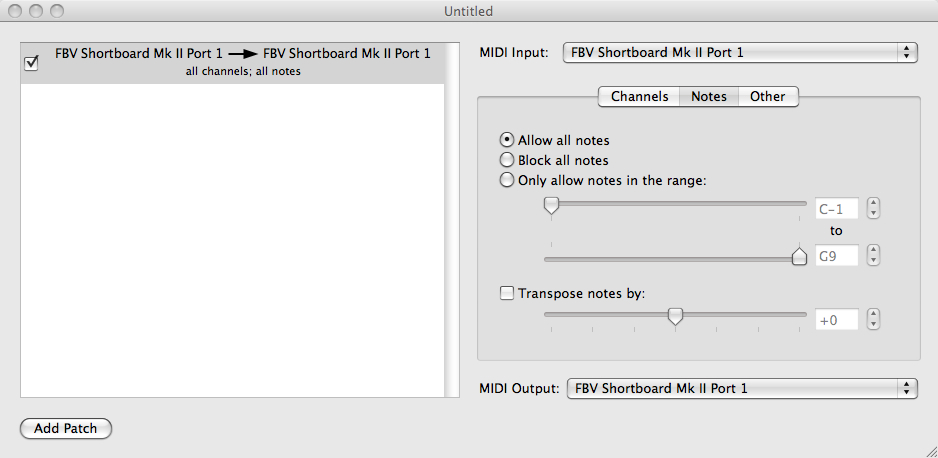
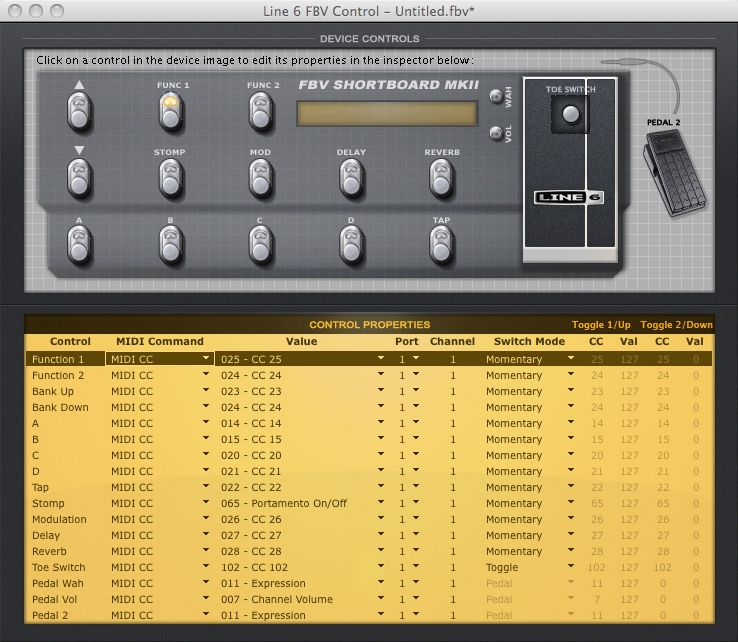
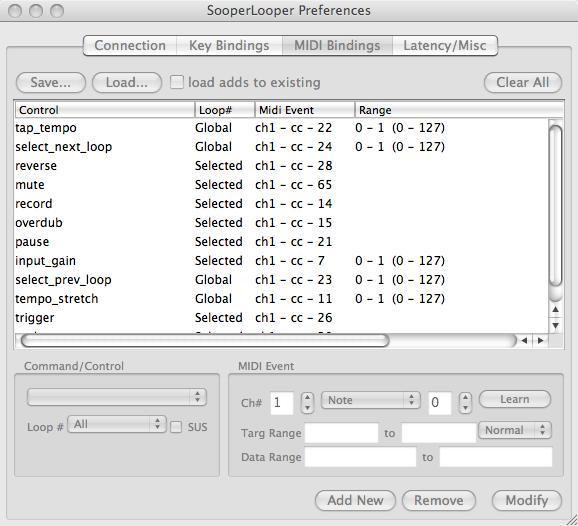
The new board is REALLY cool.  It’s solid in it’s construction and small enough to fit in my laptop bag.  After I downloaded the FBV Control software from Line 6.   I tried to set up a SooperLooper session in AU lab.  The concept was to run the AU of SooperLooper in AU Lab and use a midi patchbay to make sure the signal was going from the FBV to the Sooperlooper session.  Here are the patchbay settings.

Had some trouble initially  but once I went into FBV control and reset some of the switches everything worked.

This probably isn’t the smartest series of codes to get everything to work – but it’s working.

The only gripe that I have is that I wish that some additional parameters in SL could be controlled via midi (i.e. 1/2 or double speed or main monitor volume for fades).  It’s easy enough to lean over and hit the keyboard – but it does defeat the purpose of ordering a 15′ USB cable.  The board itself though works like a charm.

I’m in the process of working on sounds on the X3 Live for the show – and tweak PA vs. amp sounds.  One thing I’ve noticed with modeling is that there are at least 4 different scenarios for setting up sounds:

1.  Headphone patches – i.e. practicing or recording

2.  Playing through an amp at low volumes

3.  Playing through an amp at high volumes

4.  Playing through a PA.

You might think that there wasn’t a lot of variance – but the differences between these parameters are huge.  I have patches that sound mediocre at low volumes and sound really good when the volume gets goosed a bit.  Headphone patches that work well at home and fall apart live – and vice versa.

As a result of all of these constant parameters I’ve been experimenting with Impulse Responses in Logic’s Space Designer (and LA Convoluter) and getting some encouraging results.

Impulse Responses (IRs)

In a simplified definition:  Impulse Responses (IRs) are measurements of acoustic spaces that can be loaded into applications (Like Altiverb or Space Designer) to create different types of reverberations.

I read an article about beefing up Logic 8’s guitar amp pro by replacing the speaker sims with IR’s.  That article is here.  This got me looking for all kinds of IR’s.  For those of you who want to see how this works on guitar tracks – check out the recabinet site.  There’s a really cool pdf that talks about the different IRs and the mics used to capture them.  As of this writing they’re selling a download of something like 2000 IR’s for $15 bucks.

Now I’ve been testing these at home – the difference is night and day!

It’s late while I’m posting this – but let me give you 2 simple examples.  First here is a simple rock rhythm with a plexi type setting.  This is just the AU recording of the pod with a plexi setting and the 4×12 cabinets selected.

DirtyrhythmnoIR

Now here is a another take of the same pattern and settings but with a 4×12 IR added. It’s a little brighter but the response is different as well.

DirthrhythmIR

To my ears – the second is a little more natural sounding particularly on the ascending chords.  Here’s one more example with a clean tone.  It’s subtle but noticable.  First with no IR

BluevelvetnoIR

And with the same IR as above added:

BlueVelvetIR

The non traditional guitar sounds have various degrees of success, some sound better some sound worse.  But this made a HUGE difference on the headphones.  I’ll try them through speakers later.

For those of you looking for free links here are a couple of them.  I’m in the process of downloading these myself – so no guarantees for the sounds themselves.

First some very cool non-guitar specific responses here:

Then some more guitar and bass specific IRs here. But I’m digging the redcabi.net IRs so far…

I found an AU ( LAConvolver ) that supports IRs and runs in AU lab – if I keep the wet gain at 50% it works well.

The advantages of AU lab are several (including low CPU use and that you can route audio OR midi through it) but the main advantage is that when you save the session all of the parameters in all associated plug-in’s applications are saved.  In other words – when I get it set up for use with a PA – it’s done.  No more re-inventing the wheel.  This is particularly helpful when you’ve set up a series of midi commands for Sooper Looper.

Here’s the laptop setup:

FNH Guitar -> Radial Dragster ->Pod x3 Live -> (Stereo out) ->Behringer FCA 202 (I hope to sub this out with an Apogee Duet eventually) -> Macbook Pro (Intel Core 2 Duo 2.4 Ghz – older model) ->Aulab running LAConvolver and Sooperlooper->(Stereo out) ->Behringer.

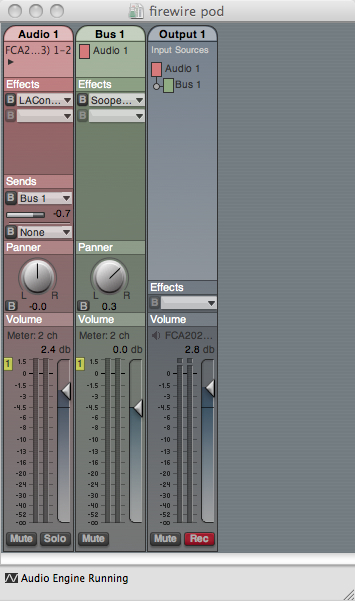
Here’s the AuLab set up – I’ve put SL on a Bus – but I since I can mix wet and Dry in SL I could have just left it on channel 1.


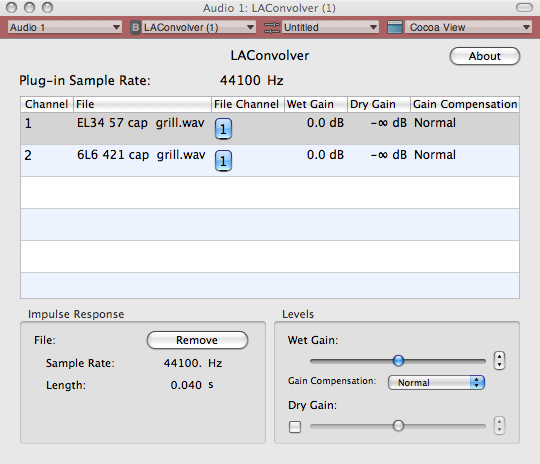
Here are some sample LA Convolver settings (these are both from the 4×12 greenback IR’s in redcabi.net):

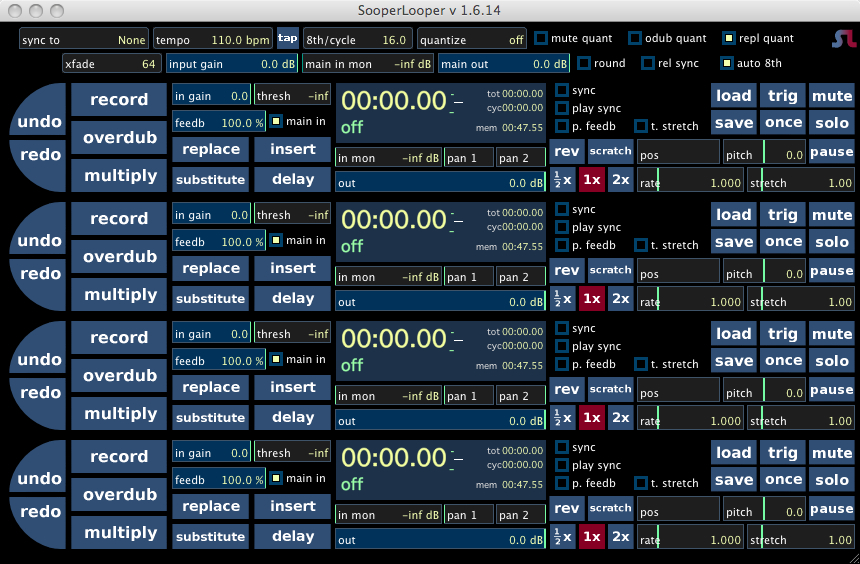
And finally 4 instances of SL.

I’m still experimenting but this is the current plan.  Now to apply all of this to mainstage to get synths and percussion in the mix….

This may not make any sense.  The goal to to fit everything into 1 bag – except for a guitar and a gig bag.  Hopefully I’ll have photos soon.

Also the title of this references the passing of Ronnie James Dio.  I enjoyed his work with Rainbow and while he and Vivian Campbell had a pretty miserable falling out – their 1st 2 cds had some great moments vocal and guitar (particularly Last in Line with perhaps the quintessential heavy metal guitar solo).  Dio was 67 on hitting the stage with Black Sabbath (ok fine – Heaven and Hell) at an age many people are bed ridden.  It reminds me of my favorite quote on retirement ever:

All I do is play music and golf.  What do you want me to retire from?” – Willie Nelson

Rest in peace Ronnie.

Line 6 Pod Farm 2.0 Overview

I’ve taken advantage of Line 6’s free 14 day download of POD Farm Platinum 2.0 ilok version and have been working on formulating somethings for a review.  I won’t be able to post a full review now, but I wanted to post a couple of brief observations.

1.  The demo version was a little glitchy in standalone version, so I’ve been using it with AU LAB.  For those of you who don’t know about it (I had to find out about it on the super looper forum) – AU Lab is a free app that comes with the OSX Xcode Tools.  It was designed to test AU plug ins with but its a stand alone app with a fully configurable mixer ( inputs, outputs, effects busses) .  It records output and even generates midi clock!  Also it makes a very small cpu impact – so it’s perfect for hosting something like Pod Farm and say SooperLooper.

2.  2.0 supports midi – which means you can control it with a foot controller like the FBV shortboard MKII or the Behringer FCB1010.  I didn’t get to work with this yet – but this brings the live laptop rig very feasible for me.

3.  Stereo rigs which you can A/B/Y!!!  which alone would have been really cool – but you can use multiple effects in the same rig – something you can’t do on the POD for example.

Here’s a screen shot of a modification I made on the Outer Space preset.  I just added a preamp in the beginning of the chain.

So here is an mp3 of a guitar track I improvised with this setting:

Outerspace II

This was made with a FNH ultrasonic guitar, Behringer FCA202,  Macbook Pro (2007), and AU Lab.  No post processing.

So this particular sample doesn’t sound very guitarish – but that’s part of the reason I really like this approach.  You can create things that you never could create with pedals without a ton of gear and/or a ton of noise.

As with many other sims – getting usable clean tones is pretty easy and getting dirty tones that respond the way an amp would is a little trickier.  But the presets on all of these models are light years away from older line 6 presets that I’ve heard.  It’s pretty easy to get a tone in the ball park and tweak it from there.

Line 6 has some great audio/video demos on their site, so I wont go into too much here for demos as they’ve done it really well.   Also the May lesson uses the same signal chain for all the mp3s that will be posted there.

I need to also give kudos in that all of the sounds on the sites are included in the presets and they have also noted processed vs unprocessed sounds.  Yes there is a big difference between the two, and it’s important to note those differences so that when you dial up a preset you know what to expect.

The only thing I wish it had was a dedicated looper, but that’s not a deal breaker.

If you have an I-LOK I’d say to definitely check it out.  It’s more flexible than the POD and does some very cool things.

For further applications of this set up you can also  go here or here.


Variax AC700 Review/Workbench Overview

This is an update from a review I did a while ago.  It includes more detail, some information on workbench and some mp3s.  It’s a LONG post, but hopefully it’ll help answer any questions you might have.

VariaxAc700Bk.jpg

In 2004, Line 6 heralded a new era in guitars with their new guitar line, the Variax. Previously they had released the Line 6 POD which emulated a number of different amplifiers through a process called modeling and put those controls in a kidney bean shaped device that fit in a gig bag. With the Variax line, they took this same concept and applied it to guitars – i.e. they answered the question, “what if we had a guitar that had a number of modeled characteristics of really iconic guitars and put them in 1 guitar?” The Variax AC700 took this same concept and applied it to acoustics. With Sweetwater offering a $400 price drop on the Black and Burst AC700 models – I thought It was time to give it a try, and see if I could get an instrument that would allow me to leave my Chappel acoustic at home.

Note:

Line 6 has currently ceased production on this guitar although you can still find the used on Craigslist or Ebay.

First impressions

I opened the box and the first thing I saw was a gig bag. Very good quality. Lots of padding and generous space for the cables.

The Variax has 2 outs on the instrument. 1 out is a VDI cable that interfaces directly with The POD x3 live/line 6 gear. The second out is a 1/4 inch out. The Vax requires power to model, so you either need to run batteries OR there is a DI box that you can use with a planet Waves cable that had XLR or 1/4′ out. DI box is high quality, and guitar came with the Planet Waves cable as well so that’s a definite plus.

A lot of people on the forums commented on how much they hated the neck, and how it didn’t feel like an acoustic – those were not the initial thoughts about mine when I got it. My initial thought was – “It’s heavier than I thought it would be”. Opening the gig bag, I discovered that the guitar was a solid body guitar with a fake sound hole, probably very similar to the Chet Atkins Nylon. Since the sound is all generated from piezos this made sense. The body is Mahagony with a Cedar top, but since mine is flat black – it’s impossible to guess at the material. The finish looked good, and I liked the inlays in the fretboard a lot as well.

The neck didn’t bother me. It’s also mahogany with a rosewood fingerboard. The profile is somewhere between an acoustic and an electric with a 17″ radius – it’s pretty flat. It’s a 25-1/2″ scale length, which means it’s the same as the other variaxs so if you like the electric you’ll like this. It has 24 frets and pretty clear access up to the 20th fret or so. The irony of my first 24 fret instrument being an acoustic is certainly not lost on me. It’s a nice touch, but if anything the extra 2 frets take up space I’d rather have open for for picking. The more important thing here is that the access to the other frets is great. Being able to play up to the 19 fret with no access issues is a major coup for the acoustic.

Setup was a little suspect. Anytime you buy a new guitar, you should plan on getting it set up by a professional. I took mine to a luthier friend in L.A. and got a new nut and a fret dressing which made a huge difference ion terms of playability.

By the way –  the guitar came with a plastic nut and bridge pins – Plastic nuts are a big sticking point for me – particularly on an instrument in this price range.

The bridge is an acoustic style bridge with individual piezos for each string. The bridge is set up so that the height is controlled by a couple of allen screws – which is a good idea. The only drag here is that the piezos are not adjustable so adjusting the physical intonation would be very tricky. Fortunately mine was set up just fine.

A brief side story:

When I got the guitar – one string was much quieter than the other strings. I went to the excellent Line 6 forums and found that on some of the models some of the piezos were bad. I called customer service – they recommended that I take it to a repair center. When I said that I was handy with a soldering iron – they mailed me a piezo. A 10 minute soldering job later and it was all set. A lot of other customer service centers could follow this example of how it should be done.

Before I explain the models, I need to explain some of the instrument controls:

The knob on the upper bout selects models – if you push it – it changes color and you can get preset tunings for each model.  You can edit these in workbench (more on that later).

Next to the knob are 3 sliders:

The top slider controls EQ – but does it in a very interesting way – the concept here is that the slider has two mic placements and by moving the slider you pan between the two sounds. A VERY cool idea – having said that additional EQ needs to come from another source. This is from the line 6 copy:

“The Variax Acoustic 700’s top slider (the one furthest away from you when you hold the guitar) allows you to alter the position of the modeled microphone. Here’s a simple way to remember how it works: As you move the slider closer to the soundhole (away from the Model Select knob), the Mic Position is also getting closer to the soundhole. Some of the instruments modeled in the Variax Acoustic 700 don’t have a soundhole, but the control will work similarly for these instruments. When the slider is close to the Model Select knob, the strings (and upper frequencies) are emphasized; when the slider is close to the soundhole, the body (and lower frequencies) are emphasized.”

Here’s how it sounds:

I’ll start with some fingerstyle (one thing to note is that the “Sweet spot” is actually right around the 24th fret.  That’s where all of these were performed.  All recordings were tracked straight into Logic with no additional EQ or processing using the USB out on the Pod X3.

Out of the box – I put a “parlor” model (based on a Martin size 5 “Parlor”) through an acoustic setting in my Line 6 Pod:

The first mp3s are excerpts of a solo finger style piece of mine that’s currently untitled.  55 refers to the bpm.  If you play each mp3 – you can hear the timbral difference is the virtual mic placement.

Parlor mic far left 55

Parlor mic far right 55

Parlor mic middle 55

Next some flatpicking.  This was something I improvised in a vaguely celtic/bluegrass that I might flush out into a Dan Crary Style flatpicking tune but for now here are 3 more excerpts.  These also use the Parlor – which isn’t my favorite guitar for flatpicking – but this gives you a full tonal sense of this setting.

Parlor mic far left 120

Parlor mic far right 120

Parlor mic middle 120

Finally for now – here’s an excerpt from another original song of mine, “The Kake Song” that features 2 handed tapping.

Parlor far left 140

Parlor far right 140

Parlor mic middle 140

The middle slider controls volume.

The bottom slider controls onboard compression. You can control the amount here but that’s the only parameter of control.  A good idea but I prefer outboard compression instead.

What is notably absent is an onboard tuner. I guess the concept here is that if you’re using a POD that you use the tuner on the POD. If you’re going direct into a PA or an amp – bring a tuner.

There are alternate modes for the sliders as well that control a virtual capo and some preset tunings. The virtual capo is a nice touch for detuned items – but I prefer a physical capo to capo up.

One thing about the different tunings to work around is that the guitar maintains standard pitch and alters the output pitch through pitch shifting. In other words – if the can hear the unplugged sound of the physical string over the pitch shifted modified string it can throw you. I like headphone to block it out. Live, I would just crank the monitor a bit.

Workbench

Line 6 sells a products called Workbench which is a software/hardware component to modify settings on variax guitars. It’s $99 for the hardware and the cd, BUT if you have a pod with a variax port, then the software is a free download for registered users. Workbench is pretty much a mandatory item if you use this product. With it you can store body models and customize your own tunings. It’s very intuitive to use and is a much better interface than trying to just use the various knob combinations on the guitar.

So you need to have the instrument hooked up through USB to a computer to get Workbench to boot (this is either done through a line 6 USB enabled device like a POD or a piece of hardware that ships with the Workbench CD if you order it.

Once you get workbench up and running, you select a model and then get brought to a screen that looks like this:


I’ll start with some basics.  The left hand side of the screen gives you a visual of the body type.  On the electric models you can move pickup placements around here and get a lot a tonal variance.  On the acoustics – it’s more of a one trick pony for the actual guitar.  A really nice feature for future updates would be if you could vary the material (different top or sides) or fingerboard (ebony or rosewood) all subtle differences – but that’s where a lot of tonal magic lies.

The right hand side of the screen will give you more of the tonal variance that may help you.  First, you’ll notice the Studio/Live switch – according to Line 6 (some detailed information here) the studio mode includes room reflections on the guitar output.  It is a noticeable timbral shift.  Trim and Compression will affect the instrument output volume and mic will help tweak the instrument tone.

For some of you – the real reason to use workbench will be the parameter at the bottom of the screen.  What is represented here is a virtual capo.  Enabling the capo allows you to pitch shift any string up or down and octave.  If you want to change a preset tuning this is the easiest place to do it.  Honestly – you will hear aliasing and artifacts at anything more than a step and a half, but – if you’re going for altered textures (i.e. non traditional acoustic tones – that could work for you).  Personally – being able to set the guitar up in 2 sets of 1/2 step clusters was pretty amazing.  Another caveat here is that while the body is still a solid body guitar – unless you are wearing good noise canceling headphones – you will probably hear the standard tuned guitar and the pitch shifted guitar at the same time.  When you’re playing with a band – I doubt you’d hear it but if you’re playing solo acoustic somewhere it could be an issue.

Related to the pitch shifting is the mix and detune functions.  You not only mix the strings (i.e. pitch shift certain stings like a 12 string and have other notes stay unaffected, but you can intonate strings in cents!  That could be HUGE in getting alt tunings more in tune to your liking.  There are some really good work bench posts on the Vettaville site here and a specific tutorial on Harmomic Open Tuning here.

Another nice feature is that you can adjust individual string volumes!  This is a really great feature if you need to quiet certain strings or make other strings pop in volume.

To get there,  under the “Editor” menu, look  for “String Volume Setup”  You’ll see something that looks like this:
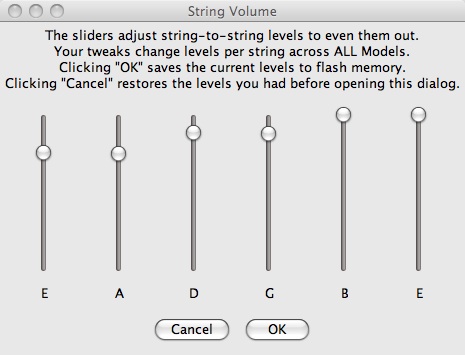
Simply drag the sliders to the level you want and click ok.  Line 6 offers this observation as well (from the above mentioned link.

“As a side note, it’s normal for many guitars to have volumes that differ from string to string. One example of this would be guitars with combination of a fairly small fretboard radius and pickups with non-staggered polepieces. It can also happen with guitars that have peaks in body resonance at or near the fundamental or one of the lower harmonics of a specific note.”

The Models

These are the models that are available on the guitar:

Martin size 5 “Parlor”
Martin 000-18
Martin D-28
Gibson J-45
Gibson J-200
Selmer-Maccaferri
D’Angelico New Yorker
Nylon String Classical
Guild F412 12-String
Stella 12-String
National Style O
Wood body Dobro
Gibson Mastertone Banjo
Mandocello
Japanese Shamisen
Traditional Indian Sitar

Generally, I find that different guitars sound better for different things. For example I like fingerpicking on the parlor – but like the J-45 for flatpicking.

This brings up another tweaking issue as well as I really dislike the banjo sound with a flatpick, but can use it fingerstyle.  Banjos usually don’t sound great with a single flatpick anyway – so this could be a non-issue.

Beyond the question of – does the 12 string sound just like a 12 string (the answer here is no), is the question of would I want to use it in a band with other instruments? And the answer there is I think it gets by. Compared to bringing another guitar and trying to keep all 12 strings in tune – it makes me happy.  It has the vibe of a 12 string and would probably sit well in band mix.

And that’s really the point of this guitar, to allow a lot of flexibility. Do you want to switch to DADGAD tuning in the middle of a tune? No problem. Want to switch from a Martin to a banjo to a 12 string for each section of a song. No problem.

For the most part this is really a live vs. a studio instrument – and in that context,  I think it shines.  But I think that this would even be usable in some recording contexts.  For my purposes – living in a noisy apartment building where having a quiet space to mic an acoustic and get through a take without extraneous noise – this things is a godsend.  Would I use this over a vintage Martin in a pro studio?  No.  Would I use this to track a take at home while sonic chaos is going on all around me?  Absolutely.

Having said that, it’s important to acknowledge what may be an issue for some players:

String Muting

One things that will be problematic for some people is the issue of string muting.  On the Line 6 Variax forums there’s a lot of talk about the issues with string muting regarding the electrics – but as this is a piezo based pickup system, the isn’t going to sound like string muting on a regular guitar.

Case in point:  Here is the sound of an Al Dimeola style lick in A Dorian. First it’s played with no muting, and then with string muting LOGIC string mute 140.  Definitely not Friday Night in San Francisco.  Some tweaking with compression and EQ might help with this – but I haven’t had much luck so far. If this is a major component of your style this might be an issue – but if you’re willing to work around it, there are a lot of other things here.

It does handle regular flatpicking fairly well though –  here is a post involving acoustic sweep picking that was recorded with the Variax.

The electic variax has undergone  a transformation in the forthcoming Tyler Variax with substantially more processing power, hopefully the acoustic will get a revision as well.

Likes:

This is a well constructed guitar with a tremendous amount of tonal flexibility.  Parlor, 000, D-28, and J-45 models sound really good.  I like the inclusion of the oddball instruments like the Shamisen and mandocello, also like the  gypsy jazz guitar and the nylon (but suspect that they probably sound better on the nylon string Variax 300).  This guitar won’t do everything – but it may save you 2-3 gig bags of guitars at your next gig.  Workbench is a truly revolutionary idea and the alternate tuning features are cool.  12 strings and virtual capos are really good ideas.

Dislikes:

In terms of the build – the body size is a little too small for me (I’d like more of a dreadnaught sized body as well).  Also, a plastic nut and pins on a high end instrument sounds like a little thing – but a guitar is a bunch of little things all put together.  String muting may be an issue for some people.  Sitar sound has a high pitch overtone that makes it unusable for me.   The banjo doesn’t seem as well executed as some of the other models. While I like the idea of the 12 string – it’s okay for strumming but doesn’t hold up on the single note level for me.

Would like (Wish List):

On the electric variax you can virtually move between various pickups body and placement options. I’d love it if I could combine a J-200 and a shamisen for example. Just as the Pod X3 has 2 rigs at once, having 2 guitars at once would be cool…

Multiple body sizes.

More models.

I’d love modeled material that you could never make a guitar out of – like stone or glass or paper. It would be nice to “build” guitars that you couldn’t feasible make in the real world.

It would be nice if you could control some other modeled aspects in Workbench – i.e. top back and side material, fingerboard material, sound hole size and placement, etc.

Final thoughts:

I don’t know if paying the extra $400 for a a natural finish ( I notice that Sweetwater doesn’t even have that model listed anymore) is worth it but for this is a lot of guitar for the money.  I’m going to be doing some studio experiments so see if I can get the tones a little closer – but for demos or backing tracks this guitar is definitely

Recommended!