Some Thoughts On Modeling, Gear Acquisition And The POD HD500

The forums have been a flutter over the Fractal Audio announcement/release of a major upgrade to the Axe FX product line, the new Axe FX II.  For those of you who aren’t familiar with the unit, The Axe FX is a high end modeler that emulates a number of amp tones and effects very well.

.

From my second hand experience the pros are:

.

  • it can sound really good – I need to emphasize that again as, “oh yeah it sounds good” gets glossed over easily.  I’ve heard people coax some mediocre tones from it as well – but the unit has the potential to sound pretty great.  The interesting thing is that while non Axe FX owners always nay-say the price, I’ve never heard an owner complaint about sound vs. value.

.

The cons are:

.

  • its expense (a fully outfitted Axe FX system (pre-version II Ultra) ran around $2,000 – with the proprietary midi board and an Atomic FR 50W active cab it would set you back about $3700 shipped).
  • it’s only available as a rack-mounted unit (so yes, there really is a use for that rack case your ADA MP-1 used to sit in!)
  • the midi controller is also high quality, but also expensive. (FYI -You can use other midi-controllers with the unit).  The comment here is more about the fact that none of the gear associated with the unit is what you could call inexpensive.

.

As soon as the FXII was announced, a number of Ultra and Standards went up on eBay.  The fact that the re-sale value on Ebay is quite high ($1300-$1600 for an Ultra on Buy it Now) also speaks well to the quality of the unit.  I’m sure that the new model is a substantial improvement over the original (which are now phased out) – but how much better does it have to be?  The current world economy is helping some people keep cooler heads and realize that if they always liked the tone out of their current Ultra – that they’re probably still going to like it a year from now.  With that in mind, here’s a gear acquisition reminder:

.

Cutting edge es MUY CARO!!

.

The latest thing is always going to set you back financially.  To add insult to injury – you’re generally paying to be part of the learning curve.  Things break, things go wrong, things need updating and as someone on board for version 1, you will be part of that curve.   On the plus side, you’ll know the unit deeper than a lot of people and be able to coax things out of it easier.  Economically, it’s a simple question of how useful or necessary that skill set is to you.

.

However, if you can hold back a little and wait out the initial rush.  You’ll see the products getting updated.  You’ll see other people having to tweak tones and work out solutions to problems. You’ll also see some people getting frustrated and selling their things at a great loss. I saw an Axe Standard on eBay for $800.  If I was in the market for one that price would be WAY more appealing than the $1700 they were originally getting for them.

.

If you want something new it’s typically financially prudent if you can hold off.  (With used gear, it’s always – you snooze you lose – and it’s also generally the case with one offs, rare or discontinued items. One of my favorite sonic mangling pedals, the Digitech Space Station, was acquired from Guitar Center when Digitech discontinued them for $90.)

.

POD HD500

.

However, when I read about the recent substantial update to the POD HD line – my curiosity was piqued.  I had already mentioned the price versus performance differences between the POD Farm and the POD HD; but the ever increasing set up time of my POD Farm rig had me looking at the POD HD a lot closer recently.  The Pod Farm rig still completely makes sense to me for laptop gigs – where I’m sitting down at a table and sculpting sound – but the laptop with a live band thing started to  become an issue, not only live but also in setup time for rehearsal.

.

There are probably a thousand pages with stats, clips, videos and MP3s of the POD HD.  So I’m going to spare you all of that.  You’ve already probably researched that to get here.  What I can offer are my impressions for using it live, and how I think it stacks up.

.

Construction:

.

This is a sturdy unit weighing in around 14 lbs due to the all-metal chassis.  It feels solid and  I have no doubts about it standing up to live use.  The switches are similar to the X3 or Shortboard MK II, but seem to be a little higher quality to me.   (I don’t have any quantifiable analysis so I might be imagining that – but they work well in any case).  The expression pedal on my unit is even smoother than my Shortboard MK II.  Some people have had problems with the pedal but mine was fine.  After I installed all of the updates, I did have to recalibrate it, but since then – I’ve had no issue with it.

.

The display is very clear, and offers multiple viewing options, but I’d like to see a fully realized list option as well.  You can edit all of the parameters on the unit, but the HD EDIT program is so much more intuitive, you’ll probably gravitate to editing things on a computer.  That said, some parameters can only be edited on the unit itself (like the looper features), so you may want to get a little familiar with the on board controls as well.

.

The HD 500 doesn’t have an off button – which is a little strange but manageable.  While the power cable is shorter than what I’m used to on a stand alone unit,  I’m guessing  that Line 6 planned on it being mounted to a pedal board and then  just plugged into a power strip.  This would also explain the elongated plug size as it looks like it’s designed to fit between other plugs on a power strip.

.

In terms of ins and outs on the unit – the 500 is very similar to the X3, ¼ “, XLR and SPDIF outs, as well as midi connectivity and an RCA jack in for mp3 players/etc.  You can record with the USB – but I only use it to connect to edit so I can’t comment on recording direct with it.  I do find the connection time with my mac to be EXTREMELY slow – but it works fine once it’s connected.  The proprietary DT50 and the  variax connections are cool as well, but since I don’t have either right now, I can’t comment on them.

.

Managing expectations for current Pod users:

.

First – and this is important – there is no upgrade path from old models to new models.  There’s no tonal equivalency between old patches and new.  Furthermore, I would argue that if you expect this unit to sound exactly like your favorite X3 patch, you’re probably going to be disappointed.

.

One thing to remember in the non-modeled world is that any amp is, by and large, a one trick pony.  I played a 5150 combo once with a nice dirty tone and one of the most useless clean tone’s I’ve ever heard.  As someone who put substantial energy into trying, it’s useless to attempt to make a Marshall sound like a Fender twin (or vice versa).  So even people who don’t model – and get the bunk of their tones with pedals of one type or another – end up compromising when it comes to tone.  If you’re playing through a Fender you might get a Marshall-ish tone, but it’s not going to stack up side by side to a Marshall going through a 4×12.  In managing my own expectations the my goal eventually shifted to getting a useable tone  (in this case with a Marshall as a bench mark).  If your expectation with modeling is that it’s going to sound exactly like a Bogner through your $100 practice amp – you’re going to be disappointed.

.

Having said that, this unit has some really good sounds.  A lot of the tricks that I developed to get around limitations in the X3, or Pod Farm are actually not necessary in the HD because the base amp sounds are that much better.

.

  • Plan on being patient.  There are more useful presets on the HD than I found on either Pod Farm or the X3, but that’s still not saying much.  There are some good patches out there and a number of good online tips. Glen DeLaune’s site is a great place to start for dirty and clean tones.  He also has a you tube channel with a number of clips that can help setting up patches as well.
  • Even with good patches, you should plan on sitting down and tweaking things to taste and then tweaking for other contexts.  My headphones are largely useless in helping me get a tone that works with my amp, so I have to plan on a couple of different tonal contexts.  But honestly, while I can record direct – the tone from my amp is the only one I’m really concerned with here.
  • Save Often!!  None of the patches take up a lot of memory – so save multiple tweaks of each patch that way you can go back over time and find alternate versions of patches if you need them.

.

Second – the tones between units aren’t compatible.  The Pod HD 300 or 400 tones won’t import into the 500 directly.  That does seem a little myopic to me – but the good news is that you can download the HD edits for any of the units and run them without hardware.  When I found a HD 400 Plexi patch I liked – I just downloaded it, opened it up in the HD 400 Edit and then just manually copied the patch elements into the 500 for tweaking.

.

Third – the volume and wah assignments aren’t automatic and are counter intuitive to me on a number of patches.  Having said that, they’re not that difficult to set up.  One thing I did was to save a patch with all my routing up and then build other patches around that set up to save time.

.

Fourth – The DSP issue.  I think that some real world tests should have been done to make sure that the POD could handle any configuration of effects in the 8 slots they have.  There’s a great PDF (Thanks Fester2k!!) that shows how the models and FX use DSP.  Some are just more hoggish than others.  The particle verb sounds great – but you’re going to have to compromise some things if you want more than one in the chain.

.

Fifth – The signal chain is very flexible (and the new GUI for editing is slick).  The expression pedal being used as a straight volume pedal takes up an FX slot – BUT if you assign the expression pedal to an amp volume parameter you can control the volume with no hits to the number of FX slots.  I suppose you could assign the expression pedal to a sweepable tone control on the amp for a makeshift wah, but since neither of these effects use a lot of DSP  for most people it won’t be an issue.

.
A neat trick I grabbed from the Gear net forums is that you can use the FX send as a volume boost by just plugging a ¼“ cable into the FX send/receive and boosting the level on the FX Send.  This is a good trick for Pad or FX heavy sounds without an amp to boost the signal and can also work as a clean solo boost.

.

Amps:

.

In the POD HD series, a lot has been made about the smaller number of amps.  Personally, I only use 4-5 amps in POD Farm anyway so the number isn’t an issue if the quality is there, and by and large I think it is.  The fenders sound really good to my ears, and you can even push them to get them to break up like a real Fender would.  The Gibson is cool and the Vox and Supro are nice touches as well.

.

In terms of distortion, I find that a number of the amps break up in a musical way and react to picking dynamics much more so than the X3 or POD Farm.  I can clean up some of the Marshall models by rolling the volume back and then punch it to distort at full bore.  VERY COOL.   The JCM 800 works really well for me live.  The park does some nice things as well as the J45.  A lot of people rave about the Dr Z…I haven’t gotten it do do what I want – but it’s a cool addition.  For metal (and metalish variations) – the mesa works really well.  The sound just cuts through everything.  The Line 6 Elektrik model can get comically over the top as well.

.

There are some nice contrasts between the pre-amp only models and the actual full amp versions.  One BIG benefit to the full amp models is the ability to tweak Master, Sag, Hum, Bias, and Bias eXcursion.  Particularly on the distorted models, being able to adjust the Master and Sag make tone adjustments that range from subtle to blatant.  The downside is using some models of the full amps will cause a spike in DSP use and may make the overload screen pop up.  Line 6 did a streaming video with some GREAT information on all of these parameters (tech talk starts around 24:00).

.

Cabinets and Mics:

.

The biggest complaint people on the forums would like to address is that they can’t upload their own IRs to use with the amps.  You can bypass the cabs and mikes on the 500 and if I were recording direct in the studio, I might be looking more in this option.   But since I’m looking at more of an all-in-one option, and running all of these into my atomic,  I think a number of the cabs sound fine for my purposes.  Being able to load IR’s would be nice but would also put a substantial tax on the processor – and I’d rather have things running the way that they are.  That being said, I’m not always happy with what I hear through headphones – but I run the patches studio direct into my Atomic and some of the amp/mic combinations work really well.

.

FX:

.

It is pretty easy to max out the processor, but some of the Fx sound really good.  Most people on the forums would like additional options for drives, gates, etc.  and I suspect we’ll see more of those over time.  In the meantime, you can certainly get useable sounds out of the Fx/amp combination pretty quickly.  There are certain sounds on Pod Farm I REALLY wanted to get out of this unit that I just can’t.  The Fx are too different and I run out of DSP too quickly.  Having said that, I have some Fx patches on this unit I can’t get out of my Pod Farm – even with all the other sounds.  So it’s a fair trade off to me.  You’re limited to DSP power but you can run multiple instances of pedals as well.  A good thing in my book.   The expression pedal can be routed to any fx parameters as well, so for example you could go from a dry clean sound to an ambient one just by fading in the verbs, delays or whatever other effects you have on the pedal.

.

Looper:

.

The looper was one of the things that excited me the most about this unit.  It doesn’t have anything near the complexity of something like SooperLooper, but is functional for stacking loops.  It does have some eq and recording volume options for loop recording that help with the stacking options.  A big part of what I do with looping involves bringing loops in and out of the mix with what I’m playing but since there’s no editable parameter for loop volume (i.e. being able to use an expression pedal to adjust wet/dry volume levels of the loop volume); it’s something that I can’t really use too much right now.  Hopefully this will get addressed in a future update (along with allowing the external ¼” expression pedal jack to be routed to a 3rd expression pedal just to control loop levels).

.

On the stock setting, the switches convert their functions to looper parameters (record/overdub, start/stop, 1/2 speed, reverse, etc).  So if you’re using the bottom row of switches to bank through sounds and  want to switch tones on a loop, you’ll have to turn the looper switch off (the loop will keep running), and then switch from there.  This also means that you have to turn the loop switch back on to turn the looper off.
.

The looper has 2 modes, post and pre.  In post, it records the entire signal chain.  Generally, this is probably the setting you want to use.  In the pre-mode the looper records the dry signal, and processes it through what ever patches you are switching between.   Having said that, by using the looper in the pre mode, you can loop a riff and then switch it between patches or tweak the sound of a patch without having to play it endlessly.

.

The only other drag I can think of right now is that none of the looper parameters can be edited in the current HD edit.  It would be nice to have a global feature on the edit that also included a parameter for the looper.

..

Using it with the Atomic:

.

This is where I think this unit really shines.  On POD Farm, there were a number of factors that I had to use to determine how the unit would sound.  Most of the distortions only sounded useable to me at 96k (which put a huge tax on the system), and even then patches at low volume and higher volume often reacted completely differently.  Sounds that sounded good at an apartment level sounded like crap at stage volume in a club and vice versa.  With the POD HD, everything evened out more live.  I turned it up at the club and really had very little tweaking from bedroom volumes.  Additionally, no one really noticed the lack of the laptop sonically, so it was a big victory there.  I used it with the 18 watt Atomic for the last Rough Hewn Trio gig, and never had to turn the master volume past 12 o’clock.

.

The comparison?

.

I’ve read a lot about people comparing this to the Axe fx.  There probably is no comparision.  It doesn’t matter to me much anyways as an Axe Fx II is out of my price range right now.

..

In terms of the POD HD:

..

  • if you’re trying to cop a specific tone – you might not be happy with any modeler.
  • there are no acoustic sims on the current version.  I’m sure that that’s going to get updated in a future release – but for right now – it’s very much of an electric guitar processor.
  • If you try to go to Guitar Center and play the floor model with stock sounds, you’re probably going to be underwhelmed.


  • If you want a musical tone (and have some patience) there’s plenty that can be squeezed out of this box.
  • You can check the line 6 page – but huge the differences between this and the 400 or the 300 are substantial.  If you need the looper and/or a lot of fx – spend the extra money on the 500.

.

I’ve never used pervious firmware versions of the POD HD but everything that I’ve read  has said that this update was substantial.  I can’t help but think that not only is this unit going to get better firmware updates (and more models of everything perhaps) – but that the Pod Farm HD version is going to be pretty much untouchable.

.

Accessories:

.

The Pod doesn’t come with a gig bag or case, so you’ll need some way to carry it.  I have a gator gig bag I used for the Pod X3, that fits the unit.   The pedal board option is more enticing, but good quality boards are expensive.  Rondo Music has an inexpensive flight case that would fit the unit.  But it’s still probably going to set you back at least $100 with tax and S/H.

.

Lately, I’m been more inclined to mount it, the power supply and all of the cables on pedal board and spend the extra buck on something like this and just be able to carry everything in one bag.  You could probably get something similar at a thrift store for $10-$20 and then be able to take it on a plane with you as well.

.

Thanks for reading.

.

-SC

.

GEAR

Hardware vs. Software – Or Praises And Perils In Live Laptop Use

Before I drag this article kicking and screaming down the bloody cobblestones of memory lane, I’ll mention that the kick off for this post was a recent effort to stabilize my laptop rig.

.

A couple of months ago I found out that the 4 gig chip that my laptop would support had come down in price.  This would allow me to max out my elder laptop at 6 gigs instead of the current 4.  I surmised that had to improve performance overall.

After saving up some cash – I ordered the chip from OWC.  It came very quickly and installation was a snap.  I turned on the laptop and seeing the memory say 6GB – was thrilled for about a ½ hour.

.

At that point, the laptop screen did a big wipe down and I got an error message of death – you need to shut off your laptop, which I did.  It powered back up and 10 minutes later did the same thing.  I took out the memory and added the old memory back and everything worked fine.  I contacted OWC – they had me try a few things, and then sent me an RMA so I could send it back for free.  The promptly sent me another chip.

.

I got that chip in the mail on Monday.  I installed it in my laptop and everything was fine.  I ran it all day and there were no issues.  I got it home and was streaming a video while I was working out and sure enough about an hour in the laptop screen did a big wipe down and I got an error message of death – you need to shut off your laptop, which I did.  This time however, when I turned off the laptop, I felt underneath it – I had the laptop elevated to get it some air to help cool it down, but even so – it was still hot enough that you could fry an egg on it.  I set the laptop on its side to cool it down and once the back was cool to the touch – maybe a couple of minutes later – started it up and it’s been working fine ever since.  I think it was the combination of the poor airflow and table lamps I have to increase the lighting. I’ll have to go to staples now and get one of those self cooling USB fan jobs and hope it doesn’t mess with the audio signal.  But it was an important reminder about the precarious nature of laptops as signal processors.   The reason I was trying this in advance was because at the next gig I have, I don’t want the laptop to shut down mid song and leave me stranded.

All of this got me rethinking the laptop vs hardware debate that I partially discussed here but is worth a broader examination.

.

The obligatory history lesson to stave off initial pointed questions of, “Do you even know what that stuff is supposed to sound like?”

As with many of the things I do, my entry into laptop guitar was completely unplanned, but in retrospect not that surprising.

When I first started playing guitar, the amp I had was a no frills, no name combo amp with a 12” speaker.  Given my influences at the time (Hendrix, Sabbath, Ozzy, etc.), it’s no surprise that almost immediately I started looking for distortion.  Then every dollar I could put together was going for other effects: wahs…chorus….delays… anything I could get my hand on to try to replicate those sounds.

When I was playing in the Committee of Public Safety (my avant-garde core French Revolution fixated band with voice, guitar, bass, cello and drums) – my signal chain was really small.  I had a Marshall JCM800 50 watt combo amp with a single 12 (this was run through a 4×12 Marshall 1960A cab).  I had a channel switcher for the amp, a volume pedal and a TC Distortion/Boost pedal.  The committee lead tone was the TC preamp before the Marshall distortion channel – and it was a creamy tone.  I want to say there was some kind of cheap delay in there as well (maybe an Arion), and from what I remember  that was it.

The Marshall got stolen from a rehearsal space in Allston while I was trying to resurrect mach 2 of the Committee.  The stolen amp was my cue from the universe that it was time to move onto another project.  In the meantime, something interesting started happening.  The more I got into pedals, the more I started getting into sounds that didn’t sound like the tones I was initially trying to emulate.  Soon the more a pedal disguised the fact that I was playing a guitar, the more I wanted that pedal.

At the time, I was working at a music store and an Ampeg guitar amp came in, and I got it for a super low price.  I started picking up some EH pedals at the time as well (including a really sweet 1st generation Russian Big Muff Pi), and I found an old tube echoplex.  I remember playing a gig and the sound man took a look at my pedals and said, “Wow – this would be a state of the art rig in like ’72.”  It was meant as a dig, but I took it as a compliment.  The rig had character, the tones were right there and it sounded as guitaristic (or non guitaristic) as I wanted it to.  That amp eventually gave way to amps by Seymour Duncan and Gibson before settling on a 4×10 Hot Rod DeVille (really a pretty great sounding amp with some mods by Tom at AzTech Electronics).

In between a lot of other pedals and effects crossed my path. This included a 1st generation Jam Man (with additional memory slotted in which really turned my head around) and eventually sold, a Rhythm and Sound (also sold), various distortions wahs and other filters.   By the time I was playing in Visible Inc (and later in The Bentmen/Tubtime/One Of Us) – my full rig was a tuner, Ernie Ball Volume Pedal, Digitech Space Station, T.C. Electronics Chorus, Memory Man Delay (original), Guyatone MD-2 delay, Akai Headrush looper, Vox Wah and another Ernie Ball volume pedal that went into the front end of a Fender Hot Rod Deville (4×10 amp).   The full rig sat in an 88 key keyboard flight case that would not fit width wise across my car seats.

During all of this, I was constantly investigating different digital options.  I had the original zoom effect that I used for quite a while, and when the line 6 came out – I remember getting a used 2.0 bean and just being blown away at the flexibility of it.  Even later – my B-rig (and the one I used primarily with Annette Farrington) was the pod bean with a line 6 pedal board, the looper, wah and volume pedal.  (Later in a cover band – it was only the Pod 2.0 in front of the amp). And that rig sounded pretty damn good in front of my amp.  Even the band’s sound guy went from dismissive to begrudging concession.  It really didn’t sound AS good as the full board – it sounded different – but it worked and it was a hell of a lot less stuff to bring than a huge pedal board.

This is all mentioned because about a month before I left Boston to go to CalArts, my rig was stolen out of an uninsured rehearsal space.  The only thing I had taken home with me was the space station and the Akai Headrush – the amp and all the rest of the pedals were gone.  The band hadn’t been rehearsing for a while so I had no idea anything was missing until a month later.  By then there wasn’t much of anything to do – but leave Boston and start what would now be my acoustic studies at CalArts.

My first year at CalArts, my wife got me a Pod XT for a Christmas gift – and that was my ticket back on the crazy train of gear.  But back when I was rocking a G3 ibook – I remember thinking that someday I’d be able to get guitar tones from a laptop.  The day would come that I’d be able to bring a guitar and a laptop and leave all those pedals behind.  And now I can say – that day is partially here.

Computer guitar tones are the best they’ve ever been, but there are a number of issues big and small that I think need to be acknowledged.

1.        Laptops do not sound like tube amps.  They just don’t.  Even running a laptop with a Marshall patch through a tube amp – doesn’t sound like a Marshall.   Having said that,  it doesn’t sound bad.  In fact, it sounds pretty damn good.  What laptops have all over traditional amps and pedals is flexibility and portability.  Knowing that I can bring a laptop and a guitar and (if the venue has a PA) get through a live show makes touring a LOT easier for me.

2.       Pedals don’t often break – but when they do – they can be bypassed and the amp still used.  The downside is that when the laptop goes down – you’re done.  I’ve never ever had a hardware POD breakdown at a show (other than one time when the venue lost stage power and ALL the amps (and PA) lost power.  I have had laptop programs crash mid set and it’s very nerve-wracking in a live context in the best situations.  In the worst situation – the show’s over.

Laptops are fragile and pedals are built for durability.  I don’t have to worry a well-built pedal getting ruined at a show (unless someone pours their beer on it) – but any one of a number of things could be the end of my laptop.

3.  The technological barrier to true emulation will be cracked.  The news of the new Thunderbolt protocol in mac books is stunning to me.  12x faster than firewire 800?  At a certain point the algorithms will be improved enough, the data transfer rate and processing power will be so high – that you will no longer be able to tell if something was recorded on tape or not.  You will no longer be able to tell if that’s a real tube amp you’re playing through.  It isn’t a question of if it will happen – only when – and honestly I think we’re only about 5-10 years away at the most.

4.  Emulation allows for sounds not feasible in the real world.  Do I want to get an idea of what running a guitar through 6 tube echoplexes sounds like?  Digitally? No Problem.  In the real world – you’d have to first find 6 working tube echoplex units – and the hiss would be unusable, trust me on that one.

If you’re planning on using a laptop live – here are some suggestions I have for you

1.  Optimize it.

  • From the get go, get the fastest processor, maximum memory and fastest hard drive you can afford initially. It doesn’t have to be the latest and greatest – it just needs to be relatively fast and expandable.  For my live looping rig I have a 2-year old Macbook Pro (2.4 gig Intel Core Duo) with 6 gigs of memory and an internal 7200 rpm drive.  I bought it with 2 gigs of ram and a 5400 rpm drive .  My initial upgrade was 4 gigs of memory and a 200 gig 7200 rpm drive as that’s what I could afford at the time.  The first time I looked at a 4 gig chip the cost was $150.  The one I just installed to get the machine to 6 gig was around $90.
  • As time goes on (and costs decrease) plan on upgrading when necessary.


  • Count on needing an external drive if you’re going to do any recording.


  • Defrag your drives – frequently. When I went from the 200 gig drive to the 500 gig drive I defragged it during the drive cloning and my system speed increase was about 30%.  It makes a big difference.

2.  Back it up.

The first time you lose all your data – you will know how important this is.  I’m especially bad at this as well and only back up once a week or so.  A hard drive is a very delicate thing.  If you knew you easily it lost information, you would lose sleep at night.

3.  Make Multiple patches and back them up as well.

Patches take up almost no drive space.  I probably have 40-50 different AU Lab settings.  The reason for this is that AU LAB remembers all of the patch parameters as you save them.  So if, for example, you finally optimize your work flow and settings and accidentally close the mixer window and save it when you close out  –  that window is gone when you reopen it – and there isn’t  a way to recall it.  What that leaves is no way to change parameters, levels etc.  In other words – you start from scratch.  I do this with POD FARM patches as well (multiple variants of tones so if I can call up parameters at will), SooperLooper, Apogee Maestro and FBV preferences as well.  Hugely helpful in sessions – believe me.

3.  Related to #2 and 3 – organize your folders and label them logically.

In working on my book, you would be amazed at the amount of time lost digging through folders with vague titles looking for old graphics.  All my patches are in one place and backed up to a flash drive.

4.  To the extent you can – run real world tests before going live.

If the stage has hot lights on it, it’s going to be doubly warm for your laptop – will it operate correctly in a live context.  In a related note, record yourself when you’re playing and check levels etc.  As I’ve said before, there’s a substantial difference in sounds that work when your practicing with headphones, sounds that work at low volumes and concert level sounds.  The more prepared you are, the easier it will be to keep it all together.

5.  Keep it compact

Typically in live performance you won’t have an hour to set stuff up.  5-10 minutes is optimal.  To the extent that you can, try to pre-cable all of your connections.  Don’t assume that the venue will have clean, continual power.  I have a surge protector built into my strip – it’s not ideal but it’s better than nothing.

6.  Go with the highest resolution your system will handle.

SooperLooper freaks out when I run anything higher than 44.1k – so if I’m looping – everything runs 44.1.  If I’m not looping everything runs 88.2, or 96k.  The clean sounds have more definition and the dirty sounds are a whole different ball game at 88.2 vs 44.1.  Again, this is where having multiple AU patches comes in handy.

7.  Be flexible.

Have a backup plan when things go wrong.  In a worse case scenario where the laptop completely fails – I can go directly into the amp and get a signal.  There won’t be any effects, but at least I don’t have to stop playing while it gets sussed out.

8.  Be calm.

This took a while for me to get my head around.  The problem with getting freaked out – is that it just exacerbates the situation as typically it leads to bad decisions which leads to more freaking out.  The more you can calmly assess what’s going wrong, the more quickly you’ll be able to solve the problem.

9.  Bring Extras.

I bring a trouble shooting pack to every gig it consists of:

  • duct tape – to tape down cables/or hold things together if need be.
  • a mag light – things get lost on stage very easily.
  • a small tool bag with screwdrivers, pliers and a wrench
  • a black magic marker and post its – in case I need to make any patch changes, write up set lists, etc
  • 9 volt batteries (for my ebow – also for my back up tuner)
  • strings and a string winder
  • back up usb and firewire cables
  • an extension cord
  • a flash drive with back up patches for everything

10.  Bring your A game.

Stage presence is a difficult thing to bring to a laptop performance, but to the extent that you can – show that you’re engaged (or at least don’t look bored/frightened) and come out from your laptop once in a while.  If it’s engaging for the audience, it’s going to make the performance go easier for you as well.

Thanks for reading!

-SC

New SooperLooper Update 1.6.16

For those of you who use SooperLooper – it looks like Jesse snuck a new release under the radar back in January that I’m just catching now.

The only release note is that the AU unit is now more stable under various hosts,  for those of you with AU validation issues – this might help out a lot.

For those of you who have a Mac and aren’t using SooperLooper – now’s the time to get on board.  SooperLooper is a shareware application that uses a lot of the functionality of the Oberheim/Gibson echoplex looping unit.  It’s leagues above the looper that you get with Mainstage and could be all you need to do a 1 person show.

(If  you do start using it – you should definitely send a couple of bucks Jesse’s way for all the hard work he’s done on it.)

-SC

BKP (Bare Knuckle Pickups) 8 String Cold Sweat Pickup

Recently, I got a call to play on a forthcoming X-box title and the composer asked me to bring a couple of guitars for some uptempo rock solos. (Unfortunately, I can’t post any audio from the session – but when the game releases I’ll post a link to any trailers for it.)

The session seemed like the perfect time to bring out my Schecter Omen 8 – particularly since I recently got Seth Mayer to install a Bareknuckle Cold Sweat Pickup and a kill switch on it.

.

Bare Knuckle Pickups

For those of you who aren’t familiar with Bare Knuckle Pickups, they are one of the few companies that are making hand-wound (!!) passive 8 string pickups (in addition to their 6 and 7 string line).

When I was first looking into this – I sent an email to Tim Mills, to see what he recommended for someone needing a lot of tonal flexibility with a basswood body 8 string and he recommended the painkiller.  After reading the forums and listening to a lot of samples – I found that Axe Palace had an 8 string cold sweat neck pickup in stock for $160 and I bit the bullet.

(BTW – I had a really good experience with the Axe Palace guys, so if you’re looking for a U.S. Dealer to purchase from – I’d recommend them.)

.

Cold Sweat Neck Close Up

The new Bare Knuckle website is excellent and absolutely full of useful information.  For example here are some specs taken from the bare Knuckle Website.  Each pick up now has this information posted so it’s really easy to compare and contrast different pickups and get a good idea about how they’re going to sound.

There are some mp3s on the Bare Knuckle Cold Sweat page – but having done some quick mp3s of the original schecter pickups, I thought I would post a couple of mp3s for comparison.

First, here is the Line 6 POD Farm patch I’m using for both clan and dirty sounds:

Here is a 4 octave B minor scale played with a clean tone ascending and descending using the neck (cold sweat), middle (Cold sweat and stock bridge) and Bridge (Schecter).

Here is a 4 octave B minor scale played with a dirty tone ascending and descending using the same pickup order as the clean tone.

Here are some clean chords played on the upper strings.  While the pickup allows for a coil tap – I didn’t have have the push pull pot to have it wired for that – but I’m sure that allowing for a coil tap – would give clean sounds like this even more tonal variety.

Here is chunk style low end riff.  The amp setting here is a little muddy to begin with – so you’ll notice that the Schecter actually cuts through pretty well.

And here is the same idea but with the tube screamer turned on.  With the added gain – the Cold Sweat takes on more definition.

.

A quick sum up

This is a short review, because rather than regurgitate a lot of information that’s on their website – I’d recommend that you go straight to the source and get the full description.

For the xbox title – I ended up playing the FNH Ultrasonic and the Schecter in front of a Marshall 4×12 and for leads – the Cold Sweat made the Schecter just scream.

The fact that they’re hand wound – is insane to me – in the best way possible.  It speaks volumes about the commitment to excellence that BNK has towards its products and tone.  This isn’t the cheapest pickup that you’ll ever buy – but it blows an EMG out of the water and comes with a lifetime warranty.  Buying a Omen and installing one of these in it – is still cheaper than a Damien Elite – and I think it’s a better sounding guitar.  You owe it to yourself to check out what they’re doing.

Recabinet 3 Announced – New IRs And A New AU/RTAS/VST Shell

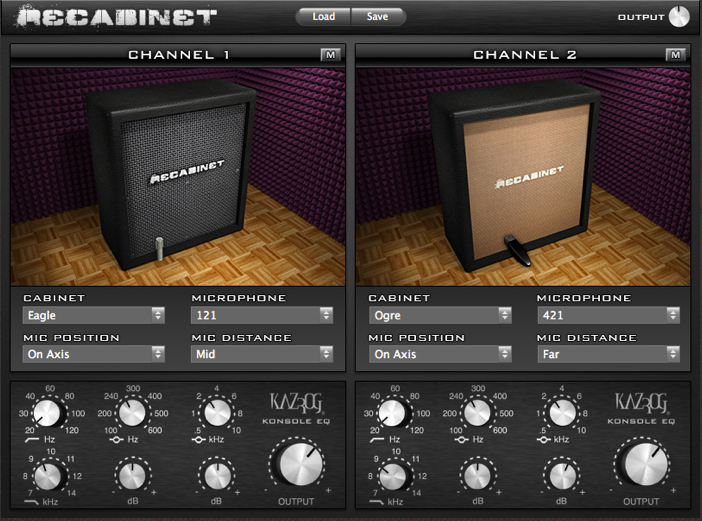
For those of you who have been exploring the laptop/tech aspects of the site – Recabinet announced yesterday that the new 3.0 update will be sold on the  http://recabinet.com site on January 18th, 2011.

In addition to a number of 20 cabinets and 8 mics, you also get a new VST/AU RTAS Shell for hosting IRs in Mac or PC.

.

(Screen shot taken from Recabinet website)

Here’s what I find appealing from a first glance perspective:

  • Drop down menus for the cabinet and mic positions are big time savers
  • The eq functions are a good idea
  • Individual gain controls (in addition to the host gain) offers a lot of flexibility
  • A number of bundled presets – also a very good idea

.

Here’s a list of the cabs and mics

(taken from Recabinet website)

.

Cabinets:

  • 1960 – based on a Marshall 1960AV 4×12
  • Angora – based on a Line 6 Vetta 4×12
  • Blackface 4×10 – based on a Fender ’65 Super Reverb 4×10
  • Chordal – based on a Roland JC120
  • Damien – based on a Marshall 1936 2×12
  • Dazed – based on a Supro Thunderbolt
  • Eagle – based on an ENGL Pro 4×12
  • Excel – based on a Randall RS412XLT100 4×12
  • Genzie – based on a Genz Benz G-Flex ported 2×12
  • Green – based on an original 1970s Marshall 4×12
  • Igor – based on a Krank Krankenstein 4×12
  • Manatee – based on an Ampeg SVT 8×10
  • Motown – based on an Ampeg Portaflex B15N
  • Ogre – based on a Bogner Uberkab 4×12
  • Oversize – based on a Mesa Standard 4×12
  • Sterling – based on a Marshall Hand Wired 4×12 (late 1960s reissue)
  • Tangerine – based on an Orange 4×12
  • Top Boost – based on a Vox AC30
  • Tweed 1×12 – based on a Fender ’53 Deluxe 1×12
  • Zodiac 2×12 – based on a Selmer Zodiac Twin 30

Recorded with the same mics as before

Microphones:

  • 57 – based on a Shure SM57
  • 545 – based on a Shure Unidyne III 545
  • 121 – based on a Royer 121
  • 409 – based on a Sennheiser MD409
  • 421 – based on a Sennheiser MD421
  • i5 – based on an Audix i5
  • Reference – based on an Earthworks M30
  • U87 – based on a Neumann U87

Pricing

While the cost for new users is $130, users who purchased the Recabinet 2.0:

  • between November 1st, 2008 and October 22nd, 2009 are eligible for a FREE upgrade (only between January 18 and January 26, 2011)
  • on October 23rd, 2009 or later can upgrade to Recabinet 3 for $60

If I understand this correctly, this means that even if you were remiss in not getting Recabinet before – if you buy Recabinet 2.0 before January 18 for $15 – you can get the new plug in for $60.  But, since this is a presumption based on the information on the website and not and official policy of recabinet, you should contact them to see if this is the case before purchasing.

If this is the case – it’s a smart incentive to get people to use their impulse responses.

X Code 3.2.5 / AU Lab 2.2 Now Available – Caveat Emptor

Here’s a pretty tech oriented post for those of you who have been using AU LAB for an audio unit host.

For those of you using AU Lab – the new X code 3.2.5 update is now available – which includes an update in AU Lab to version 2.2.

I did the update this weekend – and couldn’t get AU lab to work for the life of me.  If you’re using a newer mac – you might have better luck – but I was unable to get audio routing to the channel and the program would crash when trying to open a new document.

Based on the release notes I was able to see – the biggest update to the software was an automatic aggregate device configuration.  Which I don’t really get as setting up an aggregate device in Audio MIDI set up is well documented.

That may be the issue with the problems I had but in the meantime I had to go back and install the previous X code version over 3.2.5 to get a working version of AU Lab.

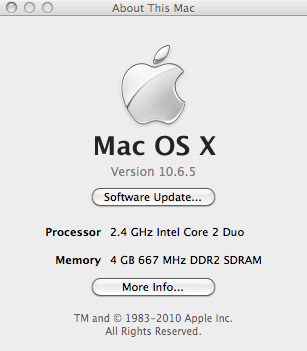
Like I said – You may have better luck if your system is more up to date.  Here’s what I’m running (note: I running 32 bit instead of 64 bit).

Special Note:

This suggestion only involves not using Software Update to install the new X code tools.  If you want to install the rest of the tools and skip AU lab – you’ll have to do it manually

  1. just follow the directions below
  2. choose X Code 3.2.5 instead of 3.2.2
  3. When down downloading choose Custom Install and install what you need

What to do if you DO need to re-install AU-Lab

Re-installing AU lab is not as straight forward as you might think.  There are probably multiple ways to  do it – but this is what worked for me.

While there are a series of paid subscriptions – you can sign up for the Apple Developer Program for free.  This will give to access to previous versions of X code tools (which has AU lab as a component).

Once you register and get to the login screen: Look for a screen called Downloads and Programmer Assets.

Then look for Developer tools.  If you scroll down you’ll see X code 3.2.2 Developer’s Tools – which has version 2.1 of AU Lab.

“Xcode 3.2.2 Developer Tools

Xcode 3.2.2 is an update release of developer tools for Mac OS X. This release provides bug fixes in gdb, Interface Builder, Instruments, llvm-gcc, Clang, Shark, and Xcode. It must be installed on Mac OS X 10.6.2 Snow Leopard and higher. Xcode defaults to upgrading an existing installation but may optionally be installed alongside existing Xcode installations. See accompanying release notes for installation instructions, known issues, security advisories.”

Download Name File Size Date Posted
About Xcode 3.2.2 (PDF) 131 KB 30 Mar 2010
Xcode 3.2.2 developer tools (Disk Image) 744.7 MB 30 Mar 2010

.

The download will take a while.  Just do the full install and it will replace the old files.

While not a very elegant solution it is a functional one.

I hope this helps!

-Scott

Schecter Omen 8 String Review Part 2 – String Observations And Sound Clips

Some observations about strings

I mentioned a lot of the issues I had with the  low F# string in part one of this review, as well as some specifics of getting an .007 up to pitch as the high A string.  I still haven’t has a change to get the guitar properly set up, so everything I’m posting here should be taken with a grain of salt.

While an .007 D’Addario can be stretched up to pitch on the 26.5″ scale neck and the strings can be bent a 1/2 step or so from the 12th fret up – it is pretty tempermental (I snapped the 5 strings I ordered from juststrings.com over the course of a couple of days).  Since the Octave4Plus strings may take anywhere from 2-6 weeks to get shipped, I’ve ordered 30 sets of the .007s in the meantime (about $.50 a string versus about $6 a string for the Ocatve4plus – but if those strings don’t snap when you look at them the wrong way – it’s a good investment).

I like the D’addario .010 7 string pack set a lot for this guitar.  With the extra scale length – the tension is a little closer to an .011.  While I can’t really bend on the .007 – I can dig in on the other strings and be a little more aggressive with the bending.

Because I ran out of .007s (and none of the local music stores stock them) I found place that carried single .008s.  Those strings will not handle being tuned to high A (apparently Octave4Plus .008s can handle this tension at this scale – FYI) – so I’ve been playing the guitar tuned down a 1/2 step to acomodate the high Ab.

.

Some modifications you may want to make / Design Recommendations

.

  • The tuners really can’t handle the strings at this pitch.  Since the guitar has 4 tuners on a side – you would need to purchase two 6 string sets to replace them.  While I like Steinberger tuners – I’d have to think quite a bit before I sank $200 into tuners on any guitar.  I’d recommend using the highest gear ratio you can get.


  • While the pickups are better than what you’d expect on a budget guitar, they are a little lackluster.  Here is the sound of a B minor scale played with the neck, middle and bridge pickup settings on a clean amp setting in AU lab with PodFarm.

(Note – if you have a problem hearing the mps3 just refresh your browser window – it’s a little glitchy in Safari but seems to work fine in other browsers.)

Also – while I could have edited the clips a little tighter – the hum from the CRT is present in the clips so this should be a realistic testing environment of what some one would get just pluging this into their laptop.

Here is the sound of a B minor scale played with the neck, middle and bridge pickup settings on a dirty amp setting.

Here is the sound of a dirge type of riff played with the neck pickup.

Here is the sound of a dirge type of riff played with the middle pickup settings.

Here is the sound of a dirge type of riff played with the bridge pickup.

I plan on swaping these out with Bare Knuckle Pickups at some point.  While you could spend $200 more and get a Damien Elite – with better tuners and an EMG set – I’m not really psyched about the EMG tones.  I’d rather have $200 to spend on pickups I like rather than spend $200 more on a guitar and still have to swap out the pickups.

.

Update:

Since this initial post – I’ve had a Bare Knuckle cold sweat put into the neck position.  Info, pics and mp3’s here.

  • I like the belly cut a lot – but I plan on getting a wrist cut added to the body to cut down on the slab feeling when playing it.
  • As I mentioned before – the 24th fret on anything other than the highest string is pretty much just for show.  If you really wanted to access those frets, you need to modify the bout.

Final Thoughts

When I play a chord like this C major 9 #11 (if you listen under headphones – you can hear all the harmonics ringing out at the end like a piano with the sustain pedal on) I’m surprised that more people don’t go this route.  Eight string guitars may not be for everyone – but for those of you who are feeling adventurous this is not only most inexpensive entry point for exploration, it also gets you a guitar that is very similar in features to the model that’s $200 more – and stand up to other eight strings costing more than twice as much.

Thanks for reading!

-SC

POD HD vs Pod Farm: A Cost Comparison

One thing that occasionally drives me crazy is trying to find out about a piece of gear – finding a googled link – reading through a multi page posting involving specific gear only to get to a final point of, “Oh I don’t have the unit and I’ve never tried it – but I’ve read the specs.”

Having prefaced this – with any luck this post won’t make you crazy.

I have been taking a good look at the POD HD 500.  One thing I like about the laptop rig is being able to set things up quickly – but as a friend of mine once quipped about another unit, “…you can’t check your e-mail on dedicated hardware – but it’s also much less likely to break down on stage.”

Another nice thing about dedicated hardware is the fact that it’s self contained.  There’s something about being able to plug something in and be up and running in no time at all.  Even as compact as my laptop rig is – it would still be faster to run through the HD than setting everything up on my laptop.

The price tag – Part I

The POD HD 500 will run about $500.  For that you get the same ins and outs that you got with the POD X3 – 16 amp and cab models (apparently the modeling is built from the ground up in a completely different way than the previous pods – hence the “HD”), about 100 effects and an onboard looper that can loop audio up to 48 seconds (in 1/2 time mode – 24 in regular speed).

If you’re running POD Farm 2.0 on a laptop consider this for a moment:

A second generation Macbook will run you at least a grand.  You really need a 7200 rpm drive – and that isn’t standard on most computers so you’re looking $50-$100 or more (assuming you’re installing it yourself) and 4 gigs of memory or more (if not already installed – again let’s say $50-100 depending on memory and model) – so let’s just average $150 ($75+75) for memory and drive costs.

You’ll need an audio interface.  If you use line 6 gear – you can get a cheaper rate on Pod farm but it’s usb… Let’s assume for a moment you’re going to go whole hog and go with a high quality audio interface.  An RME Fireface will run you at least a grand – so let’s also assume you’re going to go “budget” and get an Apogee Duet for $499.  If you upgrade to a break out box – it’s a minimum of $95 more for the unbalanced version.

You can get Pod Farm Platinum for $149 on Amazon (and for $184.99 get the Ilok key as well) – This is opposed to the $299 you’ll be charged from Line 6 for Platinum alone.

From a software standpoint I use AU Lab (which comes free on the OSX installer disc) and Sooper Looper (which is shareware – but you should pay Jesse something for the product – it’s one of the best software investments you can make).

If you don’t want to have to click on a mouse for a set – you would need a midi controller.  I like the shortboard mk II (approximately $199 – but it you may want to spend the $7-10 bucks for a 10-15 foot USB cable if running it live).  It’s usb powered, well constructed and works really well (except for the fact that Line 6 currently doesn’t support displaying patch names on the controller – only midi values – this is a big minus for live use – because you have to stare at the screen to see what patch you’re playing.

So for a live laptop rig (from scratch) or The price tag – Part II

Computer:  1000 + 150 (average memory and drive cost) + $599 (Duet + breakout box)+  $184.99 (Pod Farm + Ilok key) + $199 shortboard = $2133!!!!

That $1995 for an Axe-FX ultra is starting to look like a steal (although the Axe-FX midi controller is $799 – which makes the shortboard look better and better all the time)!  Comparatively, an Eleven Rack Mount will run you about $760 or so.

This doesn’t include a laptop bag, external drives (for looping/recording to), IRs  (impulse responses), conditioned power supply, USB hubs, breakout boxes or other expenses.  To put it in perspective however, you probably already have a computer and an audio interface of some kind so many of these other expenses are not critical.

From a cost perspective – there is no comparison between a POD HD and a laptop rig running POD farm.

But here’s my thought on it.

I can’t imagine Line 6 not issuing a POD farm version of the HD models.  The code for the models is already written and they already have a wrapper (Pod Farm).  My guess is that they’ll wait a while for hardware orders to fill up and then release a POD farm version.

I have no idea what the hardware is in the POD HD unit (it runs up to 96k internally) – but I have to think that:

1.  My laptop has more memory, hard drive space and a faster processor than what’s on the HD (or the Axe-FX or the Eleven for that matter)

2.  Related to this – that I can run more than 8 effects if need be on my laptop – which it the limit on the HD

3. The Apogee has to have better A/D/A conversion than the POD HD.

4.  While the built-in looper is a great addition – that it doesn’t hold a candle to Sooperlooper for features or loop time.

Does this mean that I’m dissing the HD series?  Not at all.  As you can see from the economic breakdown above – I think the HD is an amazing deal.

The Pod X3 was already useable – and even not having tried the HD (cough, cough) – I have to think it’s sonically a step forward. Heck if I could clear out some money – I might be willing to pick one up for sheer convenience alone.

But in going the laptop route – I’m making an investment in the future.

I’m putting my money on better software and better plugins and knowing that if the POD HD sounds that much better than the POD X3, that the Pod Farm version may even blow it out of the water.

There’s always cheaper ways to do things.  For a long time I ran a POD 2.0 into a Fender DeVille and always had people asking what I was using to get my tones.  As a general rule, I would suggest to get the best gear you can afford and make the most of it.

One final thought

If you own a car – you will always be sinking money into it – insurance, gas, oil, tires, breaks, maintenance, etc, etc.  It’s expensive – but it beats walking.

When I was at Berklee –  there was a shred guitarist whose pedal board had about 30-40 pedals on it and needed to be carried by two people.   This was before the signal hit the full rack space unit.  All of this gear was for 3 tones – clean, metal rhythm and lead.  Additionally, he had 2-3 Rocktron hush units in the rig.  When he stopped playing there would be a literal sound of locusts trying to break through the speaker before the gate kicked in (here’s an approximation of the sound: wheedley-wheedley-wheedley-wheedley-SCHHHHHKKKKKKK – silence).

A laptop guitar rig is kind of like a car.  If you own a guitar, you will always be sinking money into it (and the gear used with it) as well – but it beats walking with a pedal board with 30 pedals on it to a gig.

Thanks for reading!

-SC

.

POD HD Flash Memory Update, POD HD500 In Live Use And More Thoughts About Gear

SOME THOUGHTS ON MODELING, GEAR ACQUISITION AND THE POD HD500

LINE 6 POD FARM 2.5 UPDATE AND POD FARM FREE ANNOUNCED

APOGEE DUET 2 ANNOUNCED

New SooperLooper Update 1.6.16

OCTAVE4PLUS A4 – .007 STRING REVIEW

BKP (BARE KNUCKLE PICKUPS) 8 STRING COLD SWEAT PICKUP

.

LAPTOP GUITAR MUST BUY – GATOR VIPER ELECTRIC GIGBAG W. LAPTOP COMPARTMENT REVIEW

HOME FOR THE HOLIDAYS – GATOR VIPER GIG BAG REVIEW

SCHECTER OMEN 8 STRING REVIEW PART 2 – STRING OBSERVATIONS AND SOUND CLIPS

SCHECTER OMEN 8 STRING REVIEW

APOGEE DUET BREAK OUT BOX OVERVIEW

LINE 6 FBV EXPRESS MK II REVIEW

MONO PRODUCER BAG (LAPTOP BAG REVIEW)

.

POD HD500 AND POD FARM CONJECTURES

STEINBERGER GEARLESS TUNERS – REVIEW

TOOTHPICKS AND THEIR PROPER PLACE IN GUITAR MAINTENANCE

WHERE TO GET YOUR GUITAR REPAIRED IN LA OR LESSONS FOR THE SELF EMPLOYED MUSICIAN

GUITAR STREET IN HO CHI MINH CITY VIETNAM

RIG AROUND THE ROSIE OR MEDIATIONS AND MEDITATIONS ON GEAR

LINE 6 POD FARM 2.0 OVERVIEW

VARIAX AC700 REVIEW/WORKBENCH OVERVIEW

FNH ULTRASONIC GUITAR REVIEW

GEAR

.

Line 6 FBV Express Mk II Review

I just wanted to post a quick review on a Line 6  FBV MK II Express I picked up to use as a back up for a gig.

This unit is about 1/2 the size of the FBV mkII shortboard.    It comes with 4 midi assignable (either through USB or Cat 5 connection cable) switches, a tuner display (if used with a Line 6 amp) and a dedicated volume/wah pedal.  It was small enough that if I positioned it carefully – I would probably be able to fit it in the front flap of my gig bag – which is a big plus.

The layout is smart.  Everything is easily accessed and if you don’t need to tweak a lot of parameters – this may be a great choice of controller for you.  Another possible use in Pod Farm would be to set up the assignable switches as on/offs for various pedals – then you could turn 4 pedals on or off (plus the volume and wah) – with the unit.  I like switching through banks – so this isn’t a great option for me – but it’s very flexible for what it is.

This is a budget pedal – it has a plastic back as opposed to the metal back of the MK II shortboard – but having said that  – it seemed to hold up fine under normal use.  The USB powered out option is a really smart one – as you could use it to control parameters in a variety of plug ins or DAWs.

As a pedal, it’s a good budget investment.  If nothing else you could control wah and volume remotely though Pod Farm and that alone could be helpful.   If you like to tweak sounds – I would recommend just spending the extra $100 bucks and getting the mk II shortboard and get full functionality – otherwise – if you just have a few parameters to control – this pedal may be a good option for you.

Thanks for reading!

AU LAB/POD FARM 2.0/LIVE LAPTOP RIG TUTORIAL PART 6 – Dual Rig Distorted Tones

In previous instances – I haven’t had a whole lot of success with running both A and B channels on a dual rig – but I thought I would try to steal a tone idea from Joe Bonamassa, and give it another shot – this time running a dirty and clean tone at the same time and blending the two for a more complex tone.

This post won’t be as in-depth as some of the other AU LAB posts I’ve done as I’ve detailed a lot of the process already.

As a starting point – here’s the DIST 2 rig:

The pedal configurations are very similar to what I set up here:

The wahs and volumes are both assigned to the same pedal so that 1 pedal controls both functions.  Ditto for the distortion and the reverse delays (usually off) which I can kick in for some grand psychedelia.

In the next version of this rig – I would probably set the Mix knob of the delays to the expression pedal so I could dial in the amount of reserve delay I wanted when it was on.

As another option – you could also set the volumes independently – one to the short board volume and one to an expression pedal –which would allow you to have a clean tone and dial in the amount of distortion you wanted a la Jim Thomas of the Mermen.

EQ

One of the biggest problems I’ve had when using dual rigs in the past is a weird boosting of certain EQs.  Particularly on the low E string.  In this case what I’ve done is to cut the bass in the 80 Hz by 6db on the Graphic Eq in the signal chain.    This was an idea I got from a REALLY cool acoustic post that Bob Brozman had on his site detailing his live rig and correlating specific Eq ranges to strings.  It worked pretty well and helped tame the woof on the low E string.  There’s also a 3db boost at 750Hz and a 2db cut around 3k.

Kicking on the distortion on the distorted side take out some of the extreme low-end and compresses the low E string in a pleasing way.

The Tube Screamer settings I’m using are:

Drive 24%

Gain 66%

Tone 13%

Another thing that has helped with this is splitting the Stereo send.  I’ve panned these to 27% on either side.

Here’s the mixer setting:

Another important note – this is running out mono to an amp – so that will further affect the sonic split.  I’m running the rig in stereo because I like the sounds of the effects in stereo better than mono – but ultimately this is going down to a mono signal.

Here are the Silver Marshall Model Settings:

In live use – the Atomic is really bass heavy – so I’ve cut out a lot of the bass here and typically have it at 3-5 depending on how the room sounds.

Gaining Perspective

Another problem that comes up with laptop guitar – or modeling in general is that it’s really easy to overdo it on the gain.  When I got my first distortion pedal – I remember turning all the knobs up 100%.  It took a while to get to where I started experimenting with eq and gain staging to try to get some saturation – but keep the overall definition.  The use is gig specific –  If the sound requires a lot of gain and sludge – then I go for that – but in general – I definitely try to scale it back a bit.  I can always add an overdrive or distortion pedal if I need to increase the amount of gain – .

And the clean settings:

The volume is a constant adjustment issue here. (also note the eq differences from the settings in the AU lab tutorial).  Here – I’m just trying to find some good mix of dirty with a bit of clean for clarity.

Here is a short example of the tone – this uses the clean channel from the fender and the dirty channel from the Marshall.  This was just the setting with the same AU lab settings in the AU lab posts – recorded directly in AU lab.

One thing I realized after I tracked this is that the feedback on the Tube echo is set a little too high.  I usually leave them both around 4 so it gets a little verb/slapback sound.

I have the tube drive on the Fender off for this example but can switch it on for extra gain if I need it.

In the meantime – you can download this tone here.

Hopefully this has been helpful.  I’ll be doing a post on using AU lab as an acoustic pre for live use soon.

Thanks for dropping by!

-SC