BKP (Bare Knuckle Pickups) 8 String Cold Sweat Pickup

Recently, I got a call to play on a forthcoming X-box title and the composer asked me to bring a couple of guitars for some uptempo rock solos. (Unfortunately, I can’t post any audio from the session – but when the game releases I’ll post a link to any trailers for it.)

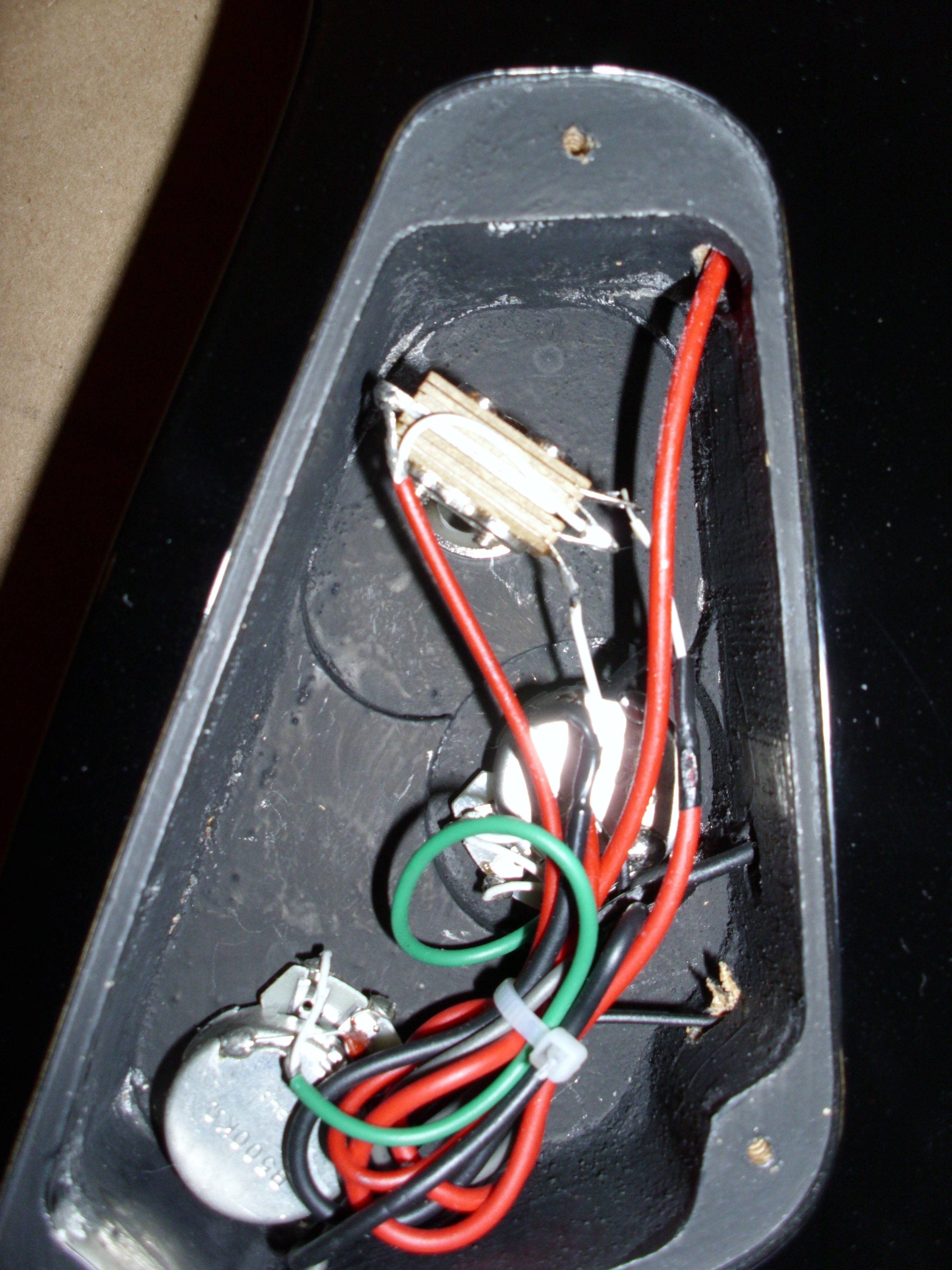
The session seemed like the perfect time to bring out my Schecter Omen 8 – particularly since I recently got Seth Mayer to install a Bareknuckle Cold Sweat Pickup and a kill switch on it.

.

Bare Knuckle Pickups

For those of you who aren’t familiar with Bare Knuckle Pickups, they are one of the few companies that are making hand-wound (!!) passive 8 string pickups (in addition to their 6 and 7 string line).

When I was first looking into this – I sent an email to Tim Mills, to see what he recommended for someone needing a lot of tonal flexibility with a basswood body 8 string and he recommended the painkiller.  After reading the forums and listening to a lot of samples – I found that Axe Palace had an 8 string cold sweat neck pickup in stock for $160 and I bit the bullet.

(BTW – I had a really good experience with the Axe Palace guys, so if you’re looking for a U.S. Dealer to purchase from – I’d recommend them.)

.

Cold Sweat Neck Close Up

The new Bare Knuckle website is excellent and absolutely full of useful information.  For example here are some specs taken from the bare Knuckle Website.  Each pick up now has this information posted so it’s really easy to compare and contrast different pickups and get a good idea about how they’re going to sound.

There are some mp3s on the Bare Knuckle Cold Sweat page – but having done some quick mp3s of the original schecter pickups, I thought I would post a couple of mp3s for comparison.

First, here is the Line 6 POD Farm patch I’m using for both clan and dirty sounds:

Here is a 4 octave B minor scale played with a clean tone ascending and descending using the neck (cold sweat), middle (Cold sweat and stock bridge) and Bridge (Schecter).

Here is a 4 octave B minor scale played with a dirty tone ascending and descending using the same pickup order as the clean tone.

Here are some clean chords played on the upper strings.  While the pickup allows for a coil tap – I didn’t have have the push pull pot to have it wired for that – but I’m sure that allowing for a coil tap – would give clean sounds like this even more tonal variety.

Here is chunk style low end riff.  The amp setting here is a little muddy to begin with – so you’ll notice that the Schecter actually cuts through pretty well.

And here is the same idea but with the tube screamer turned on.  With the added gain – the Cold Sweat takes on more definition.

.

A quick sum up

This is a short review, because rather than regurgitate a lot of information that’s on their website – I’d recommend that you go straight to the source and get the full description.

For the xbox title – I ended up playing the FNH Ultrasonic and the Schecter in front of a Marshall 4×12 and for leads – the Cold Sweat made the Schecter just scream.

The fact that they’re hand wound – is insane to me – in the best way possible.  It speaks volumes about the commitment to excellence that BNK has towards its products and tone.  This isn’t the cheapest pickup that you’ll ever buy – but it blows an EMG out of the water and comes with a lifetime warranty.  Buying a Omen and installing one of these in it – is still cheaper than a Damien Elite – and I think it’s a better sounding guitar.  You owe it to yourself to check out what they’re doing.
X Code 3.2.5 / AU Lab 2.2 Now Available – Caveat Emptor

Here’s a pretty tech oriented post for those of you who have been using AU LAB for an audio unit host.

For those of you using AU Lab – the new X code 3.2.5 update is now available – which includes an update in AU Lab to version 2.2.

I did the update this weekend – and couldn’t get AU lab to work for the life of me.  If you’re using a newer mac – you might have better luck – but I was unable to get audio routing to the channel and the program would crash when trying to open a new document.

Based on the release notes I was able to see – the biggest update to the software was an automatic aggregate device configuration.  Which I don’t really get as setting up an aggregate device in Audio MIDI set up is well documented.

That may be the issue with the problems I had but in the meantime I had to go back and install the previous X code version over 3.2.5 to get a working version of AU Lab.

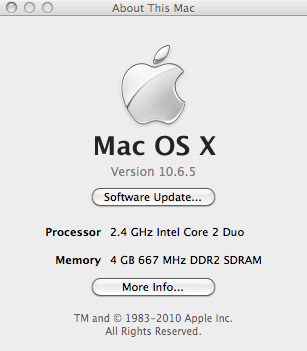
Like I said – You may have better luck if your system is more up to date.  Here’s what I’m running (note: I running 32 bit instead of 64 bit).

Special Note:

This suggestion only involves not using Software Update to install the new X code tools.  If you want to install the rest of the tools and skip AU lab – you’ll have to do it manually

  1. just follow the directions below
  2. choose X Code 3.2.5 instead of 3.2.2
  3. When down downloading choose Custom Install and install what you need

What to do if you DO need to re-install AU-Lab

Re-installing AU lab is not as straight forward as you might think.  There are probably multiple ways to  do it – but this is what worked for me.

While there are a series of paid subscriptions – you can sign up for the Apple Developer Program for free.  This will give to access to previous versions of X code tools (which has AU lab as a component).

Once you register and get to the login screen: Look for a screen called Downloads and Programmer Assets.

Then look for Developer tools.  If you scroll down you’ll see X code 3.2.2 Developer’s Tools – which has version 2.1 of AU Lab.

“Xcode 3.2.2 Developer Tools

Xcode 3.2.2 is an update release of developer tools for Mac OS X. This release provides bug fixes in gdb, Interface Builder, Instruments, llvm-gcc, Clang, Shark, and Xcode. It must be installed on Mac OS X 10.6.2 Snow Leopard and higher. Xcode defaults to upgrading an existing installation but may optionally be installed alongside existing Xcode installations. See accompanying release notes for installation instructions, known issues, security advisories.”

Download Name File Size Date Posted
About Xcode 3.2.2 (PDF) 131 KB 30 Mar 2010
Xcode 3.2.2 developer tools (Disk Image) 744.7 MB 30 Mar 2010

.

The download will take a while.  Just do the full install and it will replace the old files.

While not a very elegant solution it is a functional one.

I hope this helps!

-Scott

Home For The Holidays – Gator Viper Gig Bag Review

Gator Viper Gig Bag

With the acquisition of my new Schecter 8 string, I realized that I would need to get a new gig bag to go with it.  After some searching –  I found the Gator Viper Gig bag. The bag lists at $149 and usually sells for $100 but Amazon had it listed for $37-$39 (as of this writing J&R music is selling it for $39.99 shipped via amazon).

I picked one up and just had Santa get me another one for Christmas.

Here’s the bag:

The Exterior

First and foremost – This is a rugged bag.  It’s almost more like a case than a gig bag.  I was surprised that it was heavier than I though it would be when I picked it up.  The zippers are larger than the ones used on other bags I have.  They’re luggage quality and seem durable.  The ad copy mentions that the bag is dual lined for protection and I believe that.  I would have no worries about this bag protecting the guitar in any kind of rain/snow/ condition.

If you look at the back of the bag:

you might notice that the two straps are padded for comfort.  There’s an optional sternum strap for stability as well.  The bag also features back cushions:

which help distribute the weight.  If you want to carry it by hand – the handle is reinforced.

The Interior

If you look at the headstock interior (quilted foam):

In addition to the heavy padding around the back and sides – you also get a neck rest.  The additional string guard on the head stock and the bridge:

is a nice touch as well.

The interior has what the company calls a “Universal ergo-fit design for most Strat- and LP-style guitars” – my non traditional shaped FNH Guitar fits in there fine.  The Schecter with a 26.5″ scale fits in the bag as well.

The bag has two compartments ( It’s hard to see in this photo – but there is a separate zippered section by the headstock which could easily hold picks, string, capos, etc.)

In addition to the front zippered section, the front pocket is spacious.  I can easily fit these full size headphones in the case with no issue.

For $30 more you can get a model with a separate laptop compartment.  I like the idea a lot – but it adds additional weight to the front of the bag.

The Sum Up

The short of it is – this is one of the best deals out there. Given that a garbage gig bag will probably set you back $20-$30 it’s impressive what you’re getting in this bag for a few dollars more.

Happy Holidays!

-SC

Schecter Omen 8 String Review

Another guitar?

With the sale of a couple of guitars –  I decided I wanted to experiment with an extended range instrument – but didn’t want to spend a lot of money.  I had been looking at the Damien Elite 8 – which I saw in this video. I liked what I heard of the instrument – but then found the 2011 Omen 8 was released and $200 cheaper than the Elite (with free shipping from Amazon) so I bit the bullet and gave it a try.

I haven’t bought a new instrument in a while so I while I had played a couple of Schecter 6 strings (well made but not my thing) I was curious about what would come in the mail.  Given that a hipshot guitar bridge alone would run me $114 – I couldn’t build a guitar for $399.  My logic in the process was that even if the guitar was sub-par that I could part it out and have FNH Guitars build me a custom model (I can hear FNH’s John Harper’s eyes rolling back into his head with that!)

The Schecter Omen 8 – is a South Korean built guitar that is set up and shipped in the states.  Frankly, it’s a lot of guitar at this price point.

Guitar Stats

The guitar has a basswood body with 2 Schecter brand pickups and eight string bridge.

In comparison, the Damien Elite has a mahogany bodywith a quilted maple top , multi-ply binding and active EMG-808 pickups.  The body itself is surprisingly contoured.  While I was surprised to see a belly cut, a wrist cut would benefit the model as well.  The routing for the electronics is clean, and the finish is top notch.

The string through body bridge works well.  The pickups are functional but a little lackluster.  (Part of this could be the basswood body – Another reason I like bolt on necks vs. neck though body.  In a bolt on neck if you hate the neck but like the body (or vice versa) you can just switch it out. With a neck through body – you buy a new guitar).  I’m not a fan of active pickups so I would probably plan on replacing them even if I sprung the extra money for the Elite.

The 24 Jumbo fret bolt-on maple neck has a rosewood fingerboard and a 26.5″ scale to accommodate the extended tuning of the instrument.  Note: you could make the tuning whatever you wanted – but it’s strung with what appears to be a D’Addario stings (update I’ve been informed  on the sevenstring.org forum that Schecter’s standard 8-string set is: .10 .13 .17 .30 .42 .54 .64 .74 – thank you sir!) for a low to high tuning of F#-B-E-A-D-G-B-E.  The  Schecter tuners are functional (you get Grovers on the Damien Elite) and the inlay is a simple dot inlay (instead of the more elaborate “stained cross” inlay on the Elite).

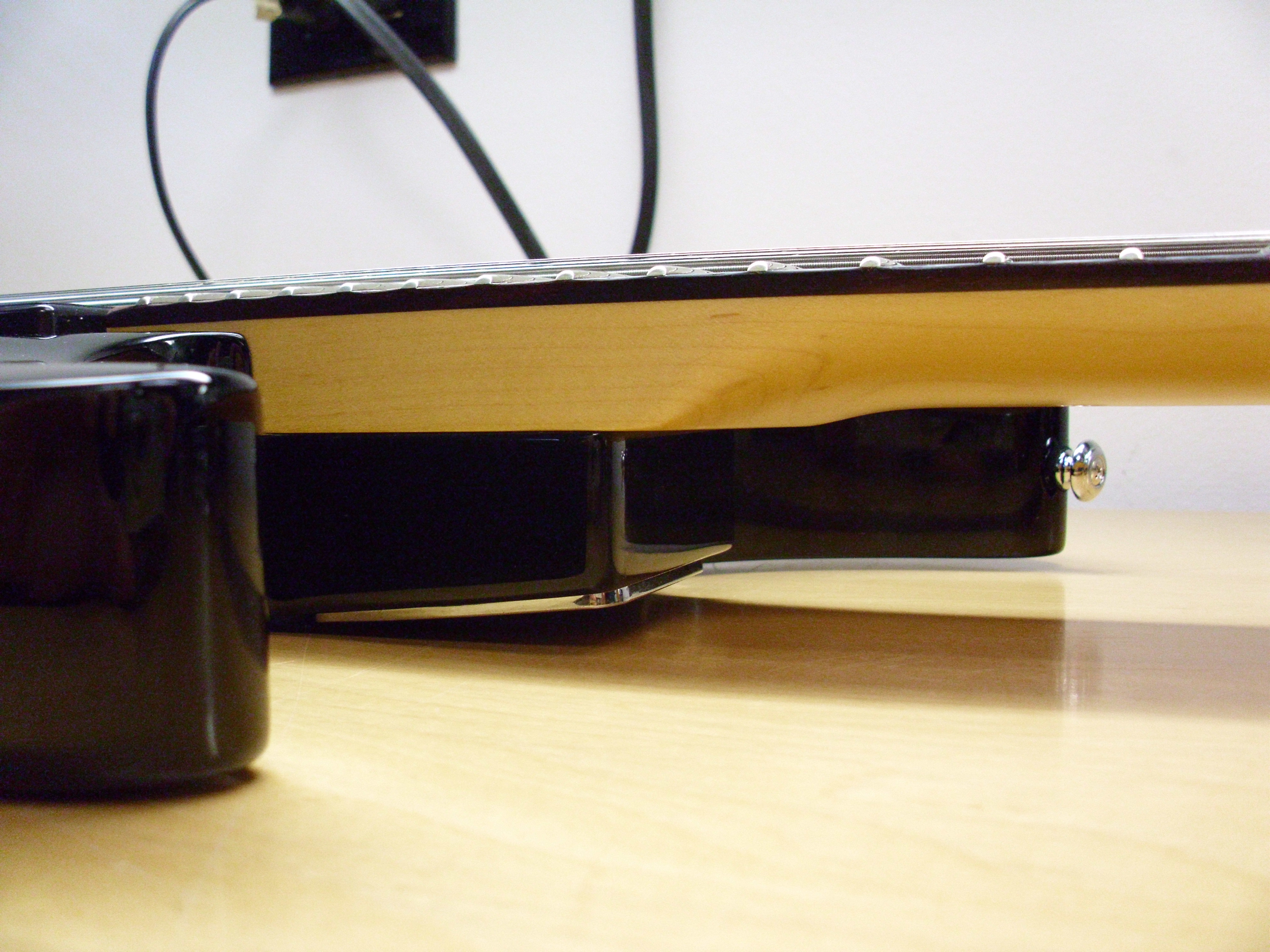
In many of the forums I researched, people complained about the “baseball bat necks” of the bolt on Schecters.  I didn’t find that to be the case at all.  While there is a heel cut in the body to help access the upper frets:

The joint itself is a little chunky.

Given the amount of string tension on the neck – this isn’t that surprising but it does mean that in performance the top two frets are basically for show.

Setup wasn’t bad but needed a little more tweaking.  In addition to the F# intonation being off the nut action was pretty high for some of the strings.

I know the lowest string needs extra room to vibrate – but it was really high on the E, A and D strings as well. Especially on the higher frets.

In use

The guitar sustains well acoustically without amplification but – the shipped string (I believe a.074) on  26.5″ scale is really too small for the low F#.  At that pitch the string just flops on the fretboard.  Also in terms of timbre – the F# is a little strange to me.  It seems to fight between wanting to be a bass and a guitar. I could get some nice sounds with clean tones – but I had a really hard time integrating it with any kind of distorted tone.  Part of that could be the pickups as well.  The high gain tones that sounds best for single pitches turn to mush on chords so there’s a balancing act there.  Going up to a .08 would probably tighten it up and I may got that route eventually but for now I wanted to go more well rounded.

Having said that – the scale length is workable by getting rid of the F#.  The tuning I’m using right now is (low to high) B-E-A-D-G-C-E-A.  This uses the above mentioned D’Addario 7 string pack with a .007 for the high A.  I’ve also swapped out the .059 for a .062 for the B which seems to feel better.

Tech Tips

Here are a couple of suggestions that will help if you use the high A tuning.

  • You’ll have to adjust the intonation when using a different string.  Start by removing the lowest string (in this case F#).  Before you put the new string in – move the saddle so the front edge is in line with the saddle on the low B string. (Do not adjust the height screws! All you’re doing is adjusting the string length so that the string intonates properly.  Since the other strings are already intonated – this will cut down on time adjusting it substantially).  Leave the top string (the High A) where it is and adjust accordingly.
  • I’ve tuned the B string up to C.  This keeps a 4th between the E and high A string (top 2 strings) and a 3rd between the C & E strings.  This way all of my 3 note per string scale patterns stay the same.
  • There’s a company that sells strings specifically for high pitches on extended range instruments called Octave4Plus.  While I may look into their strings in the future – while I was waiting for the guitar to come – I put an order into Just Strings and ordered 2 sets of the D’Addario 7 string packs and 5 single .007 strings to see if I could do it on my own.  (Update – you can read an Octave4plus review here) – What I wanted to see was if the string would snap near the nut or at the bridge.  When I tuned the first string up – I tried to get it to pitch and it snapped at the tuner.

What I recommend you do is tune the string up to F# or G and let it sit for a while.  Tune the other strings.  Every 3-5  minutes or so – try to bring it up another 1/2 step and repeat until you get it to pitch.  By letting the string stretch at various points – it becomes more stable under pressure.

In using this tuning – I wonder how it would work in a 25.5″ scale.  The advantage of that to me is that I could use .011s (or .012s!) for the 6 strings and then fill in the top and bottom appropriately.  I can’t help but think that heavier gauge strings would drive the pickup more and result in better tone.  The issue there would be the floppy low B. Every variation is a series of compromises – just something to consider.

  • In moving the strings – you will probably have to adjust the nut slots.  I’d recommend having a qualified guitar tech do this if you’re not sure what you’re doing.
Overall Thoughts

I am constantly amazed at the cost point versus quality of work that is coming out of South Korea these days.  If Amazon is selling this guitar at $400 (I rounded up for convenience), that means that it’s probably leaving South Korea at a cost of $150-$200 shipped – which is pretty mind boggling if you think about it.

Count on spending some additional cash on setup right out of the gate.  Further on down the line – you will probably want to put money into pickups and perhaps tuners as well.  If you like active pickups, or want a really nice looking figured top- this is a no brainer – save up an additional $200 and get a Damien Elite 8.  Otherwise – minus the top and the pickups – this is basically the same guitar for 1/3 less money.

I’m still sorting out how to play this!!  In the meantime, you can read more and hear some mp3s here.

If you’re looking for a gig bag for one of these – the Gator Viper is the best deal out there right now.

In the meantime – If you have any questions – please feel free to drop me a line @ guitar.blueprint@gmail.com !

Happy Thanksgiving!

-SC

POD HD vs Pod Farm: A Cost Comparison

One thing that occasionally drives me crazy is trying to find out about a piece of gear – finding a googled link – reading through a multi page posting involving specific gear only to get to a final point of, “Oh I don’t have the unit and I’ve never tried it – but I’ve read the specs.”

Having prefaced this – with any luck this post won’t make you crazy.

I have been taking a good look at the POD HD 500.  One thing I like about the laptop rig is being able to set things up quickly – but as a friend of mine once quipped about another unit, “…you can’t check your e-mail on dedicated hardware – but it’s also much less likely to break down on stage.”

Another nice thing about dedicated hardware is the fact that it’s self contained.  There’s something about being able to plug something in and be up and running in no time at all.  Even as compact as my laptop rig is – it would still be faster to run through the HD than setting everything up on my laptop.

The price tag – Part I

The POD HD 500 will run about $500.  For that you get the same ins and outs that you got with the POD X3 – 16 amp and cab models (apparently the modeling is built from the ground up in a completely different way than the previous pods – hence the “HD”), about 100 effects and an onboard looper that can loop audio up to 48 seconds (in 1/2 time mode – 24 in regular speed).

If you’re running POD Farm 2.0 on a laptop consider this for a moment:

A second generation Macbook will run you at least a grand.  You really need a 7200 rpm drive – and that isn’t standard on most computers so you’re looking $50-$100 or more (assuming you’re installing it yourself) and 4 gigs of memory or more (if not already installed – again let’s say $50-100 depending on memory and model) – so let’s just average $150 ($75+75) for memory and drive costs.

You’ll need an audio interface.  If you use line 6 gear – you can get a cheaper rate on Pod farm but it’s usb… Let’s assume for a moment you’re going to go whole hog and go with a high quality audio interface.  An RME Fireface will run you at least a grand – so let’s also assume you’re going to go “budget” and get an Apogee Duet for $499.  If you upgrade to a break out box – it’s a minimum of $95 more for the unbalanced version.

You can get Pod Farm Platinum for $149 on Amazon (and for $184.99 get the Ilok key as well) – This is opposed to the $299 you’ll be charged from Line 6 for Platinum alone.

From a software standpoint I use AU Lab (which comes free on the OSX installer disc) and Sooper Looper (which is shareware – but you should pay Jesse something for the product – it’s one of the best software investments you can make).

If you don’t want to have to click on a mouse for a set – you would need a midi controller.  I like the shortboard mk II (approximately $199 – but it you may want to spend the $7-10 bucks for a 10-15 foot USB cable if running it live).  It’s usb powered, well constructed and works really well (except for the fact that Line 6 currently doesn’t support displaying patch names on the controller – only midi values – this is a big minus for live use – because you have to stare at the screen to see what patch you’re playing.

So for a live laptop rig (from scratch) or The price tag – Part II

Computer:  1000 + 150 (average memory and drive cost) + $599 (Duet + breakout box)+  $184.99 (Pod Farm + Ilok key) + $199 shortboard = $2133!!!!

That $1995 for an Axe-FX ultra is starting to look like a steal (although the Axe-FX midi controller is $799 – which makes the shortboard look better and better all the time)!  Comparatively, an Eleven Rack Mount will run you about $760 or so.

This doesn’t include a laptop bag, external drives (for looping/recording to), IRs  (impulse responses), conditioned power supply, USB hubs, breakout boxes or other expenses.  To put it in perspective however, you probably already have a computer and an audio interface of some kind so many of these other expenses are not critical.

From a cost perspective – there is no comparison between a POD HD and a laptop rig running POD farm.

But here’s my thought on it.

I can’t imagine Line 6 not issuing a POD farm version of the HD models.  The code for the models is already written and they already have a wrapper (Pod Farm).  My guess is that they’ll wait a while for hardware orders to fill up and then release a POD farm version.

I have no idea what the hardware is in the POD HD unit (it runs up to 96k internally) – but I have to think that:

1.  My laptop has more memory, hard drive space and a faster processor than what’s on the HD (or the Axe-FX or the Eleven for that matter)

2.  Related to this – that I can run more than 8 effects if need be on my laptop – which it the limit on the HD

3. The Apogee has to have better A/D/A conversion than the POD HD.

4.  While the built-in looper is a great addition – that it doesn’t hold a candle to Sooperlooper for features or loop time.

Does this mean that I’m dissing the HD series?  Not at all.  As you can see from the economic breakdown above – I think the HD is an amazing deal.

The Pod X3 was already useable – and even not having tried the HD (cough, cough) – I have to think it’s sonically a step forward. Heck if I could clear out some money – I might be willing to pick one up for sheer convenience alone.

But in going the laptop route – I’m making an investment in the future.

I’m putting my money on better software and better plugins and knowing that if the POD HD sounds that much better than the POD X3, that the Pod Farm version may even blow it out of the water.

There’s always cheaper ways to do things.  For a long time I ran a POD 2.0 into a Fender DeVille and always had people asking what I was using to get my tones.  As a general rule, I would suggest to get the best gear you can afford and make the most of it.

One final thought

If you own a car – you will always be sinking money into it – insurance, gas, oil, tires, breaks, maintenance, etc, etc.  It’s expensive – but it beats walking.

When I was at Berklee –  there was a shred guitarist whose pedal board had about 30-40 pedals on it and needed to be carried by two people.   This was before the signal hit the full rack space unit.  All of this gear was for 3 tones – clean, metal rhythm and lead.  Additionally, he had 2-3 Rocktron hush units in the rig.  When he stopped playing there would be a literal sound of locusts trying to break through the speaker before the gate kicked in (here’s an approximation of the sound: wheedley-wheedley-wheedley-wheedley-SCHHHHHKKKKKKK – silence).

A laptop guitar rig is kind of like a car.  If you own a guitar, you will always be sinking money into it (and the gear used with it) as well – but it beats walking with a pedal board with 30 pedals on it to a gig.

Thanks for reading!

-SC

.

POD HD Flash Memory Update, POD HD500 In Live Use And More Thoughts About Gear

SOME THOUGHTS ON MODELING, GEAR ACQUISITION AND THE POD HD500

LINE 6 POD FARM 2.5 UPDATE AND POD FARM FREE ANNOUNCED

APOGEE DUET 2 ANNOUNCED

New SooperLooper Update 1.6.16

OCTAVE4PLUS A4 – .007 STRING REVIEW

BKP (BARE KNUCKLE PICKUPS) 8 STRING COLD SWEAT PICKUP

.

LAPTOP GUITAR MUST BUY – GATOR VIPER ELECTRIC GIGBAG W. LAPTOP COMPARTMENT REVIEW

HOME FOR THE HOLIDAYS – GATOR VIPER GIG BAG REVIEW

SCHECTER OMEN 8 STRING REVIEW PART 2 – STRING OBSERVATIONS AND SOUND CLIPS

SCHECTER OMEN 8 STRING REVIEW

APOGEE DUET BREAK OUT BOX OVERVIEW

LINE 6 FBV EXPRESS MK II REVIEW

MONO PRODUCER BAG (LAPTOP BAG REVIEW)

.

POD HD500 AND POD FARM CONJECTURES

STEINBERGER GEARLESS TUNERS – REVIEW

TOOTHPICKS AND THEIR PROPER PLACE IN GUITAR MAINTENANCE

WHERE TO GET YOUR GUITAR REPAIRED IN LA OR LESSONS FOR THE SELF EMPLOYED MUSICIAN

GUITAR STREET IN HO CHI MINH CITY VIETNAM

RIG AROUND THE ROSIE OR MEDIATIONS AND MEDITATIONS ON GEAR

LINE 6 POD FARM 2.0 OVERVIEW

VARIAX AC700 REVIEW/WORKBENCH OVERVIEW

FNH ULTRASONIC GUITAR REVIEW

GEAR

.

Apogee Duet Break Out Box Overview

The Apogee Duet is a pretty remarkable piece of gear – and it terms of A/D/A conversion – it does a great job at it’s price point.  The Duet 1/4″/XLR cables, however,  are a little hit and miss:

You’ll notice that the connecting wires are thin and a little fragile looking.  Also – because of the way that the 1/4″ cables I use pull of the breakout cable – I feel like it’s adding additional tension to the wires.  In short, it made me a little nervous in live use.  Then I found out about the Duet Break Out Box – which mounts all of the cable’s into a single metal box with a rugged high quality cable attached and decided to give it a try.

There are 2 versions of the Duet Breakout Box (both are 100% passive and line level).  I’m using the unbalanced box – as I’m not sending signal over long cables – but the price difference is $99 versus The Breakout Balanced – which will run you $215 or so.

Sonically, I don’t hear a difference between the breakout cable and the breakout box -which is a good thing – the selling point of the unit is it’s ruggedness. The box is solid, well constructed and can definitely handle a live gig.  The enclosed cable is about a foot long  – so you may want to invest in a longer cable eventually – but for my purposes this works fine.

Do you need this unit?  If you’re doing mostly studio or home work you can probably get by with your existing cable fine.  But if you are planning on using the unit live – this is a worthwhile investment.

Line 6 FBV Express Mk II Review

I just wanted to post a quick review on a Line 6  FBV MK II Express I picked up to use as a back up for a gig.

This unit is about 1/2 the size of the FBV mkII shortboard.    It comes with 4 midi assignable (either through USB or Cat 5 connection cable) switches, a tuner display (if used with a Line 6 amp) and a dedicated volume/wah pedal.  It was small enough that if I positioned it carefully – I would probably be able to fit it in the front flap of my gig bag – which is a big plus.

The layout is smart.  Everything is easily accessed and if you don’t need to tweak a lot of parameters – this may be a great choice of controller for you.  Another possible use in Pod Farm would be to set up the assignable switches as on/offs for various pedals – then you could turn 4 pedals on or off (plus the volume and wah) – with the unit.  I like switching through banks – so this isn’t a great option for me – but it’s very flexible for what it is.

This is a budget pedal – it has a plastic back as opposed to the metal back of the MK II shortboard – but having said that  – it seemed to hold up fine under normal use.  The USB powered out option is a really smart one – as you could use it to control parameters in a variety of plug ins or DAWs.

As a pedal, it’s a good budget investment.  If nothing else you could control wah and volume remotely though Pod Farm and that alone could be helpful.   If you like to tweak sounds – I would recommend just spending the extra $100 bucks and getting the mk II shortboard and get full functionality – otherwise – if you just have a few parameters to control – this pedal may be a good option for you.

Thanks for reading!

Laptop Guitar Setup Or Notes From A Live Show

For the Onibaba show last night, I decided to use only the laptop rig that I’ve been working with and not use the typical Atomic/Pod X3 rig that I use.  The short of it is that from a technical standpoint – it worked without a hitch.  I don’t think that anyone noticed that there weren’t “real amps” there and tonally it fit the bill.  There were, however,  a few little quirks that needed to be sussed out.

1 The room we were playing in had very high ceilings and was really boomy.  Sounded great on acoustic instruments – but I had to be really careful of not getting washed out tone wise.

2 The midi assignments for Sooper Looper stopped working when I used the FBV express board.  The board worked fine – but I’ll probably just return it and get a breakout box instead.  The FBV Express can control about 6 functions – but ultimately I’d like to control about 10-12 functions – so I think it makes more sense to just trigger it manually.

.

No one size fits all

.

As I’ve mentioned here, there are a number of variances that occur with modeling:

“I’m in the process of working on sounds on the X3 Live for the show – and tweak PA vs. amp sounds.  One thing I’ve noticed with modeling is that there are at least 4 different scenarios for setting up sounds:

1.  Headphone patches – i.e. practicing or recording

2.  Playing through an amp at low volumes

3.  Playing through an amp at high volumes

4.  Playing through a PA.

You might think that there wasn’t a lot of variance – but the differences between these parameters are huge.  I have patches that sound mediocre at low volumes and sound really good when the volume gets goosed a bit.  Headphone patches that work well at home and fall apart live – and vice versa.”

So along this line  I knew I’d have to tweak some patches I’d been using  and make some new ones for the show.  I decided to pull some patches I liked and demo them at low volumes in my apartment and then try to fix anything glaringly wrong at the show.

.

Reverse Engineering or Start with the output

.

A while ago I mentioned I bought a back up Atomic amp from Guitar Center for $149.  The listing was for an Atomic Reactor 1×12 – but both the 50 watt and the 18 Watt are 1×12 – so what I got in the mail was the 18 watt.  Initially, I was a little disappointed – but given that you can run it on 115V OR 240V – I figured it was a good investment and that in a worse case scenario I could sell it and make my money back.

When I set up my sounds – I set them up on the 18w.  There’s no master volume knob – it just runs at 18 watts – but I could control the output with my duet and set things up at a low volume.

The Atomics in general are very bass heavy so I knew from the get go I’d have to roll a lot of the bass down and tweak other mid and high levels.

AfterI got a tone set up on a lark I decided to try to run it stereo.  I pulled out the 50 watt Atomic and there were some weird grounding issues.  While I was trying to suss that out I decided to A/B the amps – and see if there was a difference.  Suprisingly  the 18 Watt sounded MUCH better than the 50 watt.  The 18 watt does use different tubes (2 EL34’s and 1 12ax7a as opposed to the 6l6GCs and the 12AX7 in the 50 watt) – but I think that just having the amp full bore made a big difference.  The more I cranked the output volume on the Duet – the more the tone sagged in a very pleasing way.  Also the 18 watt is DEAD quiet so that solved the issue of the loud fan on the 50 watt version.  I knew the 18 Watt was loud but I wasn’t sure if it was fully going to be able to hang with drums, bass, amplified trombone and the awesome sonic terror of Vinny Golia – but it did.

.

IMPORTANT DUET NOTE: 

When setting output volume on the unit – if you choose “Instrument amp” – you get a flat volume that you are unable to control – by setting it to “Line Level” you can adjust the output with the knob on the Duet.

.

I think the Duet output went to ten – I never went higher than 5 – and at one point turned down to 3.  18 Watts was more than enough for the gig.  The drag now is I like the amp enough to sink more money into it and have I have the desire to get the amp re-tolexed.  Maybe with like a fender tweed or something.  In the meantime I used the 18 watter as a low volume template and could then tweak it further in the space as I needed to.

.

Organization is key

.

One reason to go digital is the rigs themselves they take up so little disk space you could save hundreds of them and have individual configurations for almost any situation.  This is also one reason NOT to go digital as it’s easy to get overwhelmed with options instead of narrowing it down to a few.

A great feature about POD Farm 2  is that you can create and organize folders with drag and drop ease.

For example let’s begin by looking at how I built my live setup:

First – here’s a sample patch:

.

Now if you look over to Setlists:

.

You’ll see I created a folder marked ATOMIC.

.

Tip:

If you want to control changing setlists from a Midi Controller – Just control click on the up or down arrow, in the Setlist window and then press the midi controller feature you want to use to control it

.

Within that setlist, I have a series of patches – I name them all Atomic – so I can find them easily if I have to.

.

Another Tip:

If you want to control changing Programs (i.e different patches) within a setlist  from a Midi Controller –  Go to the top of the screen – where the patch name is:

Just control click on the up or down arrow to the right of the Patch name, in the and then press the midi controller feature you want to use to control it.

I’ve set it up to be used withthe up and down arrows on the right of the shortboard.  I decided to have one  folder marked Atomic and then just scroll up and down through the folder to get to patches. You could just as easily set up multiple folders and organize patches (and if you have only 4 tones per Setlist – you could just A/B/C/D them with the shortboard and use the up and down arrows to go between setlists – just like the setup on the PODs).

When I used the pod X3 with the docking station in the Atomic – one feature I would use a lot was the dual rig feature with one rig with a speaker sim – and one with none – It gave the sound a lift in a pleasing way.  At the gig I just ran them all through the 4×12 IRs I’ve been using and it sounded fine – I may put the IRs on a bus and mix the two to see how it sounds – but this is the rig I’m using as of this post.

Clarity wise – I felt it had a noticeable advantage over the X3 – but I’ll have to do more experimenting.  In a future post – I’ll detail a Dual distortion tone I’ve been developing and discuss some more specifics with using a laptop as a guitar processor live.
.
Thanks for reading!
.
-SC

Steinberger Gearless Tuners – Review

Steinberger Tuners:


In a previous post, I had mentioned how the high E string was slipping a bit on my electric guitar.  After lubricating the nut, I decided to bite the bullet and give a set of Steinberger gearless tuners a try.

Tuners and Gear Ratios:

Typically guitar tuners operate with a gear mechanism.  If you see a gear ratio that says it’s 12:1 – that means it takes 12 turns of the tuner knob to rotate the post 1 complete turn.  The higher the gear ratio is, the more accurate the tuning.  What happens with really low  tuning ratios is that you can sometimes get close to the pitch you are looking for but are unable to really dial it in.

Higher end guitars typically have tuners with gear ratios of 16:1 or 18:1, but when I read that Steinberger had a tuner that had a 40:1 ratio, I knew I had to give it a try.  Stu Mac was selling them in the $100 range (expensive – but the gold color will run you $50 more!)

Installation:

The installation requirements for these tuners are a minimum headstock thickness of 1/2 inch and a maximum string gauge of .060.

The tuners themselves are heavier than standard tuners but seem much lighter than the Schaller locker tuners.  As an interesting aside, for those of you who are thinking of luthery, because there are no side tuners – this means that the tuners could be installed anywhere on the headstock and not necessarily only somewhere near the edge.

Installation was a little time-consuming but not that difficult.  Stu-mac provided instructions which made the process much easier.  As opposed to having a screw on the back of the guitar holding it in place, the Steinberger has a small post that mounts on the face of the headstock.  The hole size is very small so if you decide to go back to regular tuners, it will easily be covered by the grommet .

you can see a nice breakdown of the process here.

Installed it looks like this.

Front:

Back:

In Use:

The 40:1 Gear ratio is the smoothest I have ever encountered.  Even the subtlest changes in string pitch are easy to dial in.  This is a device you want to use when you’re using one tuning.  There’s really no way to do quick alternate tunings – so If you change tunings a lot – these will probably not be a good match for you.

When changing strings, the top screw is loosened to let the string in.  You then need to pull the string tight, and clamp down the top screw.  By tight – I mean that you may need a pair of pliers to get the string in the ballpark of tension.

The knob on the back, then is used to tighten the string to pitch.  As an interesting aside, rather than winding a string around a post, the tuner actually pulls the string into the headstock.  Very interesting.  As a down side – you need to clip the string really close to the post to prevent what you see in the photos – namely strings popping out of the headstock.

The instructions that were sent with the tuner include this:

“Plain strings must either have silk or steel wrapping at the ball ends or be soldered. Otherwise, your guitar will be easy to pull out of tune.”  I haven’t soldered the ball end – but it will be interesting to see in the weeks ahead how it works.

This coupled with the tensioning issue – means that changing a string mid-gig could be tricky.  Supposedly the process puts less tension on the overall string – so you’re less likely to break one.  But I’d recommend bringing a backup guitar to the gig just in case.

As I’m using a guitar with a tremolo bridge, I do notice a distinct difference in the tension in string bending.  I’m definitely working a little more to get strings bent to pitch – and now that the tuners lock the trem is moving more when I bend.  Not a big deal – just a noticeable difference…..

The Plus Side:

Light weight (for a locking tuner).

Truly stable tuning

Incredibly smooth mechanism

Ability to tune in increments not possible with conventional tuners.

The Minus Side:

Pricey

Getting string to pitch before clamping can be tricky

Will not handle multiple tunings.

Won’t handle string gauges above .60

Verdict:

Over all, this is a case of you get what you pay for.  If you’re going to be sticking with one tuning on a guitar – these are pretty impressive tuners!

AU Lab/POD Farm 2.0/Live Laptop Rig Tutorial Part 5

Welcome back!  In this post, I’ll be integrating Absynth, a midi controller and an audio player  into the AU LAB Live rig I’ve been building.  If you haven’t read the earlier posts about this (part 1part 2, part 3 or part 4) you may want to read those before continuing on.

In the last post of this series, we’ll be integrating Absynth, a second midi controller and an audio player into the AU LAB Live rig I’ve been building.

Adding Midi Instruments:

If I want to add a midi keyboard to get some Absynth sounds, that’s really easy to do.

First, go under the AU LAB Edit Tab:

And Select Add Audio Unit Instrument:

I’m using the nanoKEY and Absynth.  If you want more info – you can click Show Audio Unit Details:

Then click ok.

If you set the Bus on the channel to Bus 1.  You can now loop the sounds in Sooper Looper as well.

Adding an Audio Player:

If I want to add field recordings, or play along to tracks, that’s really easy to do.

First I need to go under the AU LAB Edit Tab:

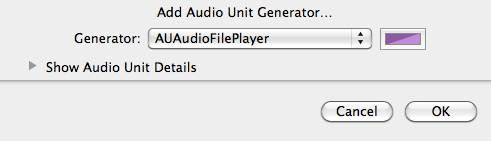
Select “Add Audio Unit Generator”:

Under Generator select “AUAudioFilePlayer”

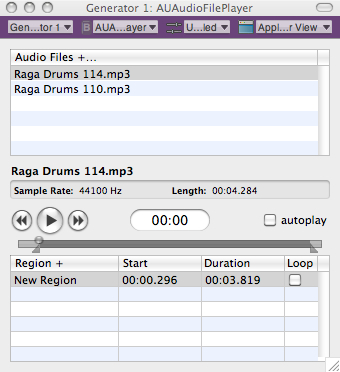
That will open up the AU File Player Track:

Now you add audio files by clicking the “+” after “Audio Files”.

By moving the markers under the transport you can set start and stop points for audio.

You’ll notice that I’ve added another track.  A nice feature of AU lab – is that in/out markers are unique to each audio file – so if I pull up another audio file.

the in/out markers are re-set.  By clicking the loop button I can loop the audio file  as well.

Another advantage of putting Sooper Looper on a bus is that in an instance like this – you can loop audio independently from Sooper Looper if you want.

AU Lab : Transport

Here’s something pretty cool the Window tab in AU Lab – select Show Transport

That will bring up the following window:

The MIDI Clock Source will probably default to Disabled – If you set it to Internal – you can use to tap tempo feature to synch effects or Sooper Looper  by tempo.  Pretty cool feature!

Also in the the Window tab in AU Lab there are some other useful options particularly –  Show CPU Load – which brings up a handy visual meter to let you see how your project is doing with it’s resources:

The rig:

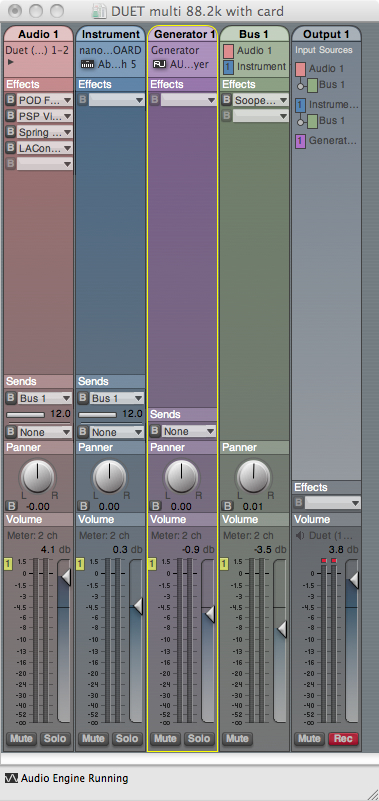
Here is the rig so far, incorporating all of the elements that have been discussed so far.

In part 6 of this series, I’m going to post some mp3s comparing and contrasting the sounds of different IR’s, audio rates, etc. and sow some strategies for using stereo rigs.

Additional Resources: AU LAB

If you go to the help option in the AU LAB menu bar:

You’ll come to an extremely deep help section that covers every possible element of AU LAB that you could imagine including sidechains and midi assignments for control elements in AU lab itself.

Additional Resources: SooperLooper

The  Sooper Looper forum is also extremely helpful with various Sooper Looper issues, and also has a specific SooperLooper AU LAB section.

Additional Resources: POD Farm

Line 6 has a lot of good information on their forum and has also produced some videos that may help with setup or assignment.

The next AU lab post – is going to focus on using AU lab and POD farm as a Dual Rig Distortion Tone.

You can find all of the laptop guitar rig posts on the Blueprints tab on the top of the page.  Once on the blueprints page – just scroll down to the Laptop Guitar Rig section.

Thanks for reading!